
- Home
- VST Plugins
- Cableguys Snapback
- Version
- 1.1
- Developer
- CableGuys
- Languages
- English
- License type
- k'ed by GUISEPPE
| macOS range | macOS 10.13 or later |
|---|---|
| Chip | Apple Silicon, Intel 64-bit |
| Download | 37 MB |
Screenshots
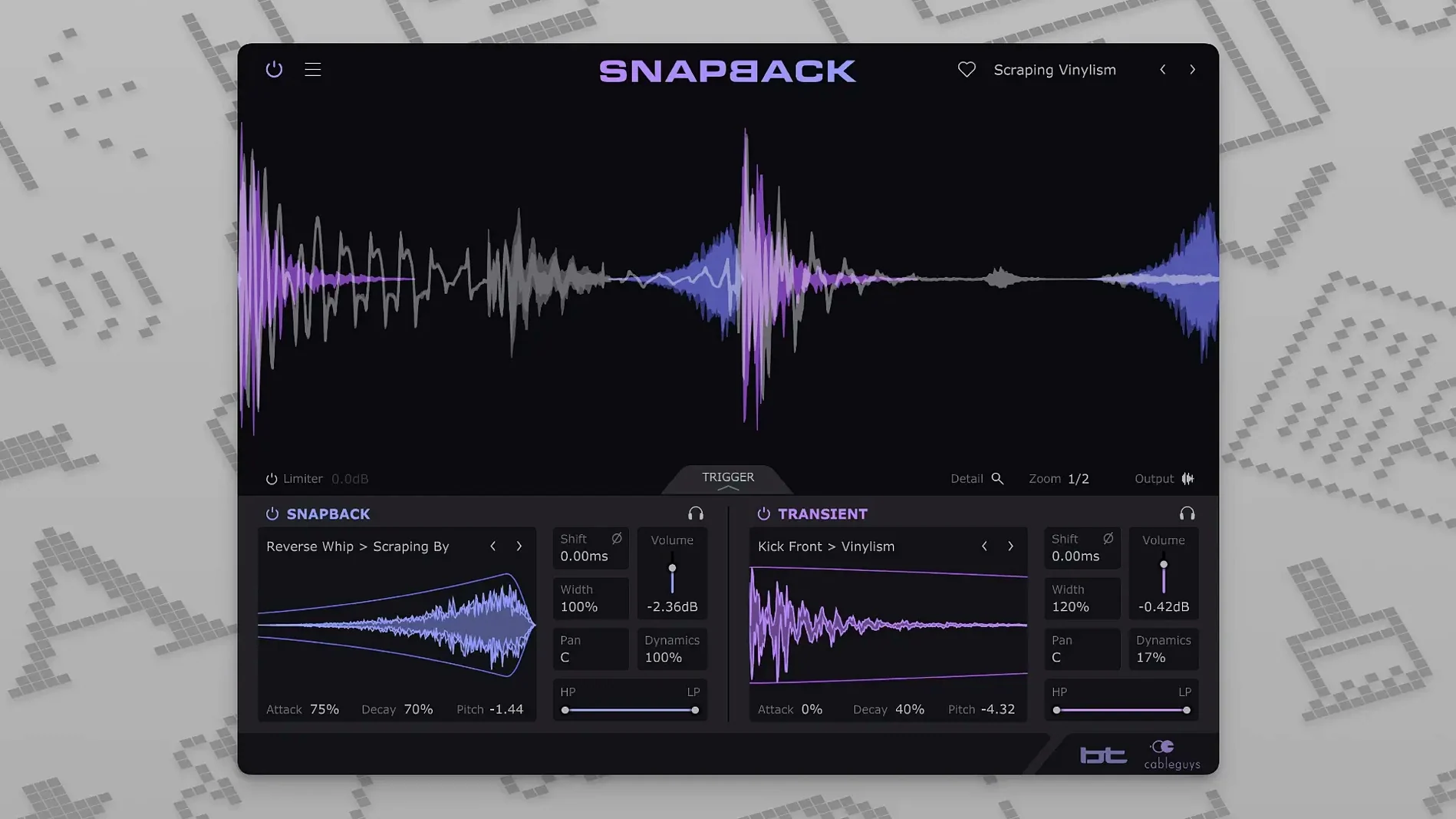
Snapback runs on any Mac from macOS 10.13 onward, whether it's an Intel model or Apple Silicon. You get VST 2, VST 3, AU, and AAX versions, so it slots into Ableton Live, Logic Pro, Pro Tools, Cubase, Bitwig Studio, FL Studio, or REAPER without fuss.
| Detail | Info |
|---|---|
| Developer | Cableguys |
| Version | 1.1 |
| Type | Drum-layering plugin |
| macOS | 10.13 or later |
| Architecture | Intel, Apple Silicon |
| Formats | VST 2, VST 3, AU, AAX |
Once it's in your host, Snapback scans your drum track, detects each hit, and locks your chosen sample to that transient. You can push the sample before the hit for attack, or leave it right on top for thickness. Import your own samples or use the built-in ones. Filters and envelopes shape the layer, so you can add texture to a kick or snap to a snare without manual lining up. It was built with BT, and the workflow shows it — quick, visual, and musical.
First Days With Snapback
Start with a single drum track, not a full mix. A kick or snare loop with clear transients is best. Load the plugin, pick one of the built-in samples, and listen to the result. Adjust the attack and blend controls to hear how the sample locks to each hit. Spend the first session on simple loops before moving to complex patterns.
Try the Reverse button in version 1.1 early. It changes how the sample behaves around the transient and can give a different character to your drum sound. Use it on a snare for a quick comparison between forward and reverse timing.
Import a handful of your own samples and test them against the same loop. Snapback handles user samples well, but not every sample works on every hit. Stick with short, punchy sounds for best results.
Over-Layering Muddy Mixes First
Over-layering is the most common error. Adding a sample to every drum hit in a busy loop can make the mix muddy. Start with one hit type — kicks only, for example — and build from there.
Another mistake: ignoring the waveform visualizer. It shows exactly where the transient sits and where your sample lands. Beginners who skip this end up with samples that feel loose or out of time.
Forgetting to check phase alignment between the original drum and the layered sample. Snapback includes a phase control. Use it. A flipped phase can cancel low end and thin out the kick or snare.
Beginners also tend to leave the filter off. Rolling off low or high frequencies on the layered sample stops it from clashing with the main drum. It takes two seconds and makes a real difference.
DAW Compatibility for VST, AU, AAX
"Will Snapback work with my DAW?" If your DAW supports VST 2, VST 3, AU, or AAX, the answer is yes. That covers the major ones: Ableton Live, Logic Pro, Pro Tools, Cubase, Bitwig Studio, FL Studio, and REAPER. No special setup is required beyond the standard install.
"Do I need a specific macOS version?" Snapback runs on Macs from macOS 10.13 onward. That includes both Intel and Apple Silicon machines.
"Can I use my own samples?" Yes. The plugin includes over 200 ready-made samples, but the import feature lets you load your own WAV or AIF files. The waveform visualizer helps you see how your sample lines up.
"What if I want the sample to hit before the transient?" Snapback lets you place the sample before the drum hit. Use that for added attack or to change the feel of a snare or kick. The visualizer shows the timing shift.
"Is it only for electronic music?" Not at all. Producers working with live drums, rock, or hip-hop use it too. Any track with clear drum hits benefits from sample layering.
- Reverse button added in version 1.1.
- MIDI ports expanded from 16 to 256.
- macOS 10.13 or later
- Intel or Apple Silicon processor
- VST 2, VST 3, AU, or AAX host DAW
- English interface
Questions I get about this line
Snapback supports Ableton Live, Logic Pro, Pro Tools, Cubase, Bitwig Studio, FL Studio, and REAPER. It comes in VST 2, VST 3, AU, and AAX formats.
Yes, the official requirements list both Intel and Apple Silicon processors, so it runs natively on M-series Macs.
Yes, Snapback allows user sample import, so you can layer your own sounds on top of the drum hits.
The install order
- Run the standard installer for your Mac.