
- Home
- VST Plugins
- Arturia Pigments
Free download (1.8 GB) Previous versions
- Version
- 7.0.1-6772
- Developer
- Arturia
- Languages
- English
- License type
- K'ed by MORiA
| macOS range | macOS 11 or later |
|---|---|
| Chip | Apple Silicon, Intel 64-bit |
| Download | 1.8 GB |
| Previous versions | 5 on file |
Screenshots
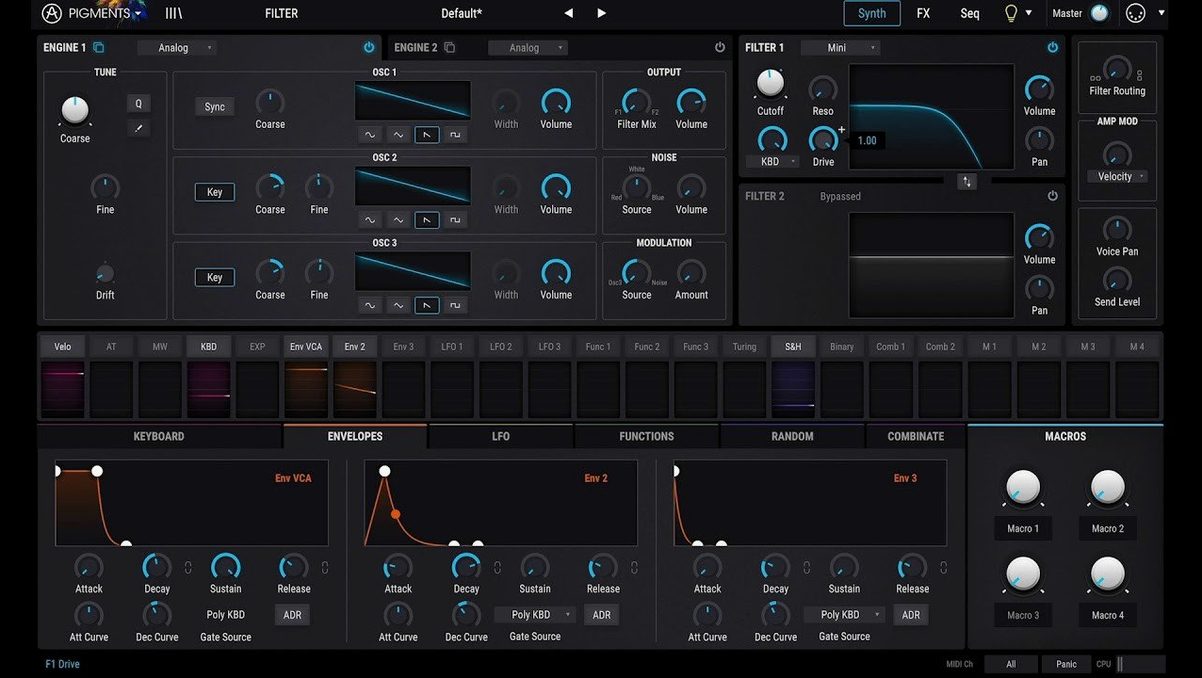
If you already work with Arturia's V Collection, Pigments feels familiar in the best way. It's the flagship all-in-one software synthesizer, and the hybrid approach means you get wavetable and virtual analog engines under one hood. The color-coded interface makes routing obvious at a glance, so you spend less time hunting and more time shaping sound.
| Detail | Value |
|---|---|
| Developer | Arturia |
| Type | Software synthesizer plugin (VST) |
| Version | 7.0.1-6772 |
| macOS | 11 and later, Intel & Apple Silicon |
| Engines | Six synthesis types |
Modulation is where Pigments earns its keep. Drag-and-drop modulation means you can patch an LFO to a filter cutoff without opening a menu. The effects section covers the usual suspects, and the new filters and Corroder effect add grit when you need it. The redesigned Play Page puts performance front and center, while in-app tutorials get you up to speed. With 150 new presets, it's ready to make noise right out of the gate.
No piece of software ships without the occasional hiccup. Here's what people tend to trip over with Pigments and how to get back on track.
Play Page Performance Controls
Plugin won't appear in your DAW
This is the most frequent question. If Pigments doesn't show up after installation, your DAW probably scanned the wrong folder. Pigments installs to the standard plugin paths, but some DAWs need a manual rescan or a restart. Open your DAW's plugin manager, point it to /Library/Audio/Plug-Ins/VST3 or /Library/Audio/Plug-Ins/VST, and rescan. If it still doesn't show, check that the plugin file isn't quarantined by macOS security — a trip to System Preferences > Security & Privacy > General usually clears that up.
No sound from the synth
Nine times out of ten, the synth is producing sound but the track's MIDI routing is off. Make sure your MIDI track is sending on the correct channel and that the Pigments instance is receiving MIDI. Also check the plugin's volume knob and the master output level on the Play Page. If you're using the standalone version, confirm your audio interface is selected in Preferences.
Interface looks tiny or huge on screen
Pigments scales to different display sizes, but it doesn't always pick the right zoom level on first launch. Look for a zoom slider in the bottom-right corner of the plugin window. Drag it until the interface fits your workflow. The default is usually fine on 1080p displays; 4K users might want to bump it up a notch.
Presets don't load
If the new factory presets from version 7.0.1 aren't showing, the preset database may need rebuilding. Go to the utility section in Pigments (the gear icon) and run the "Rescan Presets" option. It takes about 30 seconds. The 150 factory presets plus your own should appear afterward.
Redesigned Play Page for Daily Work
The 7.0.1 update isn't a ground-up overhaul, but the changes affect how you work day to day.
- The redesigned Play Page is the big one. It's cleaner and puts performance controls — pitch bend, modulation wheel, aftertouch — front and center. If you play Pigments live, you'll use the Play Page constantly. If you're a studio producer, it's less vital, but still handy for automation.
- The three new filters (Rage, Ripple, Reverb) fill gaps. Rage is aggressive, good for leads and basses. Ripple is a comb filter that does metallic textures. Reverb is exactly what it sounds like — a reverb filter that adds space. None of them replace your go-to reverb plugin, but they're useful when you want the filter and the effect in one slot.
- Corroder adds distortion with a lo-fi edge. Think bit crushing mixed with sample rate reduction, but with its own character. It's a one-knob effect for quick degradation.
- In-app tutorials mean you don't need to alt-tab to YouTube. They cover routing, modulation, and the new features. Good for new users, but veterans can skip them.
Mac Synth Comparison
Arturia Pigments vs. UVI Falcon
Both are hybrid synths with multiple engines. Falcon gives you more granular control over every parameter, but that comes with a steeper learning curve. Pigments is faster to get results from, especially with the drag-and-drop modulation. Falcon's interface is functional; Pigments's color-coded layout is easier to read at a glance. If you want deep sound design, Falcon wins. If you want to make patches quickly, Pigments is the better choice.
Arturia Pigments vs. Native Instruments Massive X
Massive X is built for bass and lead sounds. Its wavetable engine is excellent for aggressive, electronic tones. Pigments covers a wider range — pads, keys, atmospheric textures — because of its six engines. Massive X's modulation is deep but menu-heavy. Pigments's drag-and-drop approach is more intuitive. If you produce dubstep or heavy EDM, Massive X might feel more natural. For everything else, Pigments is more versatile.
Arturia Pigments vs. Spectrasonics Omnisphere
Omnisphere is the heavyweight champion of sample-based synthesis. Its library is enormous, and its synthesis engine is deep but sample-centric. Pigments is purely synthetic — no sample library, just oscillators and filters. If you need realistic instruments or hybrid sample-synth sounds, Omnisphere is the tool. If you want to build sounds from scratch with wavetables and virtual analog, Pigments is leaner and more focused. The free Pigments Play version is a good way to audition the workflow before committing.
Pigments runs on macOS 11 or later, Intel and Apple Silicon. Version 7.0.1-6772 is the current build. The package includes installation and activation instructions.
- Redesigned Play Page.
- New Rage, Ripple, and Reverb filters.
- Corroder effect added.
- 150 new factory presets, 50 wavetables, 30 samples, and 20 noises.
- macOS 11 or later
- Intel or Apple Silicon
Questions I get about this line
Yes, Pigments 7.0.1 supports both architectures and runs on macOS 11 or later.
It adds a redesigned Play Page, new filters (Rage, Ripple, Reverb), the Corroder effect, and 150 new factory presets plus extra wavetables, samples, and noises.
The install order
- Download the package and extract it.
- Read the included installation instructions.
- Follow the activation instructions in the package.