- Home
- VST Plugins
- Devious Machines Duck 2

Free download (87 MB) Previous versions
- Version
- 2.0.30
- Developer
- Devious Machines
- Languages
- English
- License type
- K'ed by MORiA
| macOS range | macOS 11 or later |
|---|---|
| Chip | Apple Silicon, Intel 64-bit |
| Download | 87 MB |
| Previous versions | 5 on file |
Screenshots
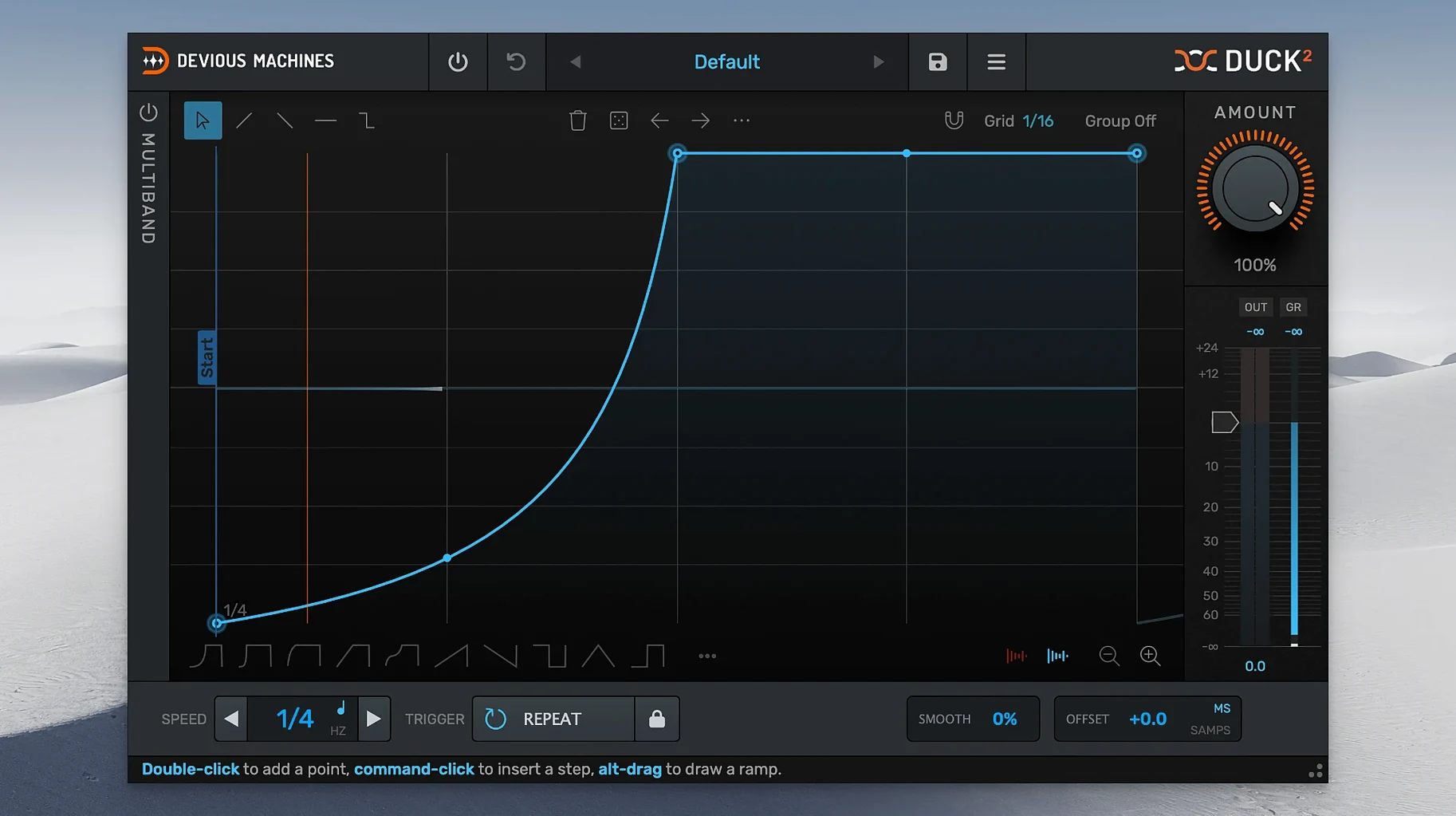
The envelope editor is where Duck 2 earns its keep. Advanced curve shapes let you dial in everything from a sharp pump to a slow, musical swell without leaving the plugin. That editor also has randomize, so you can stumble onto a shape you would not have drawn yourself.
- Insert Duck 2 on the track you want to duck — a bass line, a pad, a voiceover.
- Route your sidechain from the kick, snare, or any other source that should trigger the volume drop.
- Shape the envelope in the editor. Adjust the curve, or hit randomize and tweak from there.
- Go multiband if needed. Split into three bands, each with its own envelope, so the low end ducks harder than the mids.
- Set the offset in milliseconds, samples, or unsynced Hz. The offset combines lookahead, so you can time the duck exactly.
- Adjust the crossover slope — 12, 24, or 48 dB per octave — to blend the bands cleanly.
Duck 2 works as a direct upgrade from Duck 1, with undo/redo and a preset browser. On a send or a bus, it does the same job with less fuss. For IT folks, it is a straightforward 64-bit AU or VST that runs on Intel or Apple Silicon Macs.
A Take on a Specific Workflow: Ducking a Pad Behind a Kick
You have a sustained synth pad that swallows the kick. Here is the direct way to use Duck 2 to fix that.
- Place Duck 2 as an insert on the pad channel.
- Set the sidechain input to the kick bus.
- In the envelope editor, pick a shape with a fast attack and a medium release. The goal is a clean drop the instant the kick hits, with a smooth return before the next one.
- Switch to the multiband section and enable three bands. Leave the low band with the same fast envelope. Give the mid and high bands a slower, gentler release so the body of the pad does not pump.
- Use the offset function in milliseconds mode to nudge the duck a few milliseconds after the kick transient. This keeps the initial thump intact.
- Watch the gain reduction meter in the output section to confirm you are pulling 3-6 dB. Any more and the effect becomes obvious.
That is it. The pad stays present, the kick cuts through, and you kept the automation inside one plugin.
Duck 1 and Duck 2 in One Session
Does Duck 2 work alongside an older Duck 1 in the same session?
Yes. The plugin uses a different internal identifier, so both can sit in the same project without conflict. You can A/B the two across tracks.
Can I use it without a sidechain source?
You can. Set Duck 2 to trigger from the MIDI or audio track it sits on, or use the LFO in unsynced Hz mode for a rhythmic chop that does not depend on another input.
Will the multiband section use a lot of CPU?
The linear phase filtering in the crossover adds some processing. For a single instance on a pad or a bass, it is manageable. If you plan to run ten instances, stick to single-band mode on most of them.
Does the trace envelope work from any audio file?
It imports amplitude data from a WAV or AIF file. Useful for matching the duck shape of a reference track without guessing.
Crossover Slope: Start at 24 dB/Octave
- Crossover slope — start at 24 dB per octave. It is a good middle ground between clean separation and phase coherence. Go to 12 dB if you want a softer band split; go to 48 dB if you need surgical separation.
- Offset mode — set to milliseconds for music work. Samples mode is better for sound design and post-production where you need sample-accurate timing.
- Loop mode on the envelope — enable it if you want the duck pattern to repeat without a fresh trigger. Useful for creating a gated effect from a single MIDI note.
- MIDI velocity control — map velocity to depth. A light hit on the keyboard produces a shallow duck; a hard hit drives the volume down further. Good for expressive, played-in sidechain feels.
- Freely resizable GUI
- Multiband section with 3 bands and separate envelopes
- Trace envelope from imported audio file or sidechain input
- macOS 11 or later
- 64-bit
- Intel or Apple Silicon
The install order
- Open the downloaded package.
- Follow the included installation and activation instructions.