Free download (540 MB) Previous versions
- Version
- 2.5.0
- Developer
- Serato
- Languages
- English
- License type
- k'ed by Team V.R
| macOS range | macOS 10.14 or later |
|---|---|
| Chip | Apple Silicon, Intel 64-bit |
| Download | 540 MB |
| Previous versions | 3 on file |
Screenshots
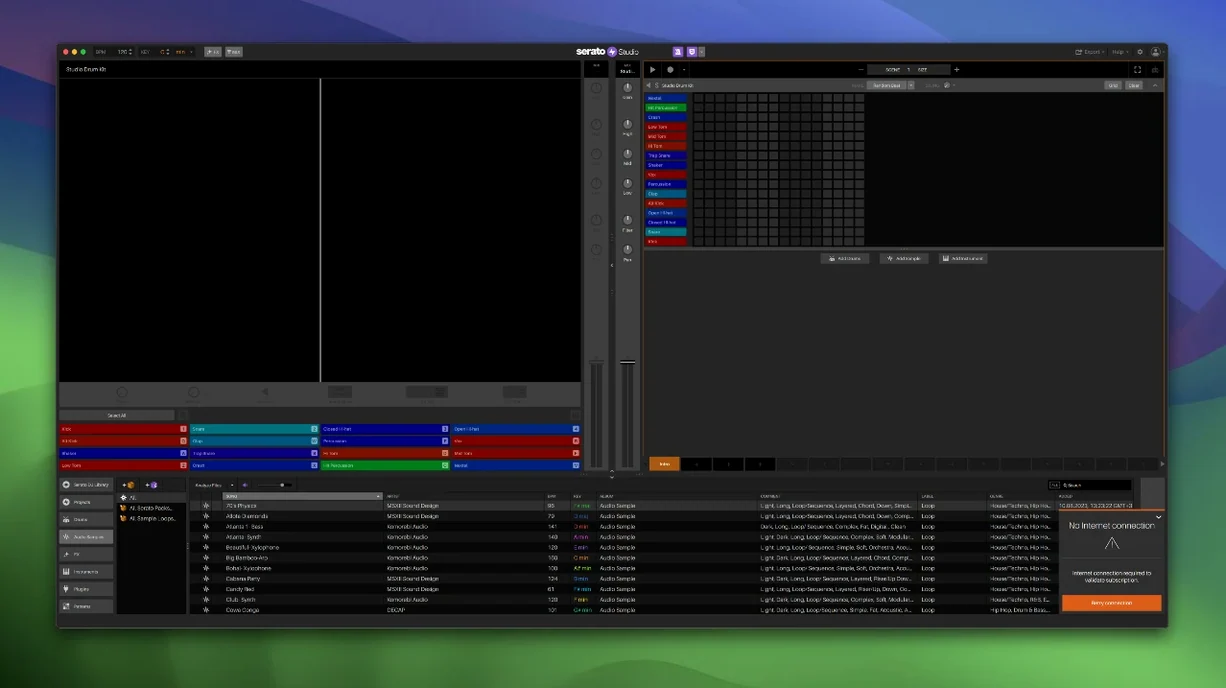
Serato Studio 2.5.0 handles up to eight sample decks, each with adjustable stem levels for acapella, melody, bassline, and drum parts. It is designed for DJs and producers who want a fast, simple workflow without leaving the Serato ecosystem.
What it includes
- Built-in drum kits, instruments, loops, and samples
- Auto Chord mode that generates chords in the project key
- Shared library with Serato DJ — including Track Rating, Favorite Crates, and Crate Search
- Stem export for individual tracks
- Native control support for AlphaTheta SLAB
For Serato DJs who want to produce beats
This app is for anyone who already uses Serato DJ and wants to produce beats without learning a separate DAW. The workflow stays oriented around scenes and decks, so a DJ can sketch a beat, layer stems, and take it to a live set quickly. The new individual stem level automation in Scene View makes it possible to build arrangements without leaving the deck-based layout.
Shared library syncs crates and ratings instantly
The shared Serato library is the main link. Any crate you build or track you rate in Serato DJ shows up inside Studio without extra import steps. That means a beat you start from a sample in your DJ library keeps the same metadata, BPM, and key information you already set. The reverse is also true — changes made inside Studio appear back in the DJ library after the project saves.
VST and AU plugin support is standard. You can drop your existing effects chains and virtual instruments into a mixer channel. The plugin scan is manual, which is normal for this type of app, and it reads 64-bit formats. The mixer channel layout follows a familiar left-to-right signal flow, so routing between plugins stays clear. Automation lanes work per channel, which makes filter sweeps or volume rides possible without a second window.
Stem export writes individual WAV files per track. These can be dragged into any DAW for final mixing or sent to Serato DJ as prepared stems for a live performance. The export window lets you select which stems to include, which saves time if you only need the drum and bass parts.
Small details that matter
- The Reverse Pad Order option in the setup screen reorders the pads on compatible hardware. Handy if you flip between two different controllers mid-session.
- Auto Chord mode can be triggered per deck. You can have one deck running chords while another plays a sample in a different key, which is not something every beat-making app lets you do without manual pitch work.
- The Feel control adjusts the timing of incoming MIDI notes. It is not a swing knob — it adds slight offsets that imitate a live keyboard player's timing. Subtle, but noticeable on a looped chord pattern.
- BPM syncing applies to every sample and loop you drag in. If a sample is at 90 BPM and your project is at 128, it adjusts without asking. That behavior is consistent across all eight decks.
- One-touch key switching works per deck, not globally. You can shift a melody loop up or down in semitones while the drums stay in the original key.
Replaces a DAW for beat sketching, not multitrack recording
Does this replace my DAW?
Not exactly. Serato Studio is built for beat sketching and sample-based production, not full multitrack recording or complex MIDI editing. If your work is mostly drum patterns, loops, and stems, it covers that. If you need comping, time-stretching across a whole arrangement, or a piano roll for every detail, you will still want a traditional DAW alongside it.
Can I use it without Serato DJ?
Yes. The app runs on its own and includes its own library of built-in drum kits, instruments, loops, and samples. The shared library feature is optional — you can keep using Studio without ever opening Serato DJ. You will just miss the crates and track rating that sync across both apps.
How does it handle large sample libraries?
The library view loads fast because it indexes the Serato library folder, not your entire drive. If you keep samples organized inside that folder, the search and crate system stays responsive. The Crate Search feature in 2.5.0 helps when you have hundreds of items.
What about hardware controllers?
Version 2.5.0 adds native support for the AlphaTheta SLAB. Other MIDI controllers work through standard MIDI mapping. The Reverse Pad Order option helps if your controller pad layout does not match the on-screen arrangement.
Is it 64-bit only on Apple Silicon?
No. The installer works on both ARM and x86 (64-bit) architectures. macOS 10.14 or later is the only system requirement.
- Added native control for AlphaTheta SLAB.
- Added support for macOS 26 Tahoe.
- Added the ability to adjust individual levels for acapella, melody, bassline, and drum stems in Sample Decks.
- Added automation for Stems On/Off and individual Stems Levels in Sample Decks.
- macOS 10.14 or later
- Intel or Apple Silicon
Questions I get about this line
Yes. Serato Studio can be used with DJ hardware and shares the Serato DJ library, so your crates and ratings carry over.
The install order
- Open the downloaded disk image.
- Run the standard installer package named Serato Studio 2.5.0 Without Core Pack.pkg.
- Run the patch installer named Serato Studio 2.5.0 patch.