- Home
- VST Plugins
- Arturia Mix DRUMS

- Version
- 1.0.0.6186
- Developer
- Arturia
- Languages
- English
- License type
- K'ed by MORiA
| macOS range | macOS 10.13 or later |
|---|---|
| Chip | Apple Silicon, Intel 64-bit |
| Download | 419 MB |
Screenshots
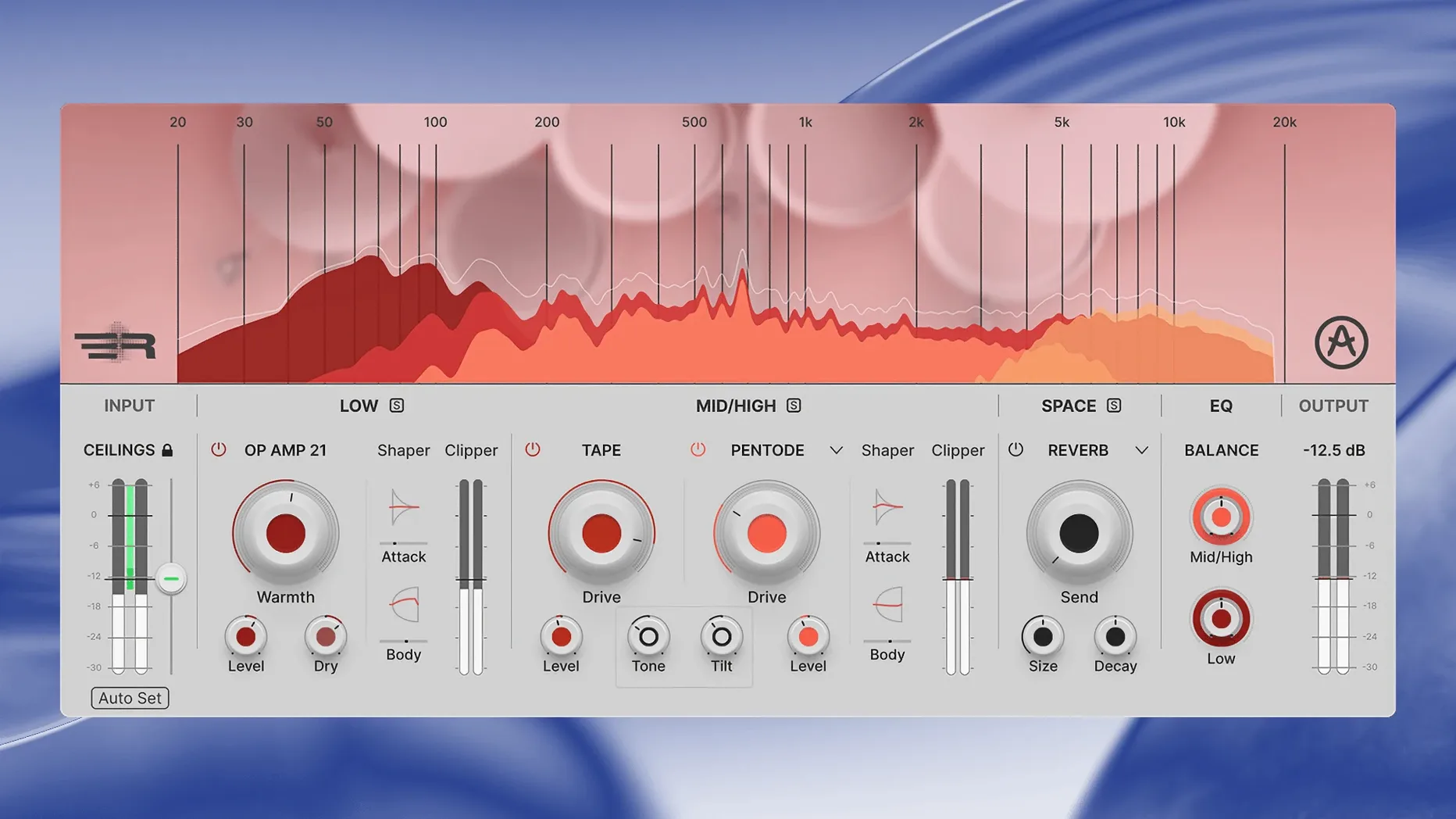
Drum tracks often sound flat until you push them into a limiter, and that kills the transients. Arturia Mix DRUMS approaches it differently: it builds impact and perceived loudness without raising peak levels, so the hits stay punchy.
Weight without Muddiness
- Individual drum tracks, drum buses, and stereo loops
- Adding weight to low frequencies while keeping mid and high detail separate
- Controlling distortion with high-pass and low-pass filters so you only crunch what you want
- Clipping each band when you need extra density
- Quick results with more than 40 presets grouped by instrument and style
Six Effects in One Plugin
- It combines dynamics, distortion, spatial effects, a three-band EQ, and a built-in reverb in one tool
- It belongs to Arturia's FX Collection, so it sits naturally next to their other processors
- Version 1.0.0.6186 works on macOS 10.13 or later, Intel or Apple Silicon
- It is a plugin, not a standalone app, so you run it inside your DAW
Presets by Instrument and Style
Open Mix DRUMS on a drum bus and start with the presets — the 40 factory options are organized by instrument and style, so you can audition a few quickly. The two-band design means you can treat the low end and the mid/high range separately, which is useful when you want more kick weight without altering cymbal transients.
Smart Peak Control
Turn on Smart Peak Control early. It sets an automatic input ceiling, so you can push the plugin harder without clipping the output. That is the quickest way to hear what Mix DRUMS does to perceived loudness.
Distortion filters
The high-pass and low-pass filters on each band let you limit which frequencies get saturated. If you only want distortion on the snare body, set the filter to cut the highest frequencies. If you want it only on the kick attack, cut the low end and let the click through.
How it behaves on your Mac
Mix DRUMS 1.0.0.6186 runs on macOS 10.13 or later and supports both Intel and Apple Silicon machines. It is a 64-bit plugin, so it works in any modern DAW that accepts AUX, VST3, or AAX. The interface is in English. No standalone mode — it loads inside your session like any other Arturia FX Collection plugin.
Settings to Check First
After you insert Mix DRUMS on a track, go through these quickly before reaching for the presets.
- Set the two processing bands to match your material. Low band handles frequencies you assign, mid/high covers the rest. Start with the crossover around 200 Hz for a typical drum bus.
- Engage the clipper on each band if you want density. Leave it off if you only need the dynamics section.
- Enable phase-coherent parallel processing. The plugin blends the clean and processed signals internally, so you get the original attack underneath the effected sound.
- Adjust the transient shapers per band before you touch the EQ. Attack and sustain controls on the low band change how the kick hits; on the mid/high band they shape snare crack and cymbal decay.
What to expect on your Mac
The plugin loads as a standard audio unit, VST3, or AAX. It does not add a standalone application to your system — it appears inside your DAW's plugin list after installation. The requirements are macOS 10.13 or later for both Intel and Apple Silicon, so any Mac that runs a current DAW will load it. The interface language is English only. If you have other Arturia FX Collection plugins, Mix DRUMS fits the same workflow and activation method. Use the included installation and activation instructions inside the package to get it registered.
- Arturia later listed version 1.0.1.6566 on its downloads page.
- macOS 10.13 or later
- Intel or Apple Silicon
- English interface
The install order
- Follow the installation instructions included with the download.
- Complete the activation steps as described in the included activation instructions.