- Home
- VST Plugins
- Accentize Chameleon Surround

- Version
- 1.1.3
- Developer
- Accentize
- Languages
- English
- License type
- k'ed by GUISEPPE
| macOS range | macOS 10.13 or later |
|---|---|
| Chip | Apple Silicon, Intel 64-bit |
| Download | 63 MB |
Screenshots
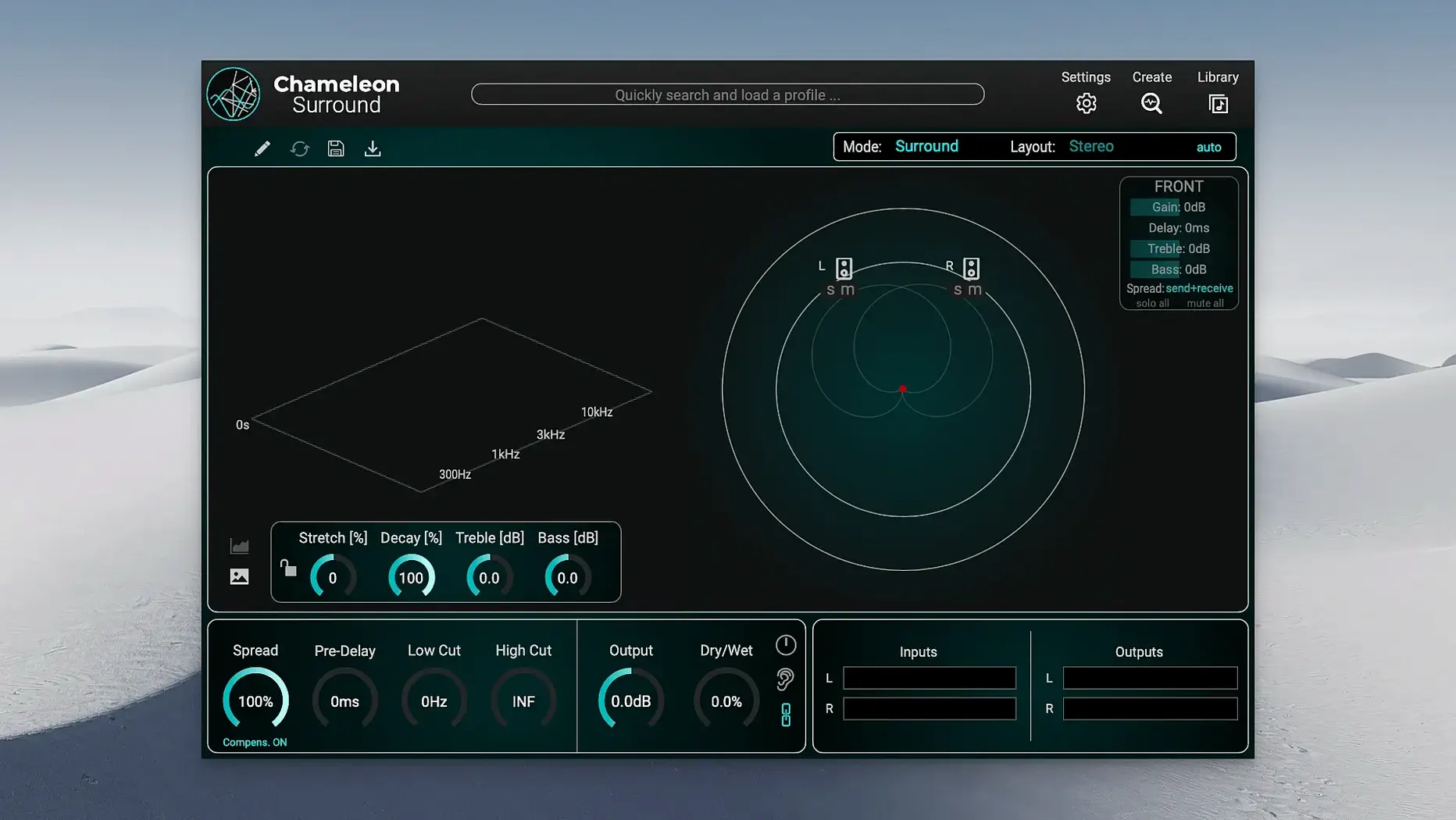
Version 1.1.3 of Accentize Chameleon Surround fixes a potential crash caused by 3D visualization, making it a safer pick for complex sessions. This surround reverb-matching plugin extends Chameleon with full multi-channel support, so you can place sound in a room, not just a stereo field. It handles formats up to 9.1.6 and includes 80 presets for quick starting points. What stands out is its ability to generate a multi-channel 3D space from a mono signal — useful when you have a dry source and want it to sit naturally in a larger environment.
| Detail | Value |
|---|---|
| Version | 1.1.3 |
| Formats | Up to 9.1.6 |
| Presets | 80 |
| macOS | 10.13 or later |
| Architecture | Intel & Apple Silicon |
Host and format support come first here, but the sound follows. For post-production or music work where the room matters, Chameleon Surround gives you the tools to match reverbs across channels without losing clarity.
Mono Analysis Mismatches Visual Context
New users often expect the plugin to be a one-shot fix. You load a dry mono signal, run the analysis, and call it done. The result sounds off because the room character doesn't match the visual context. The analysis is a starting point, not a final mix. Adjust the decay and early reflections to fit the scene.
Another mistake: ignoring the library browser dock. It opens a separate window by default, which clutters the screen. Click the dock option in the browser header to keep everything in one window. Saves time when you are cycling through presets.
Beginners also skip the preset library. You get 80 surround presets. Use them as rough templates. A cathedral preset in a small dialogue scene will sound wrong. Scroll through five or six presets before tweaking. It is faster than building from scratch.
Scenario: Film dialogue post-production
Here is a real-world use. A dialogue editor for a feature film gets a mono recording of a conversation in a tiled kitchen. The director wants the voices to feel like they are in the room, not in a booth. Chameleon Surround handles this. Drop the mono signal onto a stereo or 5.1 track. Run the analysis on the kitchen ambience from the location recording. The plugin builds a matching reverb space that places the dialogue into the original environment. No manual reverb matching across channels. The result stays consistent when the sound moves from center to side speakers.
For game audio, the same workflow applies. A single sound effect can be placed in a 7.1 environment using the mono-to-multi-channel feature. It saves hours of routing and reverb sends.
Common Missteps with the Library Browser
The library browser dock option is there for a reason, but many new users leave it floating. That default separate window gets in the way when you are auditioning presets against a running timeline. Click the dock button in the browser header once, and it stays docked for the session. You save one click every time you switch presets, which adds up over a full mix.
Another frequent error: running analysis on a full mix instead of a clean sample. If the source track has background noise, room tone from the original recording, or dialogue from another character, the analysis picks it up. The resulting reprint sounds muddy. Feed Chameleon Surround a short, isolated segment of the ambience you want to match. A few seconds of clean signal is enough for a usable profile.
Scenario: Game audio ambience design
A sound designer working on a horror game needs to place a single creaking door sound into a 7.1.4 cavern environment. The source is a stereo recording. Chameleon Surround builds a multi-channel reverb tail from that stereo file, matching the cavern's decay and early reflection pattern. The door sound now wraps around the player naturally, with the reverb tail moving through the height channels. No extra sends, no bus routing. The mono-to-multi-channel feature handles the heavy lifting, and the 80 presets provide a fast starting point for the room size.
For longer sessions, the crash fix in version 1.1.3 matters. The 3D visualization no longer triggers a crash during heavy plugin loads, which is useful when you have multiple instances of Chameleon Surround on different tracks. Keep an eye on the iLok server support added in this release if you share licenses across machines.
- macOS 10.13 or later
- Intel or Apple Silicon
Questions I get about this line
It supports multi-channel audio up to 9.1.6, so you can work with large immersive setups.
The install order
- Open the downloaded disk image.
- Run the standard installation procedure.