- Home
- VST Plugins
- iZotope VEA

Free download (86 MB) Previous versions
- Version
- 1.1.0
- Developer
- iZotope
- Languages
- English
- License type
- K'ed by TEAM HCiSO
| macOS range | macOS 13.3 or later |
|---|---|
| Chip | Apple Silicon, Intel 64-bit |
| Download | 86 MB |
| Previous versions | 1 on file |
Screenshots
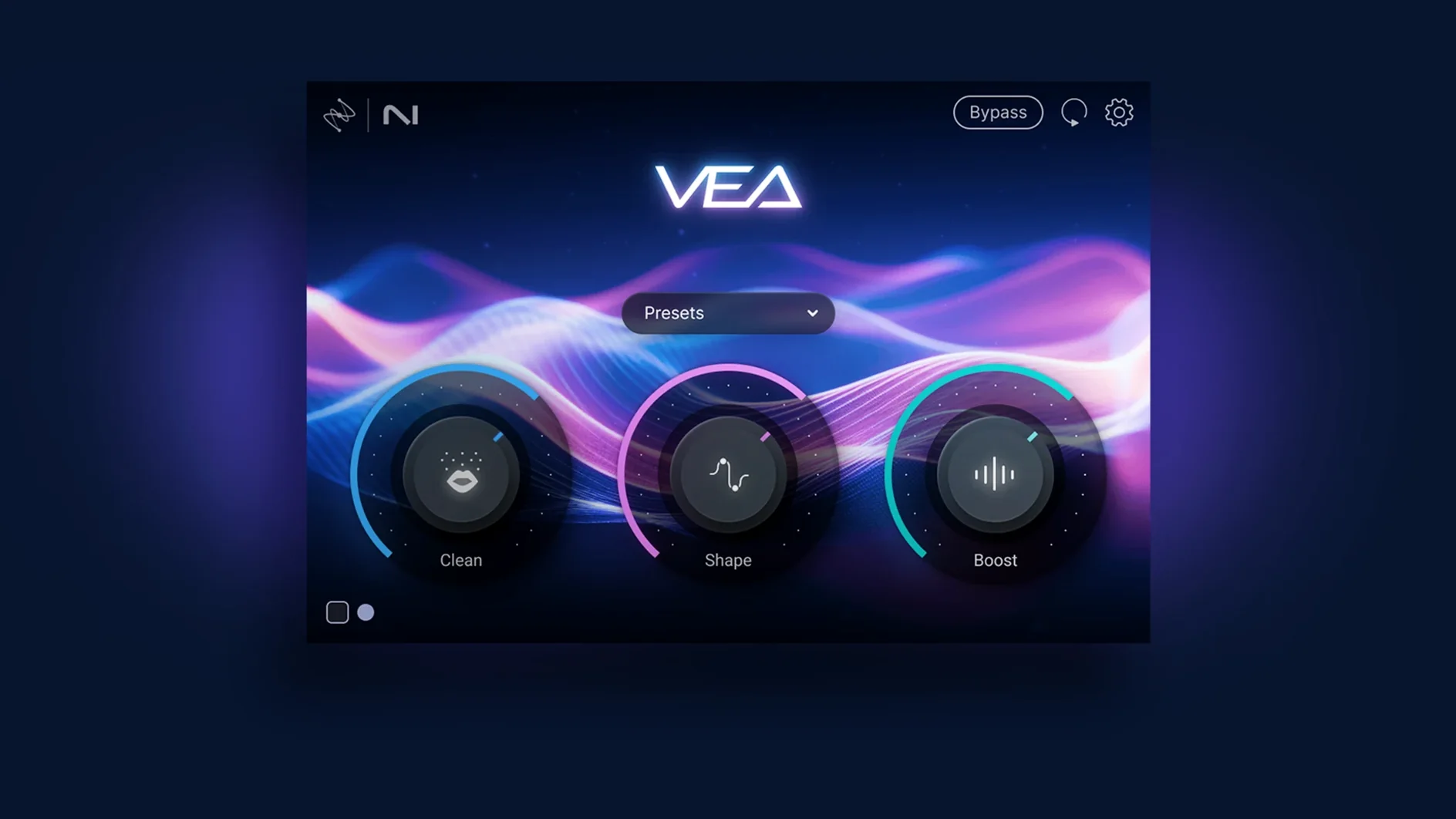
Voiceover artists, podcasters, and anyone who records dialogue will find a quick fix in iZotope VEA. It’s an AI enhancer that cleans up and evens out voice tracks without deep editing.
Hosts and Formats
VEA runs on macOS 13.3 or later, Intel or Apple Silicon. It works as a VST, AU, or AAX plugin in your usual DAW. The installer is a standard disk image, so setup takes a minute.
Set Levels and Tone
Use the Shape control to match the sound to the voice, and let it set more consistent levels. The Audiolens link inside Shape lets you reference another track’s character. Boost adds presence and strength when the take needs more push.
Workflow in Practice
Pull up a raw voice take in your DAW and insert VEA on the track. Start with Shape — the plugin listens and adapts the EQ to the speaker’s natural range. If you have a reference clip with a tone you like, use the Audiolens link inside Shape to match that character.
Next, Clean handles the noise floor. A single adjustment drops out the low-end rumble and hiss without touching the vocal. Then Boost adds presence — useful for thin recordings or voices that need more weight. The three controls cover the basics in under a minute.
Session Example
Say you edit a four-person podcast recorded in one room. Each track gets VEA. Shape evens out the varying mic distances, Clean removes the shared room tone, and Boost brings out quiet speakers. You don’t bounce or tweak automation — the plugin stays on and does the work live.
macOS 13.3 and Silicon Support
VEA version 1.1.0 requires macOS 13.3 or later. It runs on both Intel and Apple Silicon Macs, so no Rosetta concerns on M-series machines. The interface is English. Host software must support VST, AU, or AAX formats — most major DAWs qualify. The installer is a disk image, and the plugin itself is lightweight in terms of storage and dependencies.
Real-World Session: Cleaning a Remote Interview
I had a client send me a Zoom-recorded interview. The guest was on a laptop mic with constant air conditioner rumble. I dropped VEA on the guest's track in Logic. Then I used Shape to bring the guest's tone closer to the host's track, which was recorded in a proper studio. The Audiolens link inside Shape let me sample the host's EQ curve and apply it to the guest. No EQ matching, no noise print capture, no manual fades.
What You Get on Your Mac
VEA is a single plugin. It doesn't install a standalone app or background agent. The disk image is small enough to download on a standard connection. Once installed, it appears in your plugin list as iZotope VEA. You load it like any other effect. The interface is one window with three sliders — Shape, Clean, Boost — and the Audiolens link. No menus, no presets to scroll through. It runs as VST, AU, or AAX, so it works in Logic, Pro Tools, Reaper, Ableton Live, and most other DAWs that support those formats. On Apple Silicon Macs, it runs natively. On Intel Macs, it runs without translation layers. The only requirement beyond macOS 13.3 is a host that loads plugins.
The izotope vea free download gives you the full three-control set with no time limit on evaluation. If you search for izotope vea & velvet free, note that VEA is standalone — it does not include the Velvet instrument.
The Clean control reduces background hum and hiss. For quick voice fixes, it’s hard to beat the simplicity.
- Minimum supported macOS version changed.
- Supported host application versions updated.
- macOS 13.3 or later
- Intel or Apple Silicon
- English interface
Questions I get about this line
Yes, VEA supports both Intel and Apple Silicon Macs running macOS 13.3 or later.
Boost adds presence and strength to the voice, making it cut through the mix more clearly.
The install order
- Open the downloaded disk image.
- Run the standard installer.