
- Home
- VST Plugins
- Native Instruments Massive X

Free download (1.6 GB) Previous versions
- Version
- 1.7.1
- Developer
- Native Instruments
- Languages
- English
- License type
- K'ed by TEAM HCiSO
| macOS range | macOS 13 or later |
|---|---|
| Chip | Apple Silicon, Intel 64-bit |
| Download | 1.6 GB |
| Previous versions | 6 on file |
Screenshots
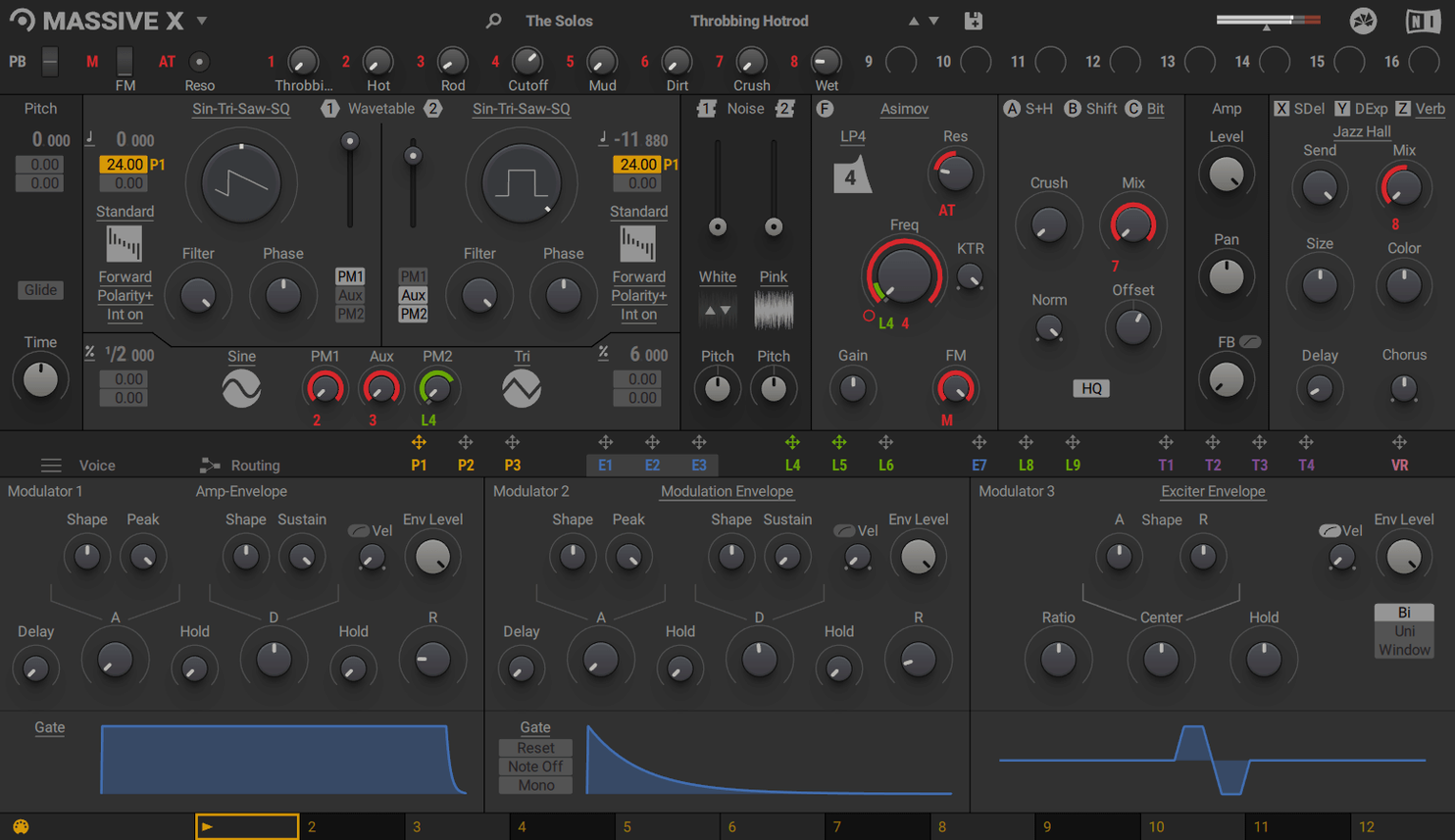
When you need a sound that cuts through a mix, not another preset that sits in the background, Massive X gives you the tools to shape it. It is a polyphonic wavetable synth built for sound design, and it earns its place in a session in a few specific spots.
- On a dedicated sound design track, using the two phase modulation generators to create evolving textures.
- On a bass bus, where its 170+ wavetable options give you plenty of tonal movement.
- On a lead track, routing any output to any input to build complex modulation chains.
- As a layer alongside Massive, keeping existing DAW projects intact while adding the newer oscillator section.
- On a return track, processing external audio through its filters for aggressive effects.
- In a cue, pulling from the 780 preset factory library for quick inspiration during a session.
It runs as a plugin only, so plan for it inside your DAW, not as a standalone tool. With flexible routing, it slots into any workflow where you need a synth that behaves the way you want.
If you are new to wavetable synthesis, Massive X can feel overwhelming. A few mistakes show up repeatedly.
Check the Performer Section on Flat Presets
Most common: assuming every preset works out of the box. The factory library has 780 presets, but many rely on modulation from the Performer section or the Remote Octave control. If a patch sounds flat, check whether a modulation pattern is assigned and whether your keyboard is triggering it.
Another one: ignoring the routing panel. Massive X lets any output connect to any input. Beginners often leave the default signal path and miss the synth's real flexibility. Spend a few minutes mapping a modulation source to a filter cutoff or a wavetable position. That is where the sound opens up.
Third: treating it like a rompler. Massive X is not a sample player. It rewards time spent with the oscillator section. The 10 wavetable playback modes change the character of even a simple saw wave. Cycle through them before reaching for effects.
Workflow: Build a Moving Pad
This walkthrough uses a standard setup. Open Massive X on a new instrument track in your DAW.
- Start with an empty init patch. Load a single oscillator with a smooth wavetable from the 170+ options. Pick something with a soft attack and long sustain.
- Assign one of the two phase modulation generators to that oscillator. Set it to a slow rate so the waveform shifts gradually over a bar or two.
- Open the Performer section. Draw a gentle rising curve and point it at the filter cutoff. Let the filter open slowly over eight beats.
- Route the second oscillator to a sub-bass wave. Keep it simple. Mix it in just enough to give the pad weight.
- Use the Remote Octave control to assign a second Performer pattern to a keyboard zone. Triggering that zone changes the modulation depth on the fly.
- Dial in reverb or delay from your DAW sends. Avoid stacking internal effects unless you need the character of Massive X's own filters.
This setup gives you a pad that moves without hands-on automation. It stays musical and leaves room for other elements.
Silent Output? Inspect the Routing Panel
Snag: the plugin does not produce sound. Check the routing panel first. If a modulation source is accidentally patched to the volume or amp envelope, the output may be ducked. Disconnect any routes you did not set intentionally.
Snag: a preset sounds thin compared to Massive presets. Massive X is a different synth. Its oscillators behave differently. Try switching the wavetable playback mode to a thicker option like "Spectral." Or layer a second oscillator tuned an octave down.
Snag: the Performer pattern does not trigger. Verify that Remote Octave control is enabled and that your keyboard is sending MIDI in the correct octave range. The pattern only fires when a key in the assigned zone is held.
Snag: CPU spikes on an Intel Mac. Massive X requires an Intel processor with AVX. If you run an older chip, the synth may not perform reliably. On Apple Silicon machines, this is not an issue. Lowering the polyphony or reducing the number of active oscillators helps in any session.
- Latest update listed for MASSIVE X is 1.7.1.
- macOS 13 or later
- Apple Silicon or Intel (Intel requires AVX support)
- 4 GB RAM (6 GB recommended)
- Internet connection for download and activation
- Graphics card with OpenGL 2.1 or higher, or DirectX 9 or 11
The install order
- Open the downloaded disk image.
- Run the standard installer.