- Home
- VST Plugins
- Neural DSP Mantra

- Version
- 1.0.1
- Developer
- Neural DSP Technologies
- Languages
- English
- License type
- K'ed by FLARE
| macOS range | macOS 10.13 or later |
|---|---|
| Chip | Apple Silicon, Intel 64-bit |
| Download | 153 MB |
Screenshots
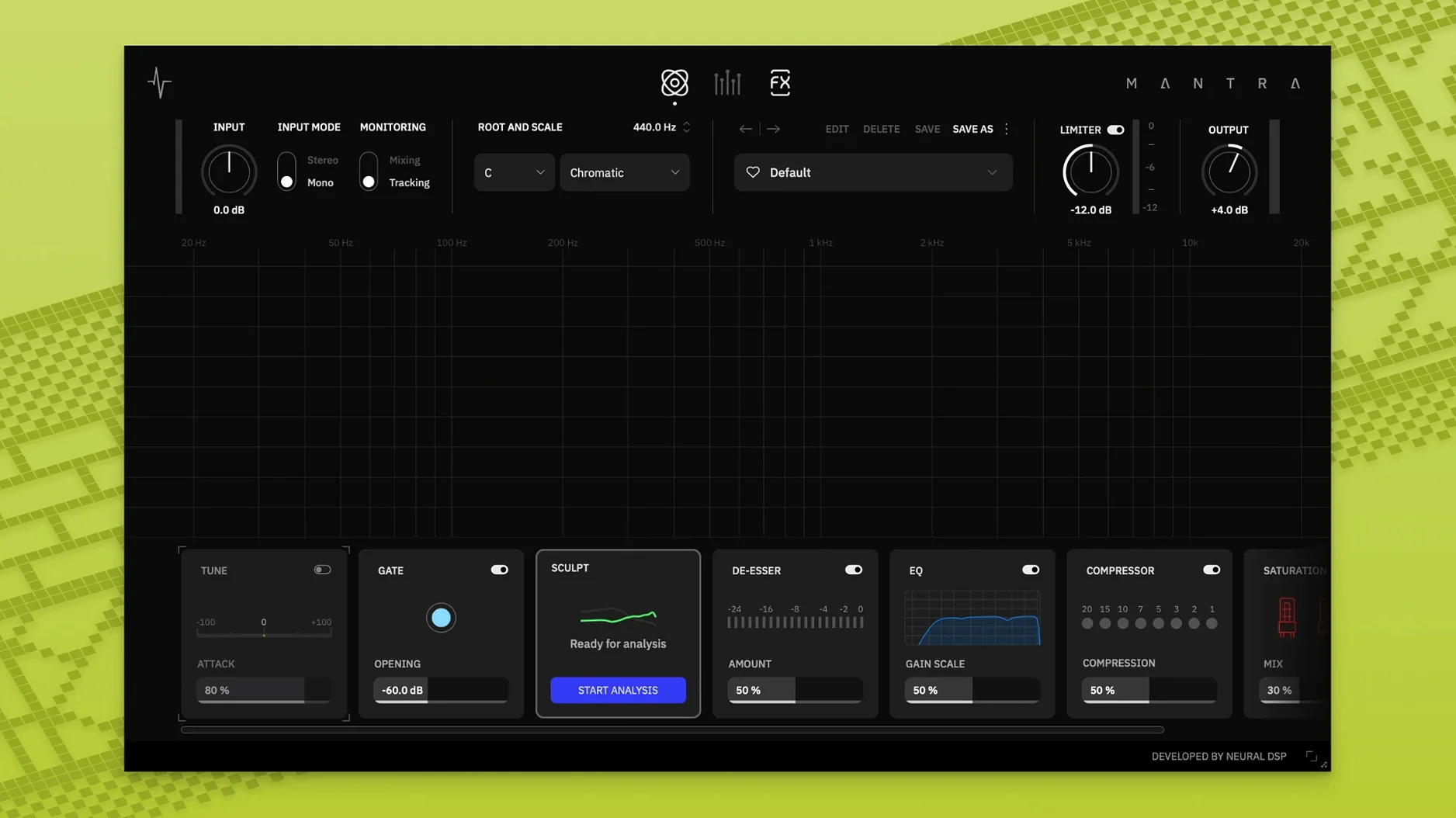
Vocal tracks rarely sit right straight off the mic. Neural DSP Mantra tackles that by putting recording and mixing workflows in one plugin, so you can shape a take as it goes down or polish it later in the mix.
Sculpt, Gate, and De-Esser on a Single Knob
- Sculpt handles automatic cleanup and presence shaping while you track, keeping the performance clean without manual EQ rides.
- Each module runs off a single main knob, so the chain stays quick to tweak.
- Deep settings hide behind one click when you need finer control.
- Recording and mixing modes split the job: record with latency-friendly processing, mix with final-quality polish.
What That Means in a Mix
In mixing mode, Mantra behaves like a finished vocal chain. The one-knob layout means you can push a sound toward polished without hunting through menus, and the deep settings cover the details when a track needs more. It is a focused tool for getting vocals to sit right, fast.
How Mantra Stacks Up Against Other Vocal Plugins
Compared to a channel-strip plugin like Waves Scheps Omni Channel, Mantra is narrower but deeper for vocals. Scheps Omni handles EQ, compression and saturation across any source, but you have to dial in each stage manually. Mantra's Sculpt automates the cleanup and presence step, which saves time when you are tracking or comping takes.
Against a dedicated pitch-and-timing tool like Celemony Melodyne, Mantra covers less ground. Melodyne edits individual notes and timing with sample-level precision, but it is purely corrective. Mantra combines pitch correction with a full processing chain, so you do not need to route audio through two or three plugins for a finished vocal sound.
Next to Antares Auto-Tune Pro, Mantra offers harmony generation and a noise gate built in, where Auto-Tune Pro requires separate plugins or sends for those tasks. Auto-Tune Pro gives you more pitch-correction detail, but Mantra keeps everything in one window with fewer clicks to get a broadcast-ready result.
Cleaning Up Zoom Interviews with Inconsistent Mic Technique
A podcast producer records interviews over Zoom with a guest who has inconsistent mic technique. In recording mode, Mantra's gate and de-esser clean up breath pops and background noise before they hit the track. The Sculpt module evens out the proximity effect when the guest leans in. During mixing, the producer flips to mixing mode, adjusts the compressor ratio with the single knob, and adds a touch of saturation to match the host's mic tone. No routing to separate plugins, no re-importing audio. The entire post session takes under an hour for a forty-minute episode.
Toggle Between Recording and Mixing Modes in One Plugin
- Recording and mixing modes live in one plugin instance, so you can record with near-zero latency cleanup and then toggle to the heavier processing without swapping plugins or duplicating tracks.
- Hidden deep settings open with one click and stay out of the way when you only need the single main knob per module.
- DI Mute in Harmonies silences the direct signal while keeping the generated harmony audible, useful for background layers or doubling effects.
- Tilt EQ in Sculpt adjusts the overall tonal balance quickly, like brightening a dull take or warming a harsh one, without opening a separate EQ window.
- Mantra works on non-vocal sources too, so you can run it on a spoken-word track, a ukulele DI, or a synth pad for the same gate-and-saturation chain.
- Release notes for version 1.0.1 are not available in the provided sources.
- macOS 10.13 or later
- Intel or Apple Silicon
- English interface
Questions I get about this line
Yes, it supports both architectures on macOS 10.13 or later.
Recording mode is for capturing or monitoring vocals with low-latency processing, while mixing mode focuses on final-quality polish.
No, Mantra is not available on Quad Cortex hardware.
The install order
- Open the downloaded disk image.
- Run the standard installation procedure.