- Home
- VST Plugins
- Nuro Audio Xpitch

Free download (190 MB) Previous versions
- Version
- 1.5.2
- Developer
- Nuro Audio
- Languages
- English
- License type
- K'ed by MORiA
| macOS range | macOS 10.13 or later |
|---|---|
| Chip | Apple Silicon, Intel 64-bit |
| Download | 190 MB |
| Previous versions | 1 on file |
Screenshots
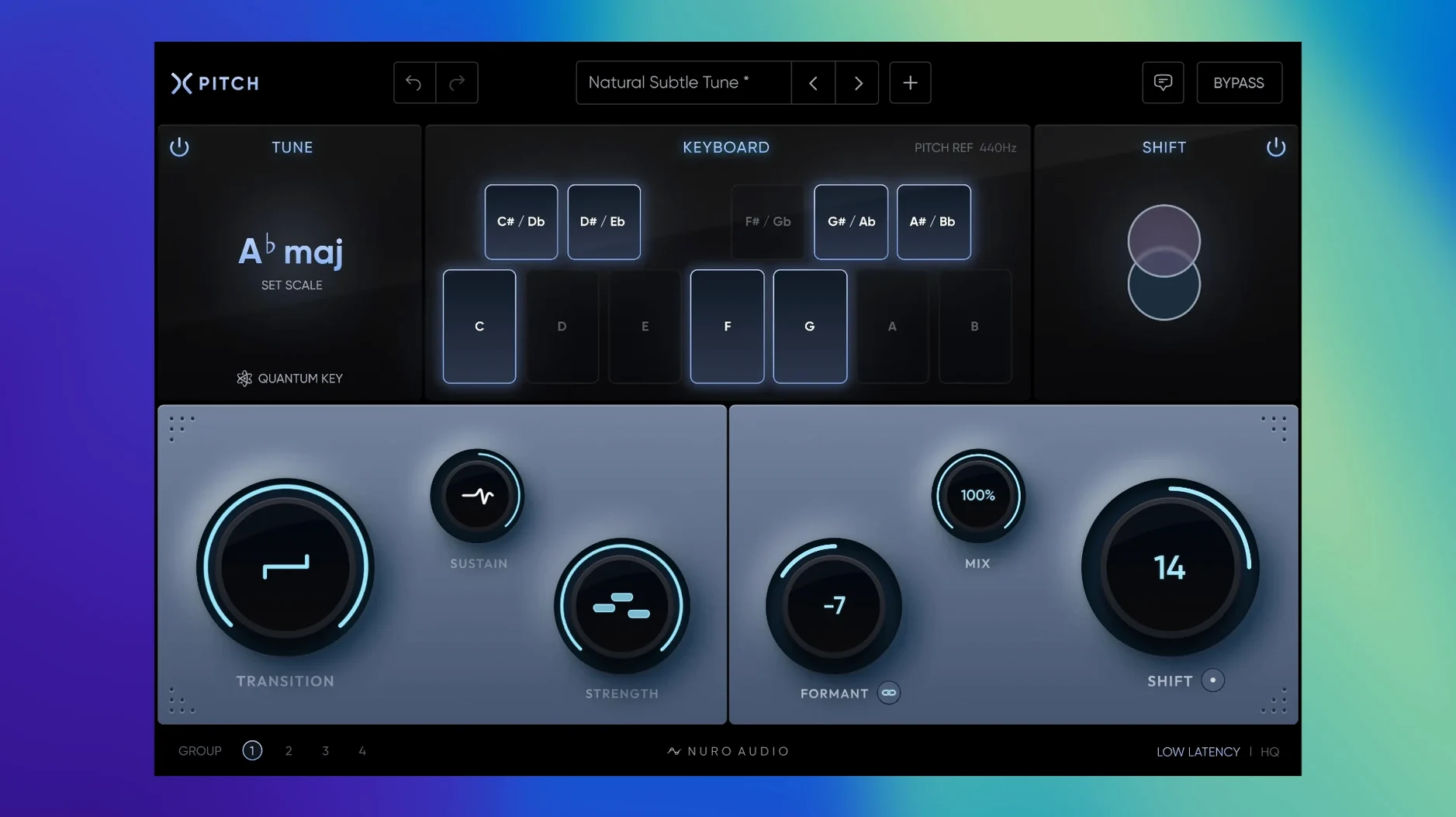
Think of Xpitch as the pitch tool you already know, but with a few extra gears. It sits across tracks and buses, handling both natural correction and full robotic effects. The strength control adjusts how much pitch correction gets applied, while the transition control smooths or speeds up pitch changes. Sustain lets you preserve or flatten note variation, so it covers everything from subtle tuning to creative warping.
- Realtime mode for recording and live use; HQ Mode for post-recording polish
- Pitch shift range of -24 to +24 semitones, plus independent formant shifting
- 48-semitone pitch and formant range in total
- Simple controls: strength, transition, sustain, and pitch/formant shift
- Works on Apple Silicon and Intel Macs
On a vocal bus, Xpitch handles both corrective and creative duties. On instrument tracks, it adds texture or tightens performance. The dual modes make it flexible whether you're tracking or mixing.
Fix Aggressive Pitch with Strength Control
A few things trip people up with Xpitch. Here is what to check when something sounds off.
- Pitch correction sounds too aggressive or not aggressive enough. Adjust the Strength control. Lower values let more of the original pitch through. Higher values clamp down harder.
- Transitions between notes sound unnatural. The Transition control is the fix. A faster setting snaps pitch changes instantly. A slower setting smooths them out for a more natural glide.
- Vocal sustain feels flat or too varied. Use the Sustain control. Turning it up preserves the original note variation. Turning it down flattens the sustain for a more consistent tone.
- Formant shift doesn't match the pitch shift. Check if the Link function is on. When linked, pitch and formant shift move together. When unlinked, you can shift them independently.
- Plugin doesn't appear in your DAW. Verify the install format matches your DAW host: AU for Logic Pro, VST3 for Cubase or Studio One, AAX for Pro Tools. Reinstall the correct format if needed.
- No sound or crackling on playback. Make sure you are not running Realtime mode and HQ Mode simultaneously. Realtime mode is for live tracking. HQ Mode is for mixing after recording.
Tighten Chorus Vocals with Moderate Strength
I was working on a vocal take that had a couple of sour notes. Nothing major, but the chorus needed to sit tighter. I inserted Xpitch on the vocal track and set it to a moderate strength. The sustain stayed neutral, and the transition was set to medium. The pitch correction cleaned up the sour notes without making the take sound robotic.
On the next track, I wanted a more dramatic effect. I pushed the strength high and turned the transition to fast. The vocal snapped into a tight, tuned sound that worked for the bridge. The formant shift added a slightly different color without making it sound unnatural.
For the outro, I switched to a full creative warp. I dropped the pitch by 12 semitones and used the Link function to match the formant shift. The effect turned a clean vocal into a deep, almost spoken-word texture. The mix control let me blend that processed signal with the original, so it sat behind the main vocal without overwhelming it.
After recording, I bounced the track and moved to mixing. I switched to HQ Mode for finer pitch processing. The strength and transition controls needed only minor tweaks to match the final mix. The session ended with a vocal that was both clean and characterful, all from one plugin.
- General bug fixes, optimizations, and stability improvements.
- macOS 10.13 or later
- Intel or Apple Silicon
- 8 GB RAM minimum
- AU, VST3, or AAX 64-bit host
Questions I get about this line
Realtime mode is intended for recording and live use, giving you immediate pitch processing with low latency.
Yes, Xpitch supports a robotic effect in addition to natural pitch correction.
Yes, Xpitch supports both Apple Silicon and Intel processors.
The install order
- Open the downloaded disk image.
- Run the standard installer procedure.