- Home
- VST Plugins
- Nuro Audio XVOX Pro

Free download (625 MB) Previous versions
- Version
- 1.5.2
- Developer
- Nuro Audio
- Languages
- English
- License type
- K'ed by MORiA
| macOS range | macOS 10.13 or later |
|---|---|
| Chip | Apple Silicon, Intel 64-bit |
| Download | 625 MB |
| Previous versions | 1 on file |
Screenshots
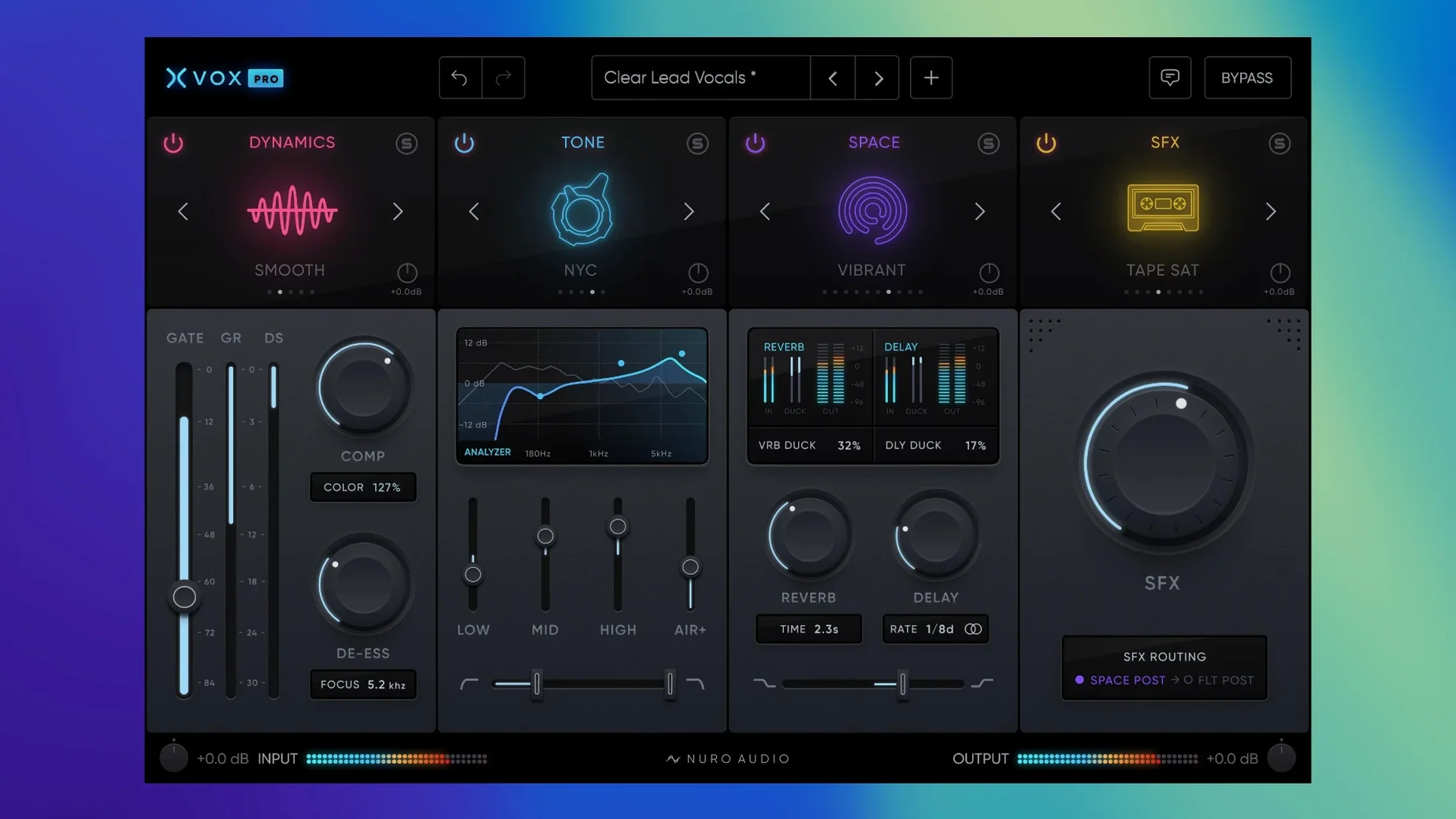
When the vocal track needs compression, de-essing, tone shaping, space, and a few effects in one pass, XVOX Pro is the plugin you drop on the channel. It is a vocal mixing suite with six modules controlled from a single interface.
XVOX Pro — The main module that routes signal through the suite and hosts the other five modules as independent sections.
XVOX Tone — A tone-correction module for adjusting the vocal's frequency balance without surgical EQ.
XVOX Comp — A compressor tuned for vocal dynamics. Catches peaks and evens out level.
XVOX DS — A de-esser that targets sibilance without dulling the rest of the vocal.
XVOX Space — Reverb and ambience module. Adds room or hall around the vocal.
XVOX SFX — An effects module for creative processing — doubling, widening, or modulation.
How XVOX Pro Stacks Up Against Similar Mac Plugins
Waves Vocal Rider is a common alternative for automatic leveling, but it handles only volume — you still need separate de-essing and reverb. XVOX Pro bundles six modules in one window, which saves track count and CPU overhead. Waves does not offer a comparable all-in-one suite for vocals.
iZotope Nectar is the closest competitor. It also combines pitch correction, compression, and effects in one plugin. Nectar’s strength is its adaptive EQ and pitch module; XVOX Pro counters with dedicated de-essing and an effects section (XVOX SFX) that Nectar lacks. Both offer 200-plus presets, but XVOX Pro’s modules are laid out as clearly labeled tabs rather than a single complex interface. Beginners often find XVOX Pro easier to navigate.
Antares Auto-Tune Vocal Compressor is narrower — compression and tuning only. It does not include reverb, de-essing, or creative effects. XVOX Pro replaces several Antares instances with one plugin. For producers who want a single insert that handles the entire vocal chain, XVOX Pro is the more complete option.
Plugin Not Showing After Install
XVOX Pro version 1.5.2 installs via a disk image. Users on macOS 10.13 High Sierra or later should have no trouble; the installer supports both ARM and x86 architectures. Still, a few things trip people up.
- Plugin not showing in the DAW. The disk image contains AU, VST3, and AAX installers. If you copied only one format, the plugin may not appear in your host. Open the image and run the installer for your host’s format — VST3 for Cubase, AU for Logic Pro, AAX for Pro Tools.
- Presets not loading. The 200-plus presets are stored inside the plugin, not as external files. If the preset browser is empty, restart the DAW after installation. Some hosts (GarageBand, REAPER) need a plugin scan before they see presets.
- CPU spikes when using XVOX SFX. The SFX module’s doubling and modulation effects are more demanding than the other modules. If the track starts crackling, bypass SFX and use the Space module instead — it uses fewer resources.
- De-esser not catching sibilance. The XVOX DS module works best after compression. Place it after XVOX Comp in the signal chain. If it still misses, reduce the threshold in the DS section — the default is set conservatively to preserve high end.
Over-Processing With Module Settings
New users often treat each module as an independent plugin and try to match settings from their usual gear. That leads to over-processing. Start with the XVOX Pro main module at its default preset. The suite is designed so that small adjustments to Comp and Tone give a usable vocal in under a minute. Adding Space and SFX should come last — after the core compression and de-essing sound right.
Another common error is loading the plugin on every vocal track in a session. XVOX Pro is a suite, not a utility. Use it on the lead vocal only, then handle backing vocals with a lighter chain — a basic EQ and compressor. Running six modules per track multiplies latency and CPU load for no benefit.
Beginners also ignore the host-specific instructions. The installer works on Logic Pro X 10.3, Pro Tools 2021, Ableton Live 11, GarageBand 10.1.1, PreSonus Studio One 6, FL Studio 20, Cubase 12, Reason 12.5, and REAPER. If your DAW is not on that list, check that the plugin format (AU, VST3, or AAX) matches your host. Installing the wrong format is the most common reason XVOX Pro appears as a ghost insert.
Finally, do not bypass the disk image step. Extract the image, then run the installer — dragging the contents to a manual folder often breaks the preset database. The standard installation process handles everything.
- macOS 10.13 High Sierra or later
- Intel or Apple Silicon processor
- 8 GB RAM minimum
- AU, VST3, or AAX 64-bit host
Questions I get about this line
XVOX Pro runs as AU, VST3, or AAX 64-bit in any host that supports those formats. Supported hosts include GarageBand 10.1.1 and later, and REAPER.
Yes. XVOX Pro runs natively on Apple Silicon and Intel Macs. Minimum macOS is 10.13 High Sierra.
Open the downloaded disk image and run the standard installer. No extra steps are needed.
The install order
- Open the downloaded disk image.
- Run the standard installation process.