- Home
- VST Plugins
- Quagliardi Pro Audio BoomBlender Pro
- Version
- 1.0.3
- Developer
- Quagliardi Pro Audio
- Languages
- English
- License type
- K'ed by MORiA
| macOS range | macOS 10.12 or later |
|---|---|
| Chip | Apple Silicon, Intel 64-bit |
| Download | 168 MB |
Screenshots
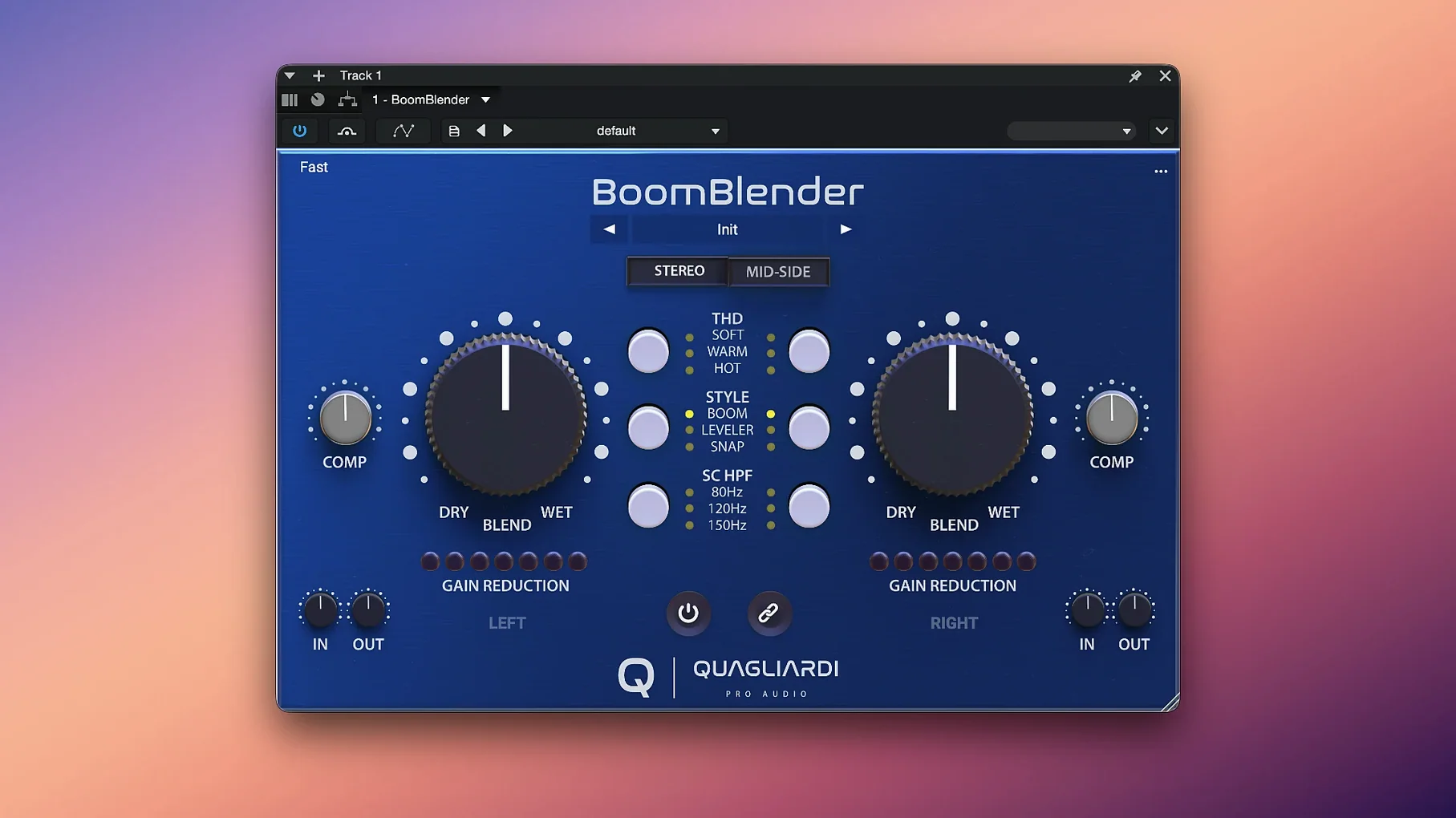
If you already work with the Quagliardi 576 compressor's BOOM mode, BoomBlender Pro takes that sound further. This plugin combines compression, expansion, and saturation with three THD modes modeled from the Quagliardi 501+ preamp — using machine learning to reproduce its distortion behavior. The dry/wet workflow lets you dial in exactly how much of the processed signal you want.
| Detail | Value |
|---|---|
| Version | 1.0.3 |
| Formats | VST, AU |
| macOS | 10.12 and later |
| Architecture | Intel 64-bit, Apple Silicon |
| Interface language | English |
It handles mid/side processing, so you can treat the center and sides separately. The expanded version of BoomBlender Lite adds more control over compression and saturation character. Works in any modern DAW on Mac.
Bringing Up the Blend on a Drum Bus
Start with a drum bus. Pull up BoomBlender Pro on the stereo track. The single knob sits at zero — fully dry. Hit play and bring the blend up slowly. You hear the compression grab the transients first, then the saturation fills in underneath. Around 30 percent wet the kick gets a little more body without losing the original attack.
Switch to a vocal track next. Mono this time. The plugin auto-detects the channel layout, so there is nothing to reset. Dial in one of the four compression styles — the one labeled for vocals works well here. The THD modes add a subtle edge. Keep the blend modest, maybe 20 percent, and the vocal sits forward without sounding processed.
For a mix bus, engage the mid/side matrix. Send the mid channel through a light compression style and the side channel through a different one with more saturation. The single knob still controls the overall blend. A little goes a long way on the mix bus — 10 to 15 percent wet tightens the center and spreads the sides slightly.
One-Knob Compressor, Expander, and Saturation
The compressor, expander and saturation all live under one knob. No stacking three separate plugins to get the same result. The mid/side matrix is built in, so you avoid the usual routing workaround.
The three THD modes are modeled from the 501+ preamp using machine learning, but you pick them from a simple switch, not a submenu. The four compression styles are similarly straightforward — click and compare. Mono and stereo tracks use the same instance, and the plugin adapts without extra setup.
If you have used BoomBlender Lite before, the Pro version keeps the same dry/wet workflow. The learning curve is minutes, not hours. The package includes both installation and activation instructions, so getting it into your plug-in folder is a short process.
A Session from Scratch
Open a mix you have been struggling with — a dense rock track where the guitars and vocals fight for space. Insert BoomBlender Pro on the vocal bus. Leave the blend at zero and audition the four compression styles. The "Opto" style gives a slower, gentler grab. The "FET" style catches the peaks harder. Pick FET.
Bring the blend up to about 25 percent. The vocal sits clearer without turning up the fader. Now add a THD mode — the "Soft" setting from the 501+ preamp model. It adds a touch of harmonic content that helps the vocal cut through the guitars. No EQ needed yet.
Move to the guitar bus. Enable the mid/side matrix and process only the side channel. Send it through a different compression style with a higher blend ratio, maybe 40 percent. The center stays clean, but the stereo image widens. The single knob keeps everything in check — one move, not a chain of adjustments.
Small Conveniences
The mid/side matrix lets you process either channel independently without duplicating the plugin or using a separate routing plugin. The four compression styles are named by their character, so you can guess the sound before you turn the knob. The three THD modes are labeled by intensity — clean, medium, heavy — which matches how the 501+ preamp behaves at different gain stages.
The plugin remembers its state between sessions. Open the same project tomorrow and the blend, compression style, and THD mode are right where you left them. Mono or stereo, it adjusts automatically on insertion. No channel config step.
The single knob controls compression, expansion, and saturation together, but each effect responds differently as you turn it. The compressor acts first, then the saturation fills in, then the expander shapes the tail. You hear the layers stack without needing three separate plugins or automation lanes.
For anyone searching for quagliardi pro audio boomblender pro macos download, this is the version that adds the 501+ preamp modeling and mid/side flexibility over the Lite version.
- macOS 10.12 or later
- Intel 64-bit or Apple Silicon Mac
- Host DAW supporting VST or AU
Questions I get about this line
It supports macOS 10.12 and later, including both Intel 64-bit and Apple Silicon Macs.
The three THD modes are modeled from the Quagliardi 501+ preamp using machine learning to replicate its distortion behavior.
The install order
- Follow the installation instructions included with the package.
- Follow the activation instructions included with the package.