
- Home
- VST Plugins
- Revoice Pro

- Version
- 5.1.30
- Developer
- Synchro Arts
- Languages
- English
- License type
- K'ed by iamdumb
| macOS range | macOS 10.14 or later |
|---|---|
| Chip | Apple Silicon, Intel 64-bit |
| Download | 39 MB |
Screenshots
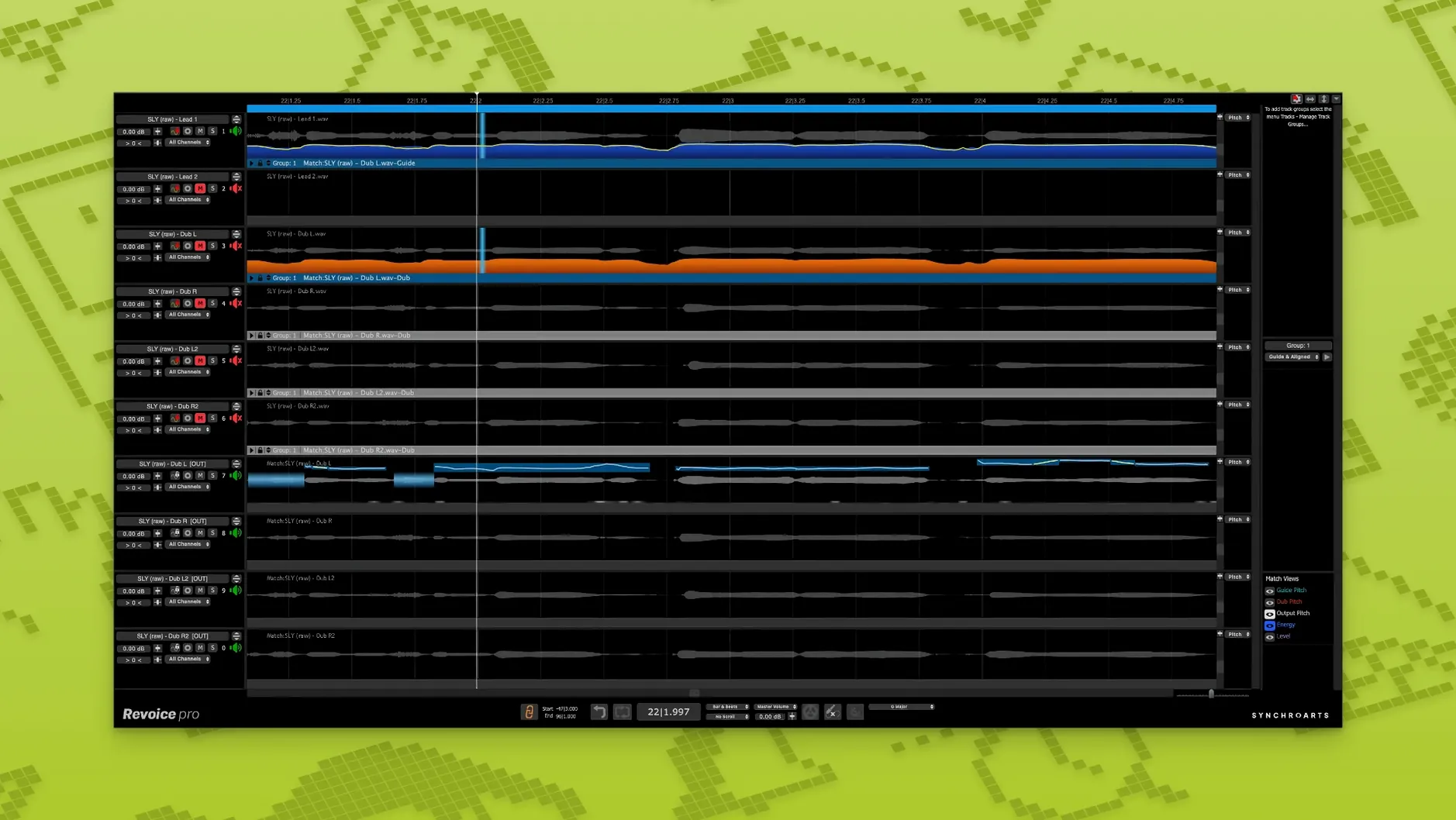
You have a lead vocal track that’s solid but the double tracks drift in and out of time. Or a harmony take that’s sharp on the chorus. Revoice Pro handles that. It aligns audio, corrects pitch, and builds vocal doubles that sound like the same singer, not a flanger effect.
SmartAlign and SmartPitch Plug Into Your DAW
- SmartAlign – syncs takes that have different start or end points. Works where time-stretching in your DAW feels clumsy.
- SmartPitch – matches the pitch of doubles and harmonies so they blend with the lead.
- Shaper Tool – fine-tune pitch adjustments when Auto-Tune or Melodyne overshoot.
- Vocal Doubler – creates layered doubles without the phase issues of copy-pasting.
What You Get With Version 5.1.30
The Shaper Tool lets you draw pitch curves instead of relying on automatic correction. SmartPitch and SmartAlign handle the repetitive timing and pitch matching so you can focus on takes, not grid snapping. Runs on Intel and Apple Silicon, AU/VST3/AAX 64-bit, macOS 10.14 and up.
Built for Vocal Editors Polishing Tracks and Podcasts
Revoice Pro is built for anyone who edits vocals regularly. That means music producers tracking multiple takes of a verse and needing one perfect comp. It means audio engineers polishing a podcast where the guest’s mic placement shifted between sentences. It means post-production editors matching ADR lines to location audio. The common thread is voice or monophonic material that needs to lock to a reference without sounding processed.
If you work with layered vocals — backing harmonies, doubled leads, choir stacks — the SmartPitch and Vocal Doubler save you from hours of manual tuning. If you do dialog editing, SmartAlign handles the timing mismatches that are tedious to fix by hand. It is not a one-trick plugin. It is a dedicated editor for voice, and that narrow focus means the tools are deeper than what your DAW’s built-in pitch or time functions offer.
SmartAlign Works Across Different Timeline Positions
SmartAlign works even when the take and the guide start at different timeline positions. That is a subtle thing, but in practice it means you do not have to trim regions to the exact same bar before processing. Drop the file in, set the guide, and Revoice Pro figures out the offset.
The interface keeps things in English. No menu hunting in translated labels. The plugin formats cover the three major hosts: AU, VST3, and AAX 64-bit. Whatever DAW you run, the connection path is straightforward.
Align a Double Then Fix a Flat Harmony in Minutes
You insert Revoice Pro on that track, flag the lead as the guide, and run SmartAlign. In a few moments the double sits tight across the whole section. No manual edit points.
Next, the harmony pass that lands flat on the bridge. You route it through SmartPitch, which matches the harmony’s pitch contour to the lead. If the result needs a finer touch, you open the Shaper Tool and draw a curve to correct the last few cents on the held note. The harmony blends without that warbly artifact that aggressive time-stretching can cause.
Finally, you select the chorus phrase and run the Vocal Doubler. The layered result thickens the chorus without panning or chorus plugins. Export the processed audio back to the original track. The session stays clean, and the vocal stack sits the way you heard it in your head. That is the workflow: align, pitch-match, double, move on.
- Shaper Tool: manual pitch-adjustment tool for fine control.
- SmartPitch: matches the pitch of doubles and harmonies automatically.
- SmartAlign: synchronises tracks that have different start or end positions.
- macOS 10.14 or newer
- Intel or Apple Silicon processor
- AU, VST3, or AAX 64-bit compatible host
- Interface language: English
The install order
- Open the downloaded disk image.
- Run the standard installation procedure.