
- Home
- VST Plugins
- RC-20 Retro Color
Free download (170 MB) Previous versions
- Version
- 1.5.1
- Developer
- XLN Audio
- Languages
- English
- License type
- K'ed by TEAM HCiSO
| macOS range | macOS 10.13 or later |
|---|---|
| Chip | Apple Silicon, Intel 64-bit |
| Download | 170 MB |
| Previous versions | 3 on file |
Screenshots
Version 1.5.1 brings native Apple Silicon support and a 64-bit-only Mac build. The install process is standard: mount the disk image and run the installer. The plugin works as VST, AU, or AAX in any modern DAW.
- Mount the downloaded disk image.
- Run the standard installation procedure.
- Authorize the plugin via the XLN Audio account system.
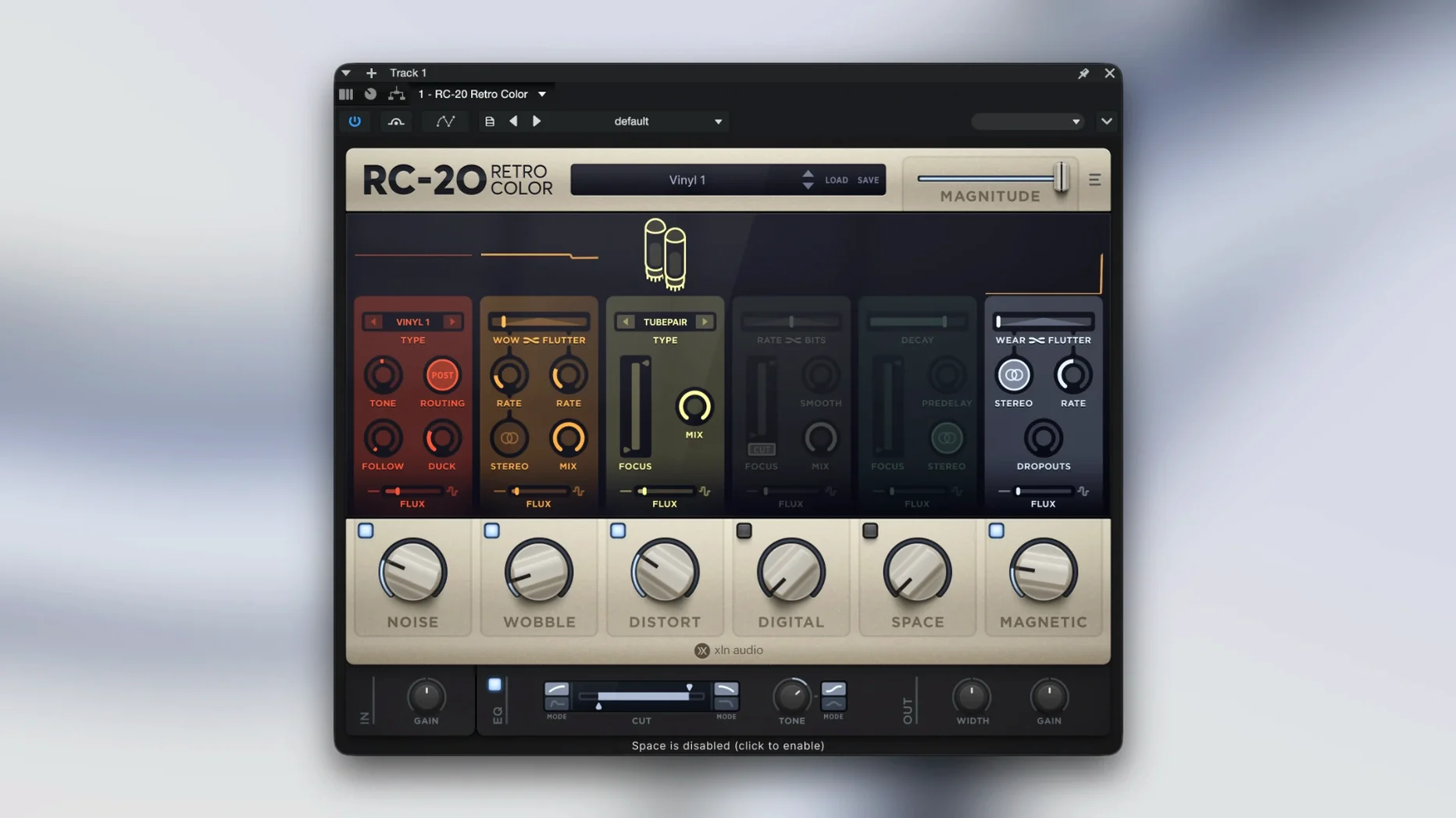
Once loaded, RC-20 adds the feel of vintage recording gear — noise, wobble, saturation, and space. The included presets cover everything from subtle tape warmth to broken radio crunch. The in-app manual link saves you digging through folders.
Distinct from Vintage-Effect Competitors
If you use other vintage-effect plugins, you will find RC-20 distinct. Here is how it compares with three common alternatives.
RC-20 vs. iZotope Vinyl
iZotope Vinyl focuses on record-player artifacts: crackle, rumble, wear. It does one thing well. RC-20 covers a wider range: tape wobble, digital bit-crushing, lo-fi space, and magnetic saturation. Vinyl is for a specific turntable sound. RC-20 is for general vintage color across a mix.
RC-20 vs. Waves Kramer Master Tape
Kramer Master Tape models tape saturation and wow/flutter. It is a single-module emulation of one machine. RC-20 combines six modules in one plugin. You can layer noise, distortion, and space together inside one instance. Kramer Master Tape is a faithful single-purpose emulation. RC-20 is a multi-effect toolbox.
RC-20 vs. Soundtoys Decapitator
Decapitator is a distortion and saturation specialist. It excels at aggressive harmonics. RC-20's Distort module gives you some of that, but the real strength is blending it with the other five modules. If you only need distortion, Decapitator is the focused choice. If you want noise, wobble, space, and magnetic character in one place, RC-20 wins.
Native Apple Silicon in Any DAW
RC-20 works as a standard plugin in any DAW that supports VST, AU, or AAX. That covers Logic Pro, Ableton Live, Pro Tools, Cubase, Reaper, and Studio One. No special routing or wrapper needed.
The plugin is native Apple Silicon. No Rosetta layer. That means it loads fast and uses no extra translation overhead on M-series Macs. The 64-bit-only requirement is standard for modern DAWs, so no compatibility headaches there.
RC-20 also works within XLN Audio's Addictive Drums and Addictive Keys ecosystem. If you use other XLN products, the same account system handles authorization. One login, one installer pattern.
For macOS power users, the plugin respects the system-wide audio buffer and sample rate settings. No separate configuration panel. You set your DAW's buffer, and RC-20 follows it.
Instant Lo-Fi Character for Drums and Vocals
Music producers who work in lo-fi, hip-hop, or ambient genres will reach for RC-20 often. The noise and wobble modules add instant character to drum loops, pads, or vocal samples.
Mix engineers use it to glue a bus. Putting RC-20 on a drum sub-mix or a synth group and dialing in a little magnetic or space module ties the tracks together. The Flux engine adds gentle random variation, so the bus never sounds static.
Sound designers can abuse the modules. Crank the distortion, max the wobble, and let the Flux run wild. The results are useful for foley, transitions, and post-production texture.
Recording musicians who track at home get value from the presets. Load a preset that matches the mood — worn tape, radio crackle, lo-fi chamber — and print the effect. No need to learn each module immediately.
Flux at 20-30 Percent for Random Variation
Open the plugin and start with a preset you like. Then change these:
- Flux amount. Turn it up to 20-30 percent. The random variation prevents the effect from sounding the same every time. Too much flux becomes chaotic. Start low and increase until the part breathes.
- Mix knob. Many presets default to 100 percent wet. Back it to 50-70 percent. The effect sits better in a mix when it blends with the dry signal.
- Noise color. The Noise module has a color control. Switch from white to pink or brown. Brown noise is less harsh and works better on bass or vocal tracks.
- Wobble depth. Keep this under 30 percent for subtle tape warble. Higher values become seasick-fast. Use low depth for a realistic tape feel.
The built-in manual link inside the plugin is worth a click early. It explains each module's controls and the signal flow.
For an rc 20 retro color torrent or rc 20 crack search, you will find RC-20 on most plugin download sites. The version here (1.5.1) is the stable Apple Silicon-native build, and the TEAM HCiSO activation works on macOS 10.13 and later for both Intel and ARM.
- macOS 10.13 or later
- 64-bit only
- Intel or Apple Silicon
- English interface
Questions I get about this line
Yes, version 1.5.1 runs natively on Apple Silicon. No Rosetta needed.
VST, AU, and AAX. The Mac version is 64-bit only.
macOS 10.13 or later. The plugin supports both Intel and Apple Silicon architectures.
The install order
- Mount the downloaded disk image.
- Run the standard installation procedure.