
- Home
- VST Plugins
- Pulsar Audio IPA
- Version
- 1.0.9
- Developer
- Pulsar Audio
- Languages
- English
- License type
- k'ed by GUISEPPE
| macOS range | macOS 11 or later |
|---|---|
| Chip | Apple Silicon |
| Download | 75 MB |
Screenshots
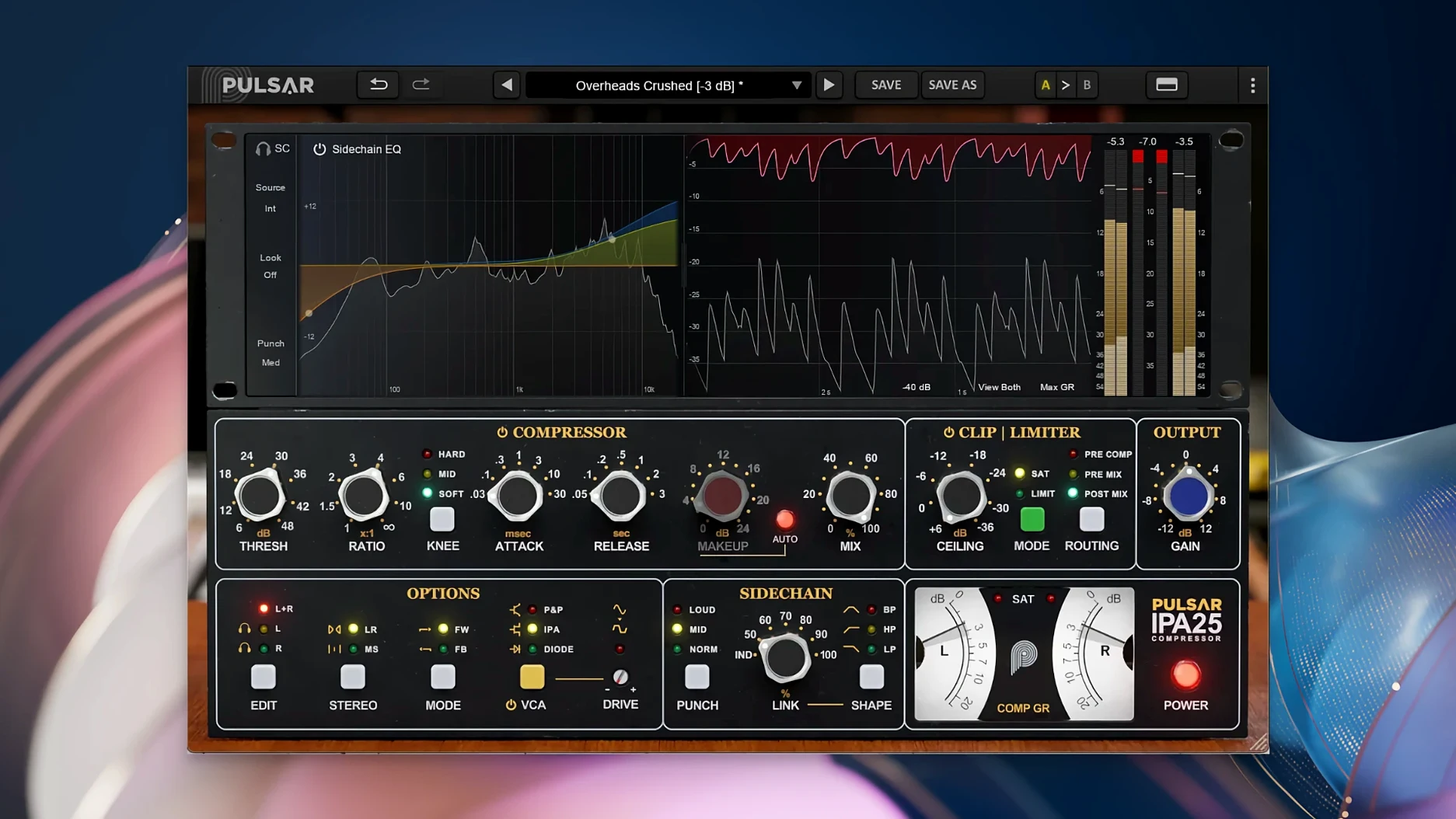
Pulsar Audio IPA is a multi-VCA dynamics processor plugin for Mac and Windows, presented as a modern take on the classic API 2500 bus compressor. It works as a 64-bit Audio Unit, VST2, VST3, or AAX plugin inside any compatible DAW on macOS 11 or later, including Apple Silicon natively.
IPA includes three switchable VCA modes — IPA, P&P/Mu, and Diode — plus a built-in clipper and limiter. It handles Mid/Side processing, making it useful for vocals, drums, bass lines, and full mixes across rock, pop, and electronic genres. The interface is English-only.
Version 1.0.9 is the current release. Installation follows the standard plugin procedure: copy the component and VST bundles to your system audio folders, then scan in your DAW.
First days with IPA
After installing, start with the default IPA mode on a stereo bus. It behaves closest to the familiar VCA sound. Listen through each of the three VCA modes on the same material before tweaking thresholds. The difference between IPA and P&P/Mu is noticeable on transients.
Test Mid/Side processing on a drum bus early. Set the plugin to Mid mode, dial in moderate compression, then flip to Side. You will hear how the clipper interacts with the low end differently in each channel. No need to push gain hard the first time.
The visual sidechain EQ is worth a separate pass. Solo the sidechain signal, sweep the filter, and listen for resonance peaks. Cut those peaks before you enable compression. It keeps the gain reduction cleaner.
Real-world scenario: a post-rock mix
A mix engineer working on a post-rock track needs glue across a seven-piece band with two electric guitars, a bowed bass, drums, and a piano. The transient peaks from the ride cymbal and the snare are fighting the sustained piano chords.
They load IPA on the stereo bus, set the VCA to Diode mode, and dial in a 6:1 ratio. The built-in limiter catches the occasional snare spike while the clipper softens the ride cymbal attack. Sidechain EQ filters out the piano’s low mids before they trigger compression. The mix stays open, the cymbals still breathe, and the piano sits back in the arrangement without pumping.
Working session: a typical vocal-and-drums session
- Open the DAW session. Insert IPA on the drum bus in Mid/Side mode, Mid channel first.
- Set VCA mode to IPA. Listen for how the kick and snare react. Adjust threshold until you see 2-3 dB gain reduction on the downbeats.
- Switch to the Side channel. Reduce the threshold further for the hi-hat and overhead transients.
- Enable the clipper. Set it to catch the snare ghost notes that still clip the bus meter.
- Route the vocal track to an aux. Insert a second instance of IPA in stereo mode with P&P/Mu engaged. The release time matches vocal phrasing naturally.
- Engage the visual sidechain EQ on the vocal bus. Cut 200 Hz to reduce proximity effect triggering compression.
- Check the limiter on the vocal bus as a safety net. Listen for any harshness in the last sustain of phrases.
- Bounce a verse and chorus. Adjust the Diode mode on the mix bus for the final rough print.
- macOS 11 or later
- Apple Silicon (native) or Intel
- 64-bit plugin (AU, VST2, VST3, AAX)
- Requires a third-party DAW application
Questions I get about this line
macOS 11 or later, Apple Silicon or Intel, a 64-bit DAW host, and the plugin runs as AU, VST2, VST3, or AAX.
It is suitable for rock, pop, and electronic genres, and can be used on vocals, drums, bass lines, and full mixes.
The install order
- Perform the standard installation procedure.