- Home
- VST Plugins
- Synapse Audio Proxima
Free download (104 MB) Previous versions
- Version
- 1.0.1
- Developer
- Synapse Audio
- Languages
- English
- License type
- k'ed by GUISEPPE
| macOS range | macOS 10.14 or later |
|---|---|
| Chip | Apple Silicon, Intel 64-bit |
| Download | 104 MB |
| Previous versions | 1 on file |
Screenshots
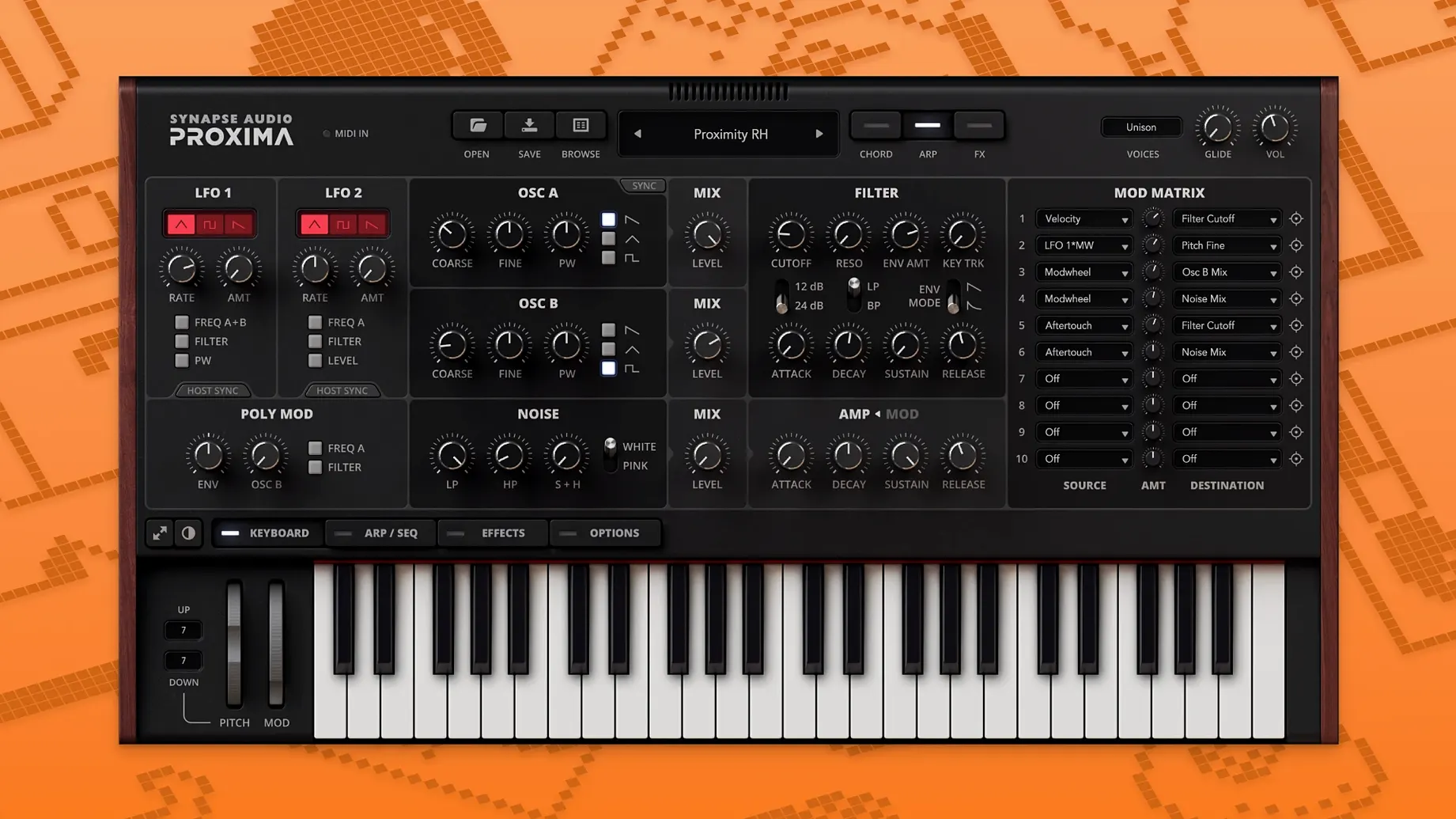
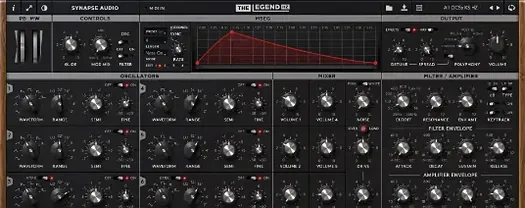
When a session needs a warm, rich synth pad or a bass line with character, Proxima delivers without hogging the CPU. It's a plugin modeled after a classic 1982 analog synthesizer, so you get that vintage tone directly in your DAW.
Analog warmth for leads, basses, and pads
- Lead and bass tracks that need analog warmth.
- Pad layers on buses, with the built-in chorus, delay, and reverb adding space.
- Arpeggiated sequences via the built-in arpeggiator.
- Sound design with two oscillators per voice and a modulation matrix with ten slots.
Six-voice polyphony and system requirements
- Six-voice polyphony — plan chord voicings accordingly.
- Includes a low-frequency filter with resonance for shaping.
- Runs on macOS 10.14 or later, Intel or Apple Silicon.
- Available as VST, AU, and AAX.
Keyboard players and sound designers
Keyboard players who want a single-plugin solution for live-style splits — bass in the left hand, pad or lead in the right — will appreciate the six-voice polyphony and the modulation matrix. Sound designers who layer sequences benefit from the 32-step sequencer and the ten-slot matrix: you can route modulation sources to pitch, filter cutoff, or effect parameters without leaving the plugin. Producers building tracks from scratch can lean on the 300+ presets for quick inspiration, then tweak oscillators and the low-frequency filter to make the sound their own.
Browse presets, then tweak filter resonance
Spend the first session browsing presets by category. Note which ones use the arpeggiator or sequencer — those show you the routing possibilities before you build your own. Next, load a simple pad preset and experiment with the filter resonance and the built-in reverb send; the modulation matrix is easier to understand once you hear what the core oscillator pair can do.
Set up a single MIDI track with Proxima and a simple chord progression. Try switching between the chorus, delay, and reverb on the same part — the mix levels can change the pad width significantly. Finally, duplicate the track, change the preset to a bass or lead, and play the same progression an octave down or up to hear how the six voices handle the split. That will tell you if you need to adjust polyphony or voicing for your typical project. Download Synapse Audio Proxima for Mac to start exploring.
Who gets the most out of Proxima
Producers who work with electronic, synthwave, or ambient genres will find the six-voice polyphony and the 32-step sequencer useful for building movement without extra MIDI editing. Film and game composers who layer atmospheric pads can rely on the built-in effects to shape space inside the plugin, keeping the mixer cleaner. Musicians who perform live with a laptop benefit from the Native Kontrol Standard and MIDI Polyphonic Expression support — those features integrate with hardware controllers and expressive keyboards without extra mapping.
Anyone running an older Intel Mac with a 2.5 GHz quad-core CPU will appreciate that Proxima is an analog-modeling synth, not a sample-heavy instrument. It loads fast and stays responsive even with multiple instances on a mix bus.
First-day setup tips
Open the plugin on a blank project and load a preset that uses the arpeggiator. Play a single chord and let the sequence run — this shows you how the 32-step sequencer interacts with the six voices. Then disable the sequencer, switch to a preset with heavy modulation, and move the mod wheel or an expression pedal to hear how the ten-slot matrix responds to real-time control.
Map the filter cutoff and resonance to your MIDI controller's knobs early. That gives you hands-on control during a session without reaching for the mouse. Save that mapped preset as a user template so every new instance starts with your preferred routing.
Create two tracks: one with a bass preset, one with a pad. Play them together to check voice stealing — if notes drop, adjust the release time on one track or change the voicing mode. That five-minute test saves time later in a full arrangement.
- macOS 10.14 or later
- Intel or Apple Silicon
- 64-bit host with VST 3, Audio Unit, or AAX support
- 2.5 GHz quad-core CPU or better
- Pro Tools 11 or later for AAX
Questions I get about this line
Proxima is available in VST, Audio Unit, and AAX formats, so it works with most major DAWs and Pro Tools 11 or later.
It uses six-voice polyphony, which is plenty for typical synth parts but may limit dense chords.
Yes, it has built-in chorus, delay, and reverb effects, plus a low-frequency filter with resonance.
The install order
- Run the installer and follow the on-screen prompts.
- Use the included activation steps to license the plugin.