
- Home
- VST Plugins
- Tone Empire EDYN
- Version
- 1.0.2
- Developer
- Tone Empire
- Languages
- English
- License type
- K'ed by MORiA
| macOS range | macOS 10.14 or later |
|---|---|
| Chip | Apple Silicon, Intel 64-bit |
| Download | 198 MB |
Screenshots
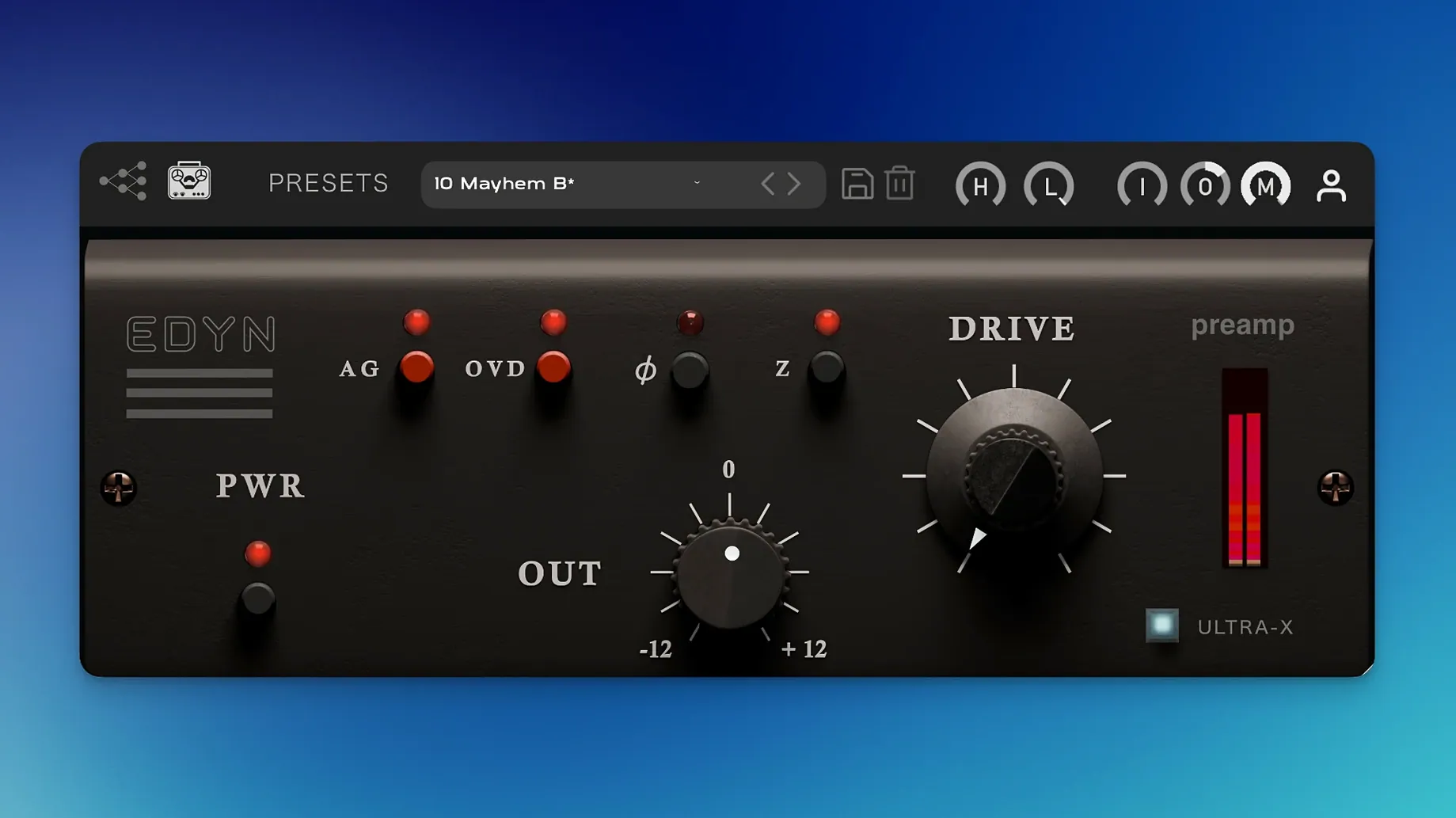
Tone Empire EDYN runs on macOS 10.14 and later, supporting both Intel and Apple Silicon Macs natively. It ships in VST3, AU, and AAX formats, so it fits into any modern DAW workflow.
| Detail | Value |
|---|---|
| Version | 1.0.2 |
| Developer | Tone Empire |
| Format | VST3, AU, AAX |
| Model | Electrodyne 1204 console |
| Key features | HP/LP filters, input impedance (50/200Ω), OVD overdrive, Mix control, automatic gain compensation |
EDYN sits well on individual tracks — vocals, drums, guitars — where its switchable input impedance and filters shape tone before compression or EQ. On buses, the Mix control and automatic gain compensation let you blend parallel processing without level jumps. The overdrive mode adds harmonic grit when you push it. For master output work, the 1.0.1 fix for offline rendering makes bounce consistency reliable. The 1.0.2 update also resolves AU validation in Logic Pro on macOS Sequoia and improves high-DPI display scaling, so it behaves predictably across sessions.
Weight without mud for mixing engineers
Mixing engineers reach for EDYN when a track needs weight without mud. It tightens low end and adds a forward midrange that cuts through a mix. Producers working on vocal chains use it to get a consistent front-to-back depth before compression. Drum processing also benefits — the fast transient response keeps attacks snappy while the saturation rounds out sustain. Anyone who works with hybrid analog-style ITB setups will find the switchable impedance and parallel Mix control useful for shaping tone at the track level.
Dull vocal take to forward depth in one chain
You open a session that has a dull vocal take sitting too far back. You insert EDYN on the channel. Start by setting the Input impedance to 200 ohms — that brings the presence region forward. Dial the Drive up until the meter shows gentle saturation, then back it off a hair. The vocal now has a brighter edge without sounding harsh. You engage the high-pass filter at 80 Hz to clean up proximity effect. The Mix control lets you blend the processed signal with the dry track — start at 70 percent wet and adjust by ear. Output trim brings the level back to match the bypass level. The automatic gain compensation keeps the volume consistent as you tweak Drive. The vocal sits in front of the mix now, with the kind of discrete transistor character you expect from old American console gear.
Crash-free Logic Pro bounces with 1.0.2 fixes
The 1.0.2 update fixed offline rendering on the master output — bounces now match what you hear during playback. AU validation errors in Logic Pro on macOS Sequoia are gone. Multiple instances no longer crash Logic Pro, which matters for large sessions with EDYN on several tracks. Pro Tools parameter automation now behaves correctly. Apple Silicon performance got optimized, so CPU load is lower than before. The interface also scales properly on high-resolution displays. None of these changes alter the plugin’s sound, but they make it more reliable in daily work.
- Bug fixes for offline rendering on the master output.
- AU validation fixes in Logic Pro on macOS Sequoia.
- Crash fixes for multiple instances in Logic Pro.
- Parameter automation fixes in Pro Tools.
- Apple Silicon performance optimization and reduced CPU load.
- Improved support for high-resolution displays with a scalable interface.
- macOS 10.14 or later
- Intel or Apple Silicon processor
- English interface language
Questions I get about this line
Yes. Version 1.0.2 fixes AU validation issues in Logic Pro on macOS Sequoia.
Yes. It includes a Mix control for parallel processing and automatic gain compensation, and version 1.0.1 fixed offline rendering on the master output.
The install order
- Download the package from mac-torrent-download.com.
- Extract the archive to a folder of your choice.
- Copy the .vst3, .aax, or .au files to your system’s designated plugin folders (e.g., ~/Library/Audio/Plug-Ins/VST3).
- Restart your DAW or rescan plugins.
- Activation details are included in the package.