
- Home
- VST Plugins
- T-RackS
Free download (2.3 GB) Previous versions
- Version
- 6.3.2
- Developer
- IK Multimedia
- Languages
- English
- License type
- K'ed by MORiA
| macOS range | macOS 10.15 or later |
|---|---|
| Chip | Apple Silicon, Intel 64-bit |
| Download | 2.3 GB |
| Previous versions | 10 on file |
Screenshots
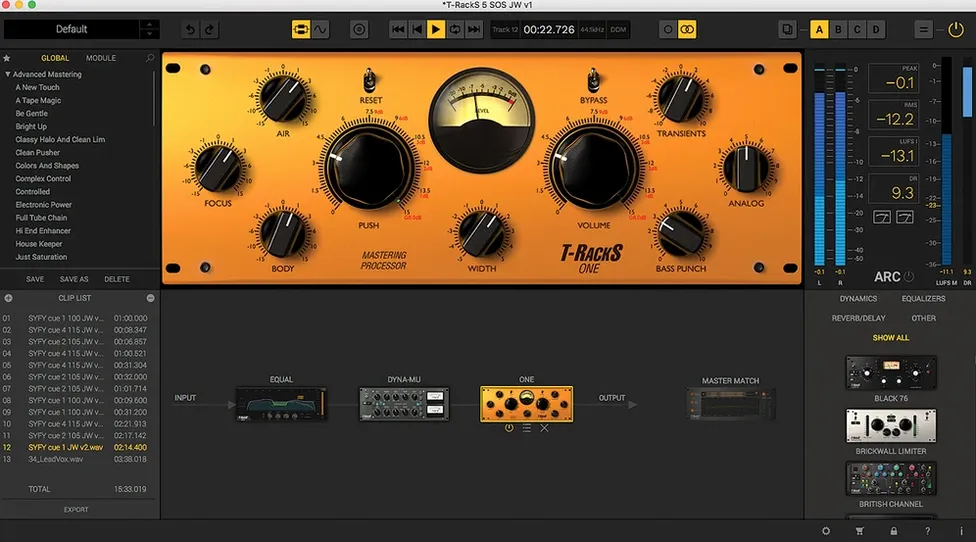
T-Racks 6 works on any Mac running macOS 10.15 Catalina or later, whether it's an Intel model or Apple Silicon. The package installs as a standalone Mastering Console, a plug-in suite for your DAW, and separate plug-in formats for audio devices. That covers most setups without hunting for a specific build.
Standalone App and Plug-In Hosts
You get the full module rack as a standalone app or as plug-ins inside Logic, Pro Tools, Ableton Live, and other hosts. The new Module Manager keeps your processor collection organized, and the standalone console handles album assembly with sequencing and metadata embedding. Multi-format file export means you can bounce a master as WAV, AIFF, or MP3 without leaving the app.
Then the Sound
Nine processors cover equalization, compression, limiting, and harmonic shaping. Master Match X analyzes a reference track and applies matching EQ and dynamics. Processing runs at 32-bit floating point up to 192 kHz, so high-res sessions stay clean. For a modular mastering chain that works both inside a DAW and on its own, T-Racks 6 is a solid choice.
Run the Mastering Console Before Loading Plug-Ins
After you run the standard installer, open the standalone Mastering Console once before loading any plug-ins. That forces the Module Manager to scan and register the nine processors. Next, load a short stereo track and cycle through Master Match, Dyna-Mu, EQual, and ONE to confirm each processor activates without errors. If you plan to use T-Racks inside a DAW, quit the console, open your DAW, and insert T-Racks as a VST 3, AU, or AAX plug-in on a test session. Verify the plug-in window matches the redesigned GUI. Only then move to real projects.
Mixing Engineers with Serial or Parallel Slots
Mixing engineers who want a single plug-in with serial or parallel slots gain the most. You can route a vocal chain inside one instance. Mastering engineers working on full albums get the album assembly and metadata tools. Producers who switch between Logic and Pro Tools keep the same processor layout because T-Racks supports both platforms. The dithering options and 192 kHz support matter for engineers who deliver high-resolution masters.
Small Details Worth Noting
The four dithering choices let you match the noise-shaping curve to your delivery format, not just a generic noise floor. The 16-slot chain accepts processors in serial or parallel, so you can split a bus and recombine it inside one rack instance. Multi-format file export writes WAV, AIFF, or MP3 from the same session without reloading. The Module Manager remembers which processors you hide, which saves scrolling through a full list every time.
First-Day Workflow Tips
Start with one or two processors, not the full 16-slot chain. Load Master Match X first and feed it a reference mix you trust. Let it set the initial EQ and dynamics curve, then swap in EQual or Dyna-Mu for fine adjustments. Keep the rack serial until you learn how each processor interacts. Parallel routing is useful for bus compression or harmonic shaping, but it can mask problems if you overdo it early. Save a few preset rack configurations as starting points for different genres.
Who Gets the Most Out of It
Home studio producers who work alone benefit because the standalone console replaces a separate DAW for final mastering. Post-production engineers who need quick loudness matching across episodes or spots can use Master Match X to match one mix's character to another without manual EQ chasing. Engineers who deliver to streaming services appreciate the dithering options and 192 kHz support for high-resolution masters. Anyone who owns multiple DAWs gets consistent processing without re-learning plug-in layouts. T-Racks 6 covers the gap between a simple limiter and a full outboard mastering chain.
- macOS 10.15 Catalina or later
- 64-bit CPU and operating system
- Intel or Apple Silicon
Questions I get about this line
Yes. T-Racks 6 supports both Intel and Apple Silicon Macs, as long as macOS 10.15 or later is installed.
The install order
- Download the installer file.
- Run the standard installation procedure.