- Home
- VST Plugins
- UJAM VOXCRAFT

Free download (261 MB) Previous versions
- Version
- 1.1.1
- Developer
- UJAM
- Languages
- English
- License type
- K'ed by MORiA
| macOS range | macOS 10.13 or later |
|---|---|
| Chip | Apple Silicon, Intel 64-bit |
| Download | 261 MB |
| Previous versions | 2 on file |
Screenshots
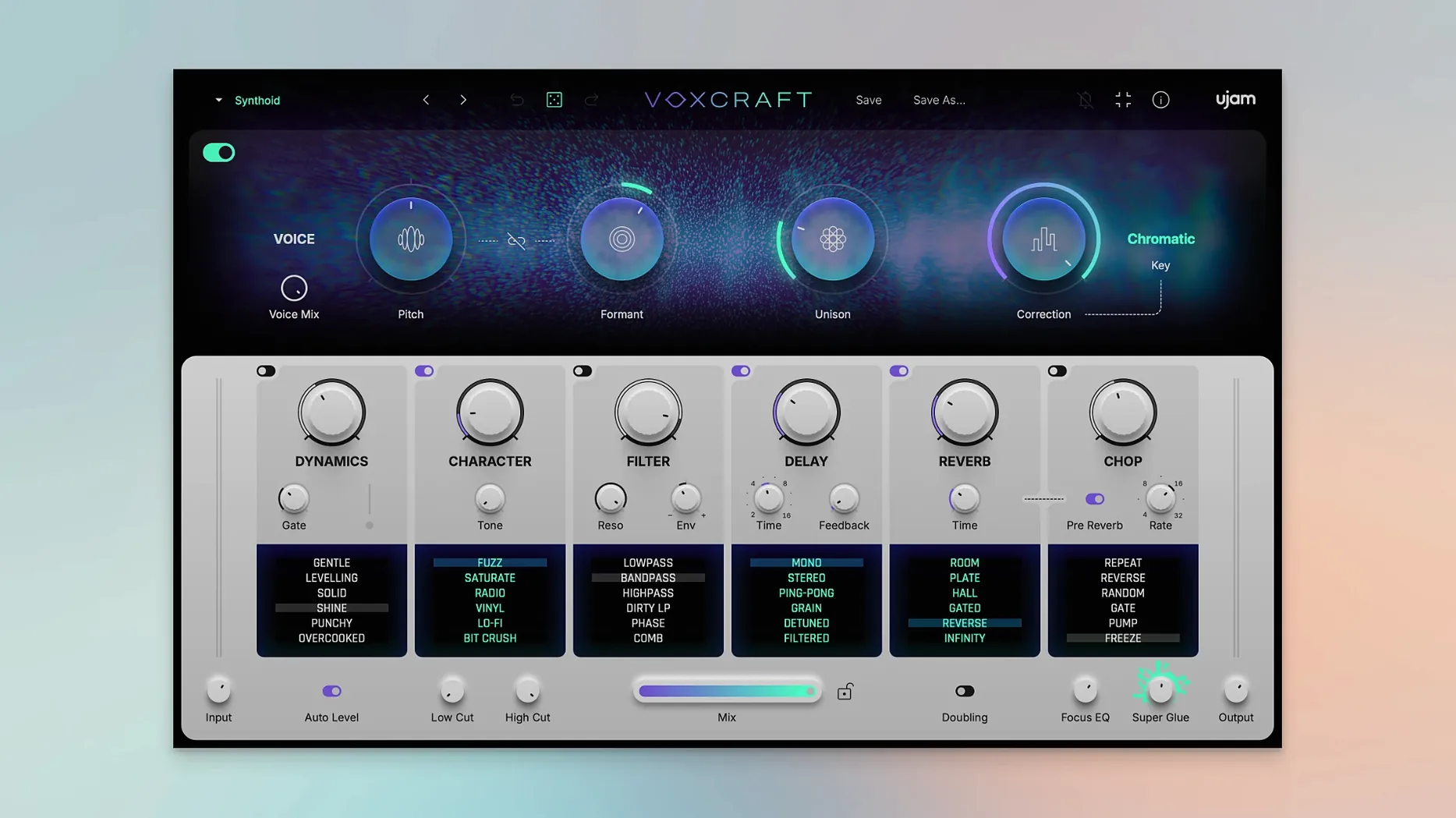
You need a vocal track to cut through the mix without spending an hour on pitch editing. UJAM VOXCRAFT is a plugin that handles pitch correction, tone changes, and layered effects in one window. Here is what a newcomer should try first.
Load into a DAW and Pick a Preset
Load it on a vocal track in your DAW (Ableton Live, Logic Pro, Pro Tools, etc.). Pick any of the 100 ready-made presets and play the track. The plugin applies pitch correction, tuning, and multiplication automatically.
What are the six FX modules for?
Each module has six vocal-processing modes. You can adjust pitch, formant shift, and add creative effects. Click the random preset button to generate a new sound instantly if you want to experiment.
A practical workflow: from dry vocal to layered chorus
Start with a short vocal loop or sample — a single phrase of two to four bars works best for learning. Insert VOXCRAFT on the track and browse the preset list until you find one that matches the mood you want. Press play. The plugin corrects pitch and applies its built-in effect chain immediately.
If you want a thicker chorus sound, go to the multiplication section and increase the voice count. The plugin layers copies of your vocal with slight pitch and timing offsets. No manual doubling needed. Use the formant shift control to change the character of the layers — higher formants sound brighter, lower ones darker.
For a rhythmic effect, activate the chopping module. It gates the vocal in time with the tempo of your project. Adjust the pattern until the chops lock with your beat. Finish with the reverb and delay modules to place the vocal in a space that fits the track.
Bounce the result to audio once the sound is right. That gives you a fixed layer you can edit further or mix against other parts.
Apply to a Raw Vocal Track Only
- Applying it to a finished mix. The plugin works best on a raw vocal track. Running it on a bus with other instruments already blended in gives unpredictable results because the pitch correction reacts to everything in the signal.
- Skipping the random preset button. Many users dial in one preset and stop. Clicking the random button once or twice can show you a processing chain you would not have built yourself. You can always go back if it does not work.
- Over-correcting pitch. The pitch module is aggressive by default on some presets. If the vocal sounds artificial or warbles, reduce the correction strength before adding other effects. Let the original performance breathe.
- Ignoring module order. The six FX modules process the signal in sequence. Changing the order changes the sound drastically. If the reverb sounds muddy, try moving it after the chopping module instead of before it.
- Not bouncing to audio. VOXCRAFT uses real-time processing. If you leave it as a live plugin and later change a preset, you lose the exact sound you had. Bounce to audio when the part is final.
Yes. VOXCRAFT runs on Intel and Apple Silicon Macs with macOS 10.13 or later. It comes in VST2, VST3, AU2, and AAX formats.
- macOS 10.13 or later
- Intel or Apple Silicon processor
- DAW that supports VST2, VST3, AU2, or AAX
Questions I get about this line
It works with Ableton Live, Logic Pro, Pro Tools, FL Studio, Cubase, Studio One, Bitwig, Reaper, and Reason.
Yes. You can tweak the six FX modules and save your settings. There is also a one-click random preset button to generate new sounds.
VOXCRAFT supports macOS 10.13 and later, so it works on Ventura and newer versions. It runs on both Intel and Apple Silicon Macs.
The install order
- Mount the disk image or extract the download package.
- Copy the plugin files to your DAW’s plugin folder or run the installer if provided.
- Open your DAW, rescan plugins, and load VOXCRAFT on a vocal track.
- Activation instructions are included in the package.