
- Home
- VST Plugins
- UnderTone Audio UnFairchild
Free download (220 MB) Previous versions
- Version
- 1.0.8
- Developer
- UnderTone Audio
- Languages
- English
- License type
- K'ed by BUBBiX
| macOS range | macOS 10.13 or later |
|---|---|
| Chip | Apple Silicon, Intel 64-bit |
| Download | 220 MB |
| Previous versions | 1 on file |
Screenshots
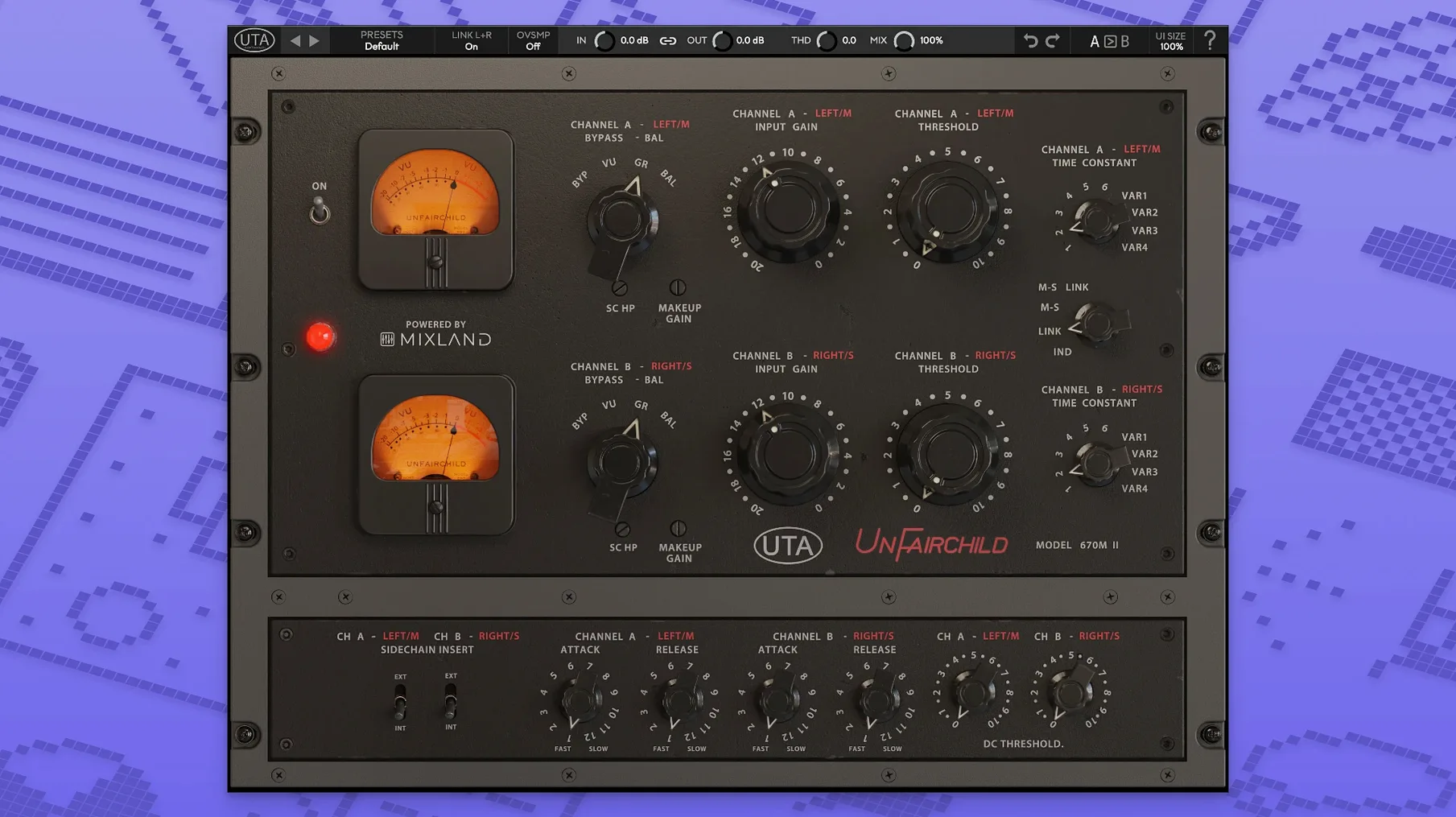
If you know the UnFairchild 670M mkII hardware compressor, this plugin is that same vari-mu circuit in software form. UnderTone Audio, in collaboration with MIXLAND and Eric Valentine, built the UnFairchild as a direct software port of the hardware unit. It runs on both ARM and 64-bit x86 Macs under macOS 10.13 or later.
The plugin gives you the usual vari-mu compression behavior plus a few extras. There is a user-adjustable DC Threshold control for fine-tuning the compression threshold. The left/right balance can be trimmed independently, and the MS function lets you process mid and side channels separately. A true bypass and a wet/dry control handle parallel compression without extra routing.
It is suited for vocals, but the controls make it flexible for buses and individual tracks. The interface is English only. The install package includes activation instructions, so there is no separate download step for a license file.
Plugin Not Showing Up in Your DAW
A few things trip people up when they first load UnFairchild. The most frequent one is the plugin not showing up in the DAW after installation. On macOS, that usually means the installer put the file in the wrong folder. Check your system's VST, AU, or AAX plugin directories — the package places the component in /Library/Audio/Plug-Ins by default. If your DAW scans a custom path, move the file there or add the folder to your scan list.
The second snag relates to the DC Threshold control. Users coming from simpler compressors sometimes leave this at its default and wonder why the gain reduction feels off. The DC Threshold adjusts how the compressor responds to the signal's average level. If the compression sounds too heavy or too light, dial this control first before touching the input gain.
Another issue is side chain routing. The plugin supports side chain processing, but not every DAW exposes the side chain input the same way. In Logic Pro, for instance, you need to enable the side chain button on the plugin insert and route your key source to the correct bus. In Pro Tools, the side chain is tied to the track's external key input. If the compressor isn't reacting the way you expect, check your DAW's side chain routing, not the plugin settings.
Maintenance Update Without Feature Changes
Version 1.0.8 is the current release. No version-specific feature changes or bug fixes were detailed in the official material, so the update appears to be a maintenance release — likely compatibility adjustments for newer macOS builds or DAW updates. For day-to-day use, the behavior and controls remain identical to earlier 1.0.x builds. The six original preset time constants and four variable time constants are still the core of the workflow.
Works Inside Any DAW With Standard Formats
UnFairchild works with any DAW that loads standard plugin formats: VST3, AU, and AAX. On the macOS side, it respects the system's audio routing and buffer settings. There is no standalone app — it stays inside your DAW as an insert effect.
For drum bus work, pair it with a transient shaper before the UnFairchild. The transient shaper tightens the attack, and the vari-mu compressor then glues the bus without pumping. For vocals, put it after a de-esser to keep sibilants under control before compression. The wet/dry control makes parallel compression easy on a return track, though you can also use it inline for faster setup.
The MS function integrates cleanly with mid-side processing chains. Send a stereo track to the plugin, switch to MS mode, and adjust compression independently on the mid and side signals. This is useful on stereo mixes where the vocal sits in the center and the sides carry ambience or reverb. The side channel can take heavier compression without pulling the vocal down.
On macOS, Apple Silicon Macs run the plugin natively. If you are on an Intel Mac, the same installer works — the package includes both ARM and x86 binaries. Just make sure your DAW and macOS version are both 64-bit. The plugin does not load under 32-bit hosts.
- macOS 10.13 or later
- 64-bit Intel or Apple Silicon processor
Questions I get about this line
It requires macOS 10.13 or later. It works on both Intel (x86) and Apple Silicon (ARM) systems.
Yes, it has a wet/dry control for parallel compression, along with a true bypass.
The install order
- Run the installer from the package.
- Follow the activation instructions included in the package.