- Home
- VST Plugins
- Wavesfactory Re-Esser

Free download (49 MB) Previous versions
- Version
- 1.0.2
- Developer
- Wavesfactory
- Languages
- English
- License type
- K'ed by MORiA
| macOS range | OS X 10.9 or later |
|---|---|
| Chip | Apple Silicon, Intel 64-bit |
| Download | 49 MB |
| Previous versions | 2 on file |
Screenshots
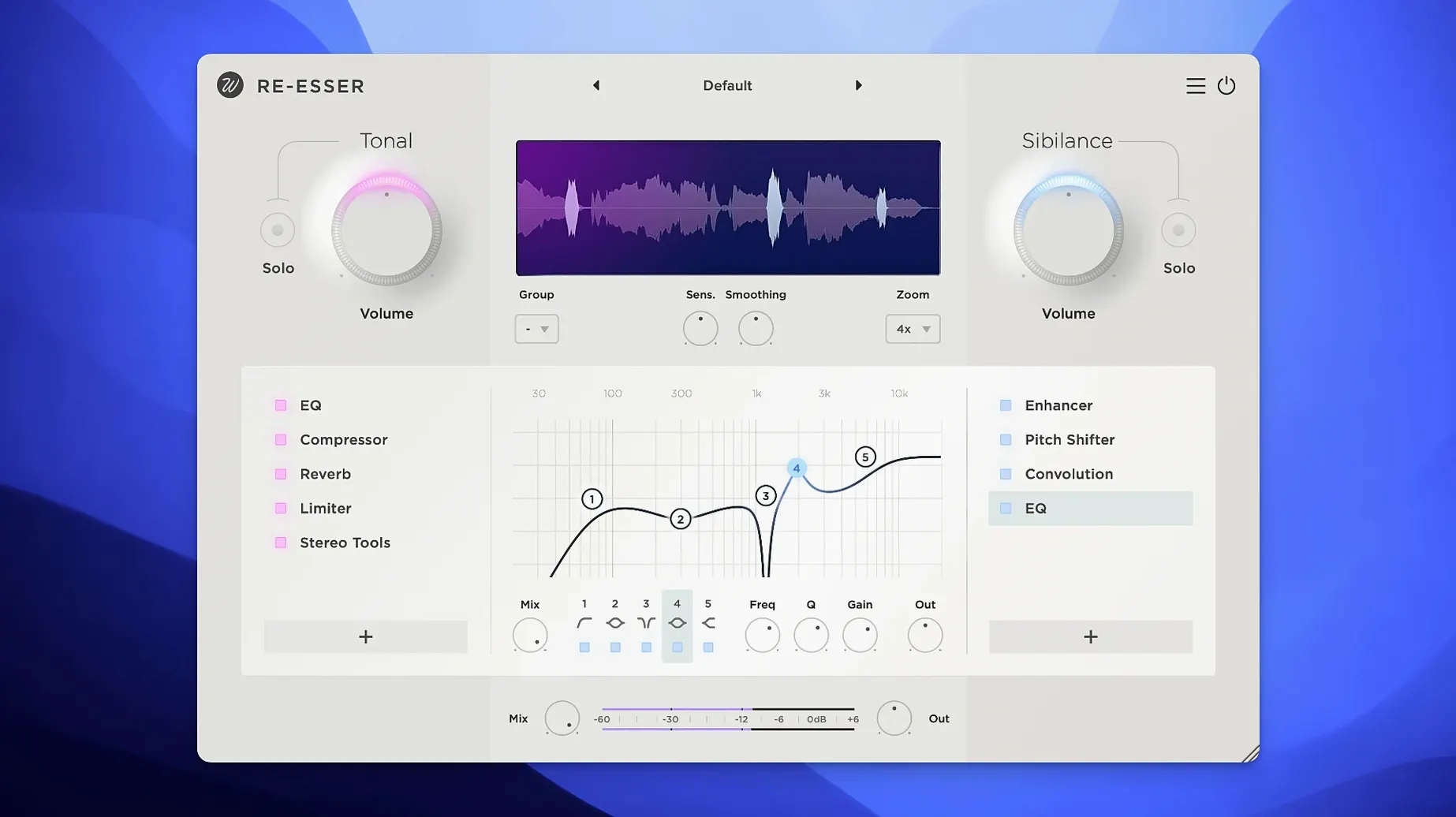
You’re in the middle of a vocal session, and the singer’s “s” sounds are cutting through the mix. Re-Esser steps in to handle that sharp sibilance without dulling the rest of the voice. It’s a de-esser plugin with a clear interface and real-time visual indicators, so you see exactly what’s being processed.
Controls sharp sibilants in voice recordings
- Controlling sharp sibilant sounds in voice recordings
- Applying effects separately to sibilant or tonal parts
- Adding high-frequency boost or saturation to shape the sound
- Syncing multiple instances via grouping for consistent processing
16 built-in effects on macOS 10.9+
- 16 built-in effects are included
- Interface is in English
- Runs on macOS 10.9 or later, Intel and Apple Silicon
- Version 1.0.2 is the current release
Early setup tips
After installing, drop Re-Esser on a vocal track and use the adaptive detector first. It highlights problematic moments automatically, so you can see where sibilance peaks before touching any controls. Start with the main sibilance reduction knob at a moderate setting, then solo the track and listen for the “s” and “sh” sounds. If the vocal still feels clear, you’re in the right range.
Try the grouping feature early if you have multiple vocal takes or layers. Sync processing across instances so all sibilance behaves consistently without tweaking each track separately.
Placed before compressor or EQ in chain
Re-Esser sits well before a compressor or EQ in your chain. Let it tame the sibilant content first, then compress or shape the tone afterward — the de-esser won’t fight your later processing. For dialogue work, pair it with a broadband EQ to catch any room resonance before Re-Esser handles the sibilance.
The built-in effects like high-frequency boost and saturation can replace a dedicated EQ or saturator on that channel. Apply boost to the tonal part only and keep sibilance clean, or saturate just the sibilant content for an edge in a dense mix. Experiment with routing the effect to one part alone — the plugin’s separation makes it straightforward.
When you download Wavesfactory Re-Esser for Mac, you get a tool that slots into your existing workflow without extra routing. Grouping, visual feedback and onboard effects keep you from stacking too many plugins on a single track.
First days with Re-Esser
Spend the first session with one vocal track only. Let the adaptive detector scan a full verse and chorus before you adjust anything. Watch the visual indicators to see which consonants trigger the most reduction — that tells you if your threshold is set too low or high for that singer’s delivery.
Save a preset once you find a setting that works for the vocalist. If you have multiple singers in the same project, create a separate preset for each voice. The grouping feature makes it easy to recall those settings across takes without rebuilding the chain.
Integration with macOS audio tools
Re-Esser works as an Audio Unit or VST plugin inside any macOS-compatible DAW. Logic Pro, Ableton Live, and Reaper all pick it up without extra configuration. Drag it onto a channel strip the same way you would any native plugin.
For voice-over or podcast work, combine it with the system’s built-in Audio MIDI Setup for monitoring latency before you start recording. The visual feedback in Re-Esser shows you real-time sibilance activity, so you can adjust mic technique or distance while the talent speaks.
If you use automation lanes in your DAW, automate the main sibilance reduction knob to tighten up only the problem phrases in a vocal take. Let the rest of the track pass through untouched — Re-Esser’s separation keeps the tonal quality intact while you target specific moments.
- macOS OS X 10.9 or later
- Intel or Apple Silicon
Questions I get about this line
Yes, the effects can be applied separately to sibilant or tonal parts, giving you targeted control.
Grouping synchronizes processing between instances, so settings stay consistent across multiple tracks.
The install order
- Follow the installation instructions included in the package.
- Use the activation instructions provided in the package to finish setup.