
- Home
- VST Plugins
- Serum

Free download (1.2 GB) Previous versions
- Version
- 2.1.5
- Developer
- Xfer
- Languages
- English
- License type
- k'ed by Team V.R
| macOS range | macOS 10.13 or later |
|---|---|
| Chip | Apple Silicon, Intel 64-bit |
| Download | 1.2 GB |
| Previous versions | 7 on file |
Screenshots
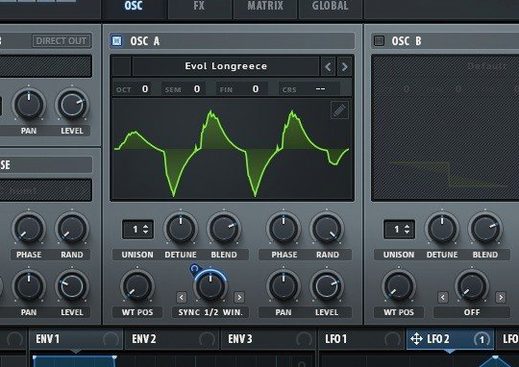
You're building a track in Logic or Ableton, and the pad needs more movement. Serum lets you shape that sound by creating, importing, editing, and modulating wavetables in real time — no need to bounce audio or switch apps. It sits right next to your other plugins, ready when you need a thick bass or a shimmering lead.
| Detail | Value |
|---|---|
| Developer | Xfer Records |
| Type | Wavetable synthesizer (VST) |
| Version | 2.1.5 |
| macOS | 10.13 and later |
| Architecture | Intel and Apple Silicon |
Serum's oscillators go beyond basic waveforms. Each one has advanced unison parameters, and you can stack voices up to 16 per oscillator for a wider sound. Stack settings let you layer octaves so one pressed note sounds fuller. Dual filters let you switch between types, and modulatable effects like flangers, phasers, and comb filters can track the note you play. It's a solid addition to any Mac-based studio.
How Serum Compares with Similar Mac Synths
If you're choosing a wavetable synthesizer for macOS, Serum sits alongside a few other popular options. Here's how it compares.
Serum vs. Native Instruments Massive. Massive has been a go-to for years, with a straightforward signal flow and a large preset library. Serum's advantage is its wavetable editor: you can import audio files and turn them into wavetables, then warp and modulate them on the fly. Massive doesn't offer that degree of real-time manipulation. Massive's oscillators are fixed, while Serum's can stack up to 16 unison voices with separate waveforms per voice. Both have strong filter sections, but Serum's dual filter routing gives you more flexibility for layered filter sweeps.
Serum vs. Arturia Pigments. Pigments combines multiple synthesis types in one plugin — analog, wavetable, FM, and granular. It's a broader tool. Serum's focus is narrower: deep wavetable synthesis. If you want a single synth that does everything, Pigments might cover more ground. If you want the best wavetable editor and modulation system in one place, Serum wins. Serum's note-tracking flangers and comb filters are also unique — Pigments doesn't have that tied to the played pitch.
Serum vs. u-he Hive. Hive is a wavetable synth with a clean UI and a different modulation matrix. Both let you morph wavetables, but Serum's unison stacking and per-voice warping give it more density from a single oscillator. Hive's filters are excellent, but Serum's filter list includes sample-rate reduction and all the LFOTool types, which is rare. For sound designers who build custom wavetables regularly, Serum's workflow is faster.
Works in Any DAW That Supports VST
Do I need a specific DAW for Serum? No. It works as a VST plugin in any DAW that supports the format — Logic Pro, Ableton Live, FL Studio, Cubase, Bitwig, and others. Just point your DAW to the plugin folder after installation.
Will it run on Apple Silicon? Yes. The build supports both ARM (Apple Silicon) and x86 64-bit Intel Macs, as long as you're on macOS 10.13 or later.
Is the demo limited? Xfer Records limits the demo to 15 minutes per session. That's enough to test it quickly, but for extended work you want the full version. The k'ed release removes that restriction.
Can I import my own sounds? Yes. You can drag in audio files to create new wavetables. Serum's editor lets you edit the waveform, then apply unison warping and modulation. This is the core feature that sets it apart from simpler synths.
Does it include presets? Yes. The plugin ships with a preset bank, and you can save your own as you go.
Workflow: Building a Moving Pad from Scratch
Suppose you want a pad that shifts from dark to bright over time, with a slight stereo movement. Here's how to set that up in Serum.
- Open a new instance of Serum in your DAW's instrument track.
- On oscillator A, choose a basic saw wave. Click the wavetable editor, then drag in a short audio file of a piano chord or a vocal sample. Serum creates a wavetable from it. Adjust the start and end points to taste.
- Set oscillator A to 8 unison voices. Turn up the Unison Spread to widen the stereo field. Under Unison WT Pos, assign a different waveform to each voice — pick variations that morph from dark to bright. This is what gives the pad its evolving texture.
- On oscillator B, select a simple sine wave. Drop its level so it adds body without overpowering the wavetable.
- Route both oscillators through Filter A. Choose a low-pass 24dB filter. Set the cutoff low for a dark start.
- Add a modulation source: click the mod matrix, assign a slow sine LFO to the filter cutoff. Set the depth so it opens the filter gradually. Adjust the LFO speed to taste.
- Add an effect: enable the flanger and set it to note-tracking mode. Now the flanger's rate follows the notes you play, keeping the effect musical across different pitches.
- Play a chord. The pad starts dark and brightens as the filter opens, with the flanger adding motion that matches your playing.
Fix the Missing Plugin by Checking the VST3 Folder
Plugin isn't showing in my DAW. Make sure you copied the .vst3 file to the correct folder — typically ~/Library/Audio/Plug-Ins/VST3/. Restart your DAW after placing it. If it still doesn't appear, run a plugin scan from your DAW's preferences.
Sound drops out after a few minutes. That's the demo timer. The k'ed release removes the 15-minute limit. If you used an older patch, re-apply the patch from the VR.nfo instructions. Make sure you're using the build labeled "Team V.R."
Voices cut off or crackle. Increase your buffer size in the DAW's audio settings. Serum's unison stacking is CPU-intensive, especially at 16 voices. If you're on an older Intel Mac, lower the number of unison voices on complex patches.
Presets don't sound like the originals. Check that you're not in demo mode and that the plugin is fully activated. Also verify your DAW is running at the same sample rate as when the preset was created — usually 44.1 kHz or 48 kHz.
Can't open the wavetable editor. Click the wavetable display area, not the popup menu. If nothing happens, the editor might be hidden behind a floating window; resize the plugin window to bring it into view.
- macOS 10.13 or later
- Intel or Apple Silicon
Questions I get about this line
Serum runs on macOS 10.13 and later, on both Intel and Apple Silicon Macs.
The install order
- Run the standard installer.
- Apply the patch.
- Follow the included installation and activation instructions.
- Open the VR.nfo file for additional details.