
- Home
- VST Plugins
- Serato Hex FX
- Version
- 1.2.0
- Developer
- Serato
- Languages
- English
- License type
- k'ed by Team V.R
| macOS range | macOS 10.15 or later |
|---|---|
| Chip | Apple Silicon, Intel 64-bit |
| Download | 105 MB |
Screenshots
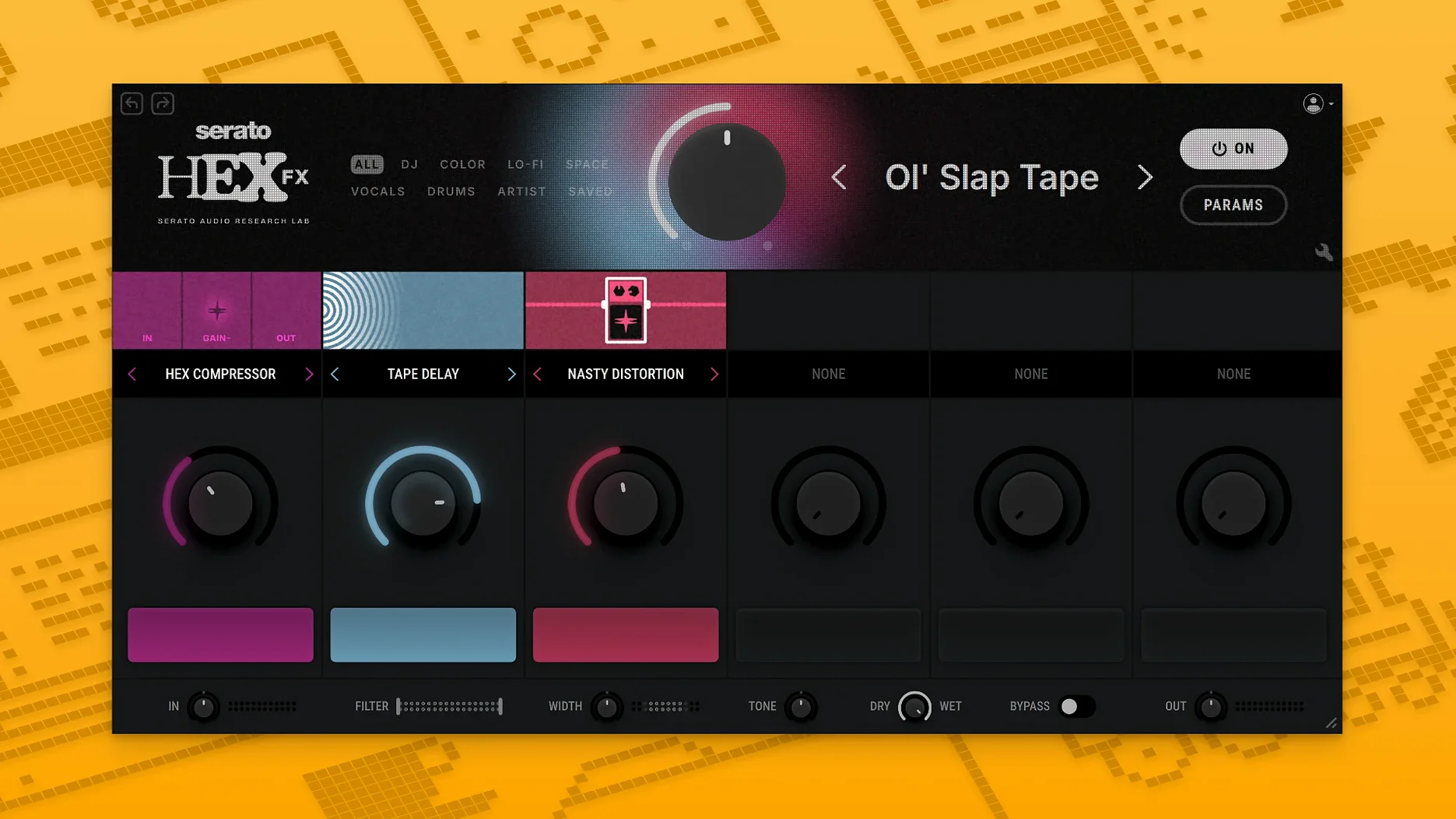
Serato Hex FX ships with three install formats: VST3, AU, and — new in 1.2.0 — AAX. That last one opens Pro Tools on macOS 10.15 through macOS 26 Tahoe. The plugin itself is a four-slot effects chain you can reorder on the fly, with parametric low-shelf, mid-bell, and high-shelf EQ plus performance FX like Halftime and Rollout. Good for adding color, energy, or movement to a track without bouncing to audio.
| Detail | Info |
|---|---|
| Developer | Serato |
| Version | 1.2.0 |
| Formats | VST3, AU, AAX Native |
| macOS Support | 10.15 and later (incl. macOS 26 Tahoe) |
| Architecture | Apple Silicon / Intel 64-bit |
| Language | English |
Once installed, you can save custom presets and reorder the four FX slots by dragging. The EQ section gives you three bands: low-shelf, mid-bell, high-shelf. Performance FX (Halftime, Rollout) are mapped to the bottom row. If you run Serato Studio, the plugin works there too.
Real-world use: a beatmaker working in Logic Pro
A producer building a loop-based beat in Logic Pro drops Serato Hex FX on a sampled vocal chop. They want movement without committing to audio yet. The chain starts with a high-shelf EQ cut to reduce sibilance, then a Rollout performance FX to create a gated, pulsing tail. The third slot holds a saturation effect from the presets, and the fourth stays empty for quick A/B. The producer saves the chain as a custom preset named "Vocal Gate." Later, they load the same preset on a pad to match the space. No bouncing, no rerouting.
AAX support and Apple Silicon crash fixes
- AAX support means Pro Tools users can now load it directly without a wrapper. The installer includes an AAX format option during setup.
- Bug fixes address crashes reported when switching presets quickly on Apple Silicon machines.
- Installation is still one disk image. On macOS 26 Tahoe, the AAX version registers correctly with Pro Tools on first scan.
Four-bar loop preset drag onto master channel
You open a project in Ableton Live, a four-bar loop with drums and a bass line. You load Serato Hex FX on the master channel. The interface shows four empty slots. You drag a preset from the browser — "DECAP Drums" — into the first slot. The chain now contains a transient shaper, a saturator, and a compressor. You click the second slot and pick Halftime from the Performance FX menu. The beat drops to half speed on the downbeat. You then adjust the low-shelf EQ band to cut 2 dB at 80 Hz to clean up sub-bass rumble. The third slot stays empty. You reorder the chain by dragging the Halftime slot to position four so it hits last. You save the chain as a new preset called "Session 1 Master." The whole process takes under two minutes.
Sound designer tweaking a field recording in FL Studio
A sound designer working in FL Studio drops Serato Hex FX on a stereo field recording of rain hitting pavement. The goal is to turn it into a rhythmic texture for a film cue. The designer loads the "Amber Navran" preset as a starting point, which gives a filtered, washed-out tone. From there, the mid-bell EQ band is boosted 3 dB at 1.2 kHz to bring out the water droplets. The Halftime performance FX is set to a dotted-eighth note division to create a staggered, skipping rhythm. The designer saves the chain as "Rain Gate." No need to freeze or flatten the track.
What version 1.2.0 changed in everyday use
- AAX format is now in the installer. Pro Tools users skip wrappers and load the plugin directly.
- Bug fixes stopped the occasional crash when cycling through presets quickly on Apple Silicon Macs.
- The installer presents the AAX option alongside VST3 and AU during setup. No separate download needed.
Serato Hex FX injects movement into static sounds with 50 effects and over 200 presets for creative producers. The serato hex fx crack references are unnecessary — the Team V.R release works out of the box with the standard install steps.
- AAX support added
- Installer now includes an AAX format option
- Bug fixes
- macOS 10.15 or later
- Apple Silicon or Intel 64-bit processor
Questions I get about this line
Yes. Version 1.2.0 adds AAX Native support, and the installer includes an AAX format option for Pro Tools.
The install order
- Open the downloaded disk image.
- Run the standard installation process.
- If the plugin crashes with an error, run the listed Terminal commands exactly as provided.