
- Home
- VST Plugins
- Slate Digital Fresh Air

- Version
- 1.0.9
- Developer
- Slate Digital
- Languages
- English
- License type
- k'ed by GUISEPPE
| macOS range | macOS 11 or later |
|---|---|
| Chip | Apple Silicon |
| Download | 40 MB |
Screenshots
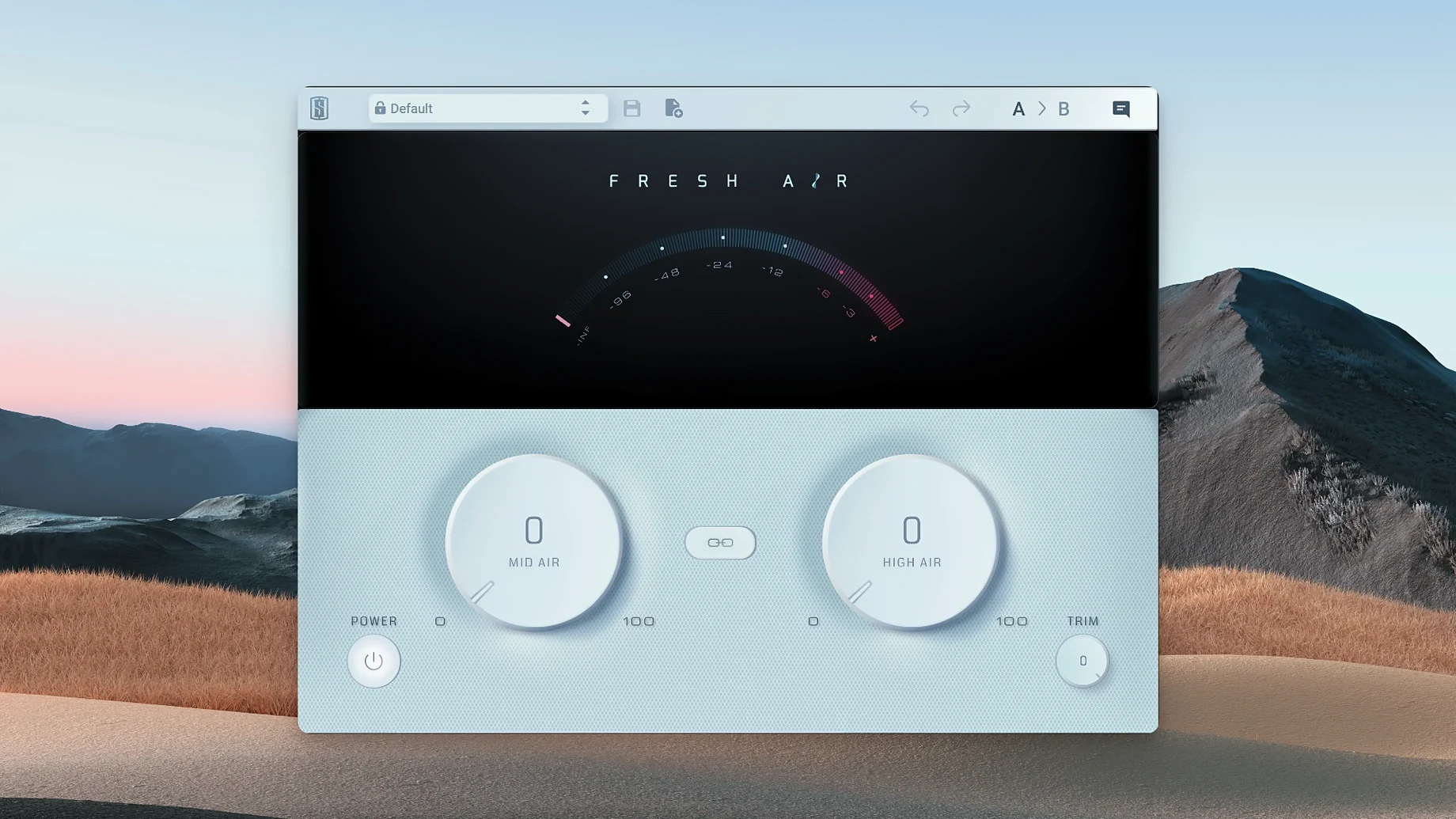
Mixes often lose their spark somewhere between the tracking session and the final bounce. High frequencies get buried, vocals lose their shine, and the whole thing sounds a bit closed in. Fresh Air is the plugin you reach for when the top end needs a lift without turning into harsh sibilance.
Brighten a Dull Vocal
Drop Fresh Air on a vocal track and start with the Mid Air knob. It adds presence in the upper mids, which is where intelligibility lives. The High Air control goes further up and adds that open, expensive-sounding shine.
Glue the Mix Bus
Fresh Air works on individual tracks, but it also earns its place on the mix bus. A small amount of High Air across the whole mix adds a consistent air that makes the master feel polished. The Trim control lets you match output level so the added brightness doesn't fool your ears into thinking it's louder.
Sit It Next to Your Other Tools
It fits the same slot as a gentle EQ shelf or an exciter, but with a simpler two-knob workflow. If your Mac already runs a standard set of mixing plugins, Fresh Air slots in without adding menu-diving complexity. Slate Digital calls it a dynamic high frequency processor, and that dynamic behavior is what keeps it musical.
Two-Knob Interface Trips People Up
The two-knob interface makes Fresh Air look simple, but a few things trip people up.
Too Much Harshness
This is the most common complaint. The fix is usually backing off both controls by about half and listening again. If it still sounds brittle, check that you are not already boosting the same frequencies with an EQ. Fresh Air works best when it is the only brightening element in the chain.
Level Jump When Bypassing
Fresh Air adds perceived loudness along with brightness. Use the Trim control to match the bypassed level. A quick A/B with the plugin bypassed and engaged will show if the level is shifting. Dial Trim down until the loudness stays consistent and only the tone changes.
Plugin Not Showing in Your DAW
After installing Fresh Air 1.0.9, your DAW may not see it right away. Restart the DAW first. If that does not work, check that your plugin scan folder includes the Slate Digital install location. Some DAWs need a manual rescan from the plugin manager.
iLok Activation Issues
Fresh Air uses iLok Cloud, iLok dongle, or machine activation. If the activation screen does not appear, make sure the iLok License Manager is installed and running. The k'ed version by GUISEPPE bypasses this entirely, so if you are using that build, no iLok is needed.
Pre-Install Questions Answered
Do I need other Slate Digital plugins to use Fresh Air?
No. Fresh Air works as a standalone plugin. Drop it on any track or bus in your session.
Runs in Any Major DAW
Fresh Air is a standard audio plugin. It loads in any major DAW that supports the format installed during setup. Users run it in Logic Pro, Ableton Live, Pro Tools, Cubase, and similar software without extra configuration.
Is this just an EQ?
No. An EQ shelf applies a static boost or cut. Fresh Air uses dynamic processing based on vintage exciter circuits. It reacts to the incoming signal, so quiet parts get a different treatment than loud parts. That is what keeps it from turning into a pile of sibilance.
Safe on the Master Bus with Low Settings
Yes. Slate Digital designed it for individual tracks and the mix bus. A light touch on the mix bus adds a consistent air across the whole mix. Start with both controls low and bring them up until the mix sounds open without being bright.
Workflow: Brightening a Dull Mix in Five Minutes
Here is a straightforward workflow for a mix that sounds closed in. This takes about five minutes once you know the controls.
- Set up a reference. Find a commercial mix that has the brightness you want. Bring it into your session on its own track. Level-match it to your mix.
- Insert Fresh Air on the mix bus. Put it last in the chain, after any compression or limiting.
- Start with Mid Air. Turn it up until the upper mids in your mix start to match the reference. This is usually around 10 to 2 o'clock on the knob.
- Add High Air. Bring it up slowly. Stop the moment the mix sounds open and airy. Going past that point adds harshness.
- Adjust Trim. Bypass the plugin, listen to the level, then engage it. Use Trim to match the volume so you are judging tone, not loudness.
- Check on headphones and monitors. What sounds good on headphones may be too bright on monitors. Listen on both before committing.
- Fine-tune per track. If the mix bus amount is working but the vocal still sounds dull, add a second instance of Fresh Air on the vocal track with a small amount of Mid Air only.
Beginners Overdo the Air Controls
Cranking Both Knobs to Max
This is the first thing everyone tries. It sounds exciting for about ten seconds, then it becomes fatiguing. Fresh Air is a subtle tool. The sweet spot is usually between 9 o'clock and 3 o'clock on each knob. More than that and you are probably overdoing it.
Using It as a Fix Instead of Polish
Fresh Air adds air and presence. It does not fix a bad recording or a muddy mix. If the source track is dull because of microphone placement or room tone, deal with that first. Fresh Air is the last step, not the first.
Forgetting to Check in Mono
Some exciter-type plugins cause phase issues that make the mix fall apart in mono. Fresh Air is designed to be mono-compatible, but it is worth checking. Switch your listening to mono after dialing in the amount. If the mix thins out, back off the High Air control.
Not Using the Link Button
The Link button ties Mid Air and High Air together so they move as one control. Beginners often ignore this button, then wonder why the two knobs fight each other. For a quick setup, engage Link and adjust the single combined control. You can always turn Link off later for finer tuning.
- macOS 11 or later
- Apple Silicon
- English interface
Questions I get about this line
Yes, Slate Digital lists Fresh Air as compatible with macOS 11 and Apple Silicon architecture.
Yes, Slate Digital says it can be used on individual tracks or on the mix bus.
The install order
- Run the installer and follow the on-screen prompts.
- Restart your DAW so it scans the newly installed plugin.