
- Home
- VST Plugins
- Slate Digital Murda Melodies
- Version
- 1.1.1
- Developer
- Slate Digital
- Languages
- English
- License type
- k'ed by GUISEPPE
| macOS range | macOS 11 or later |
|---|---|
| Chip | Apple Silicon |
| Download | 179 MB |
Screenshots
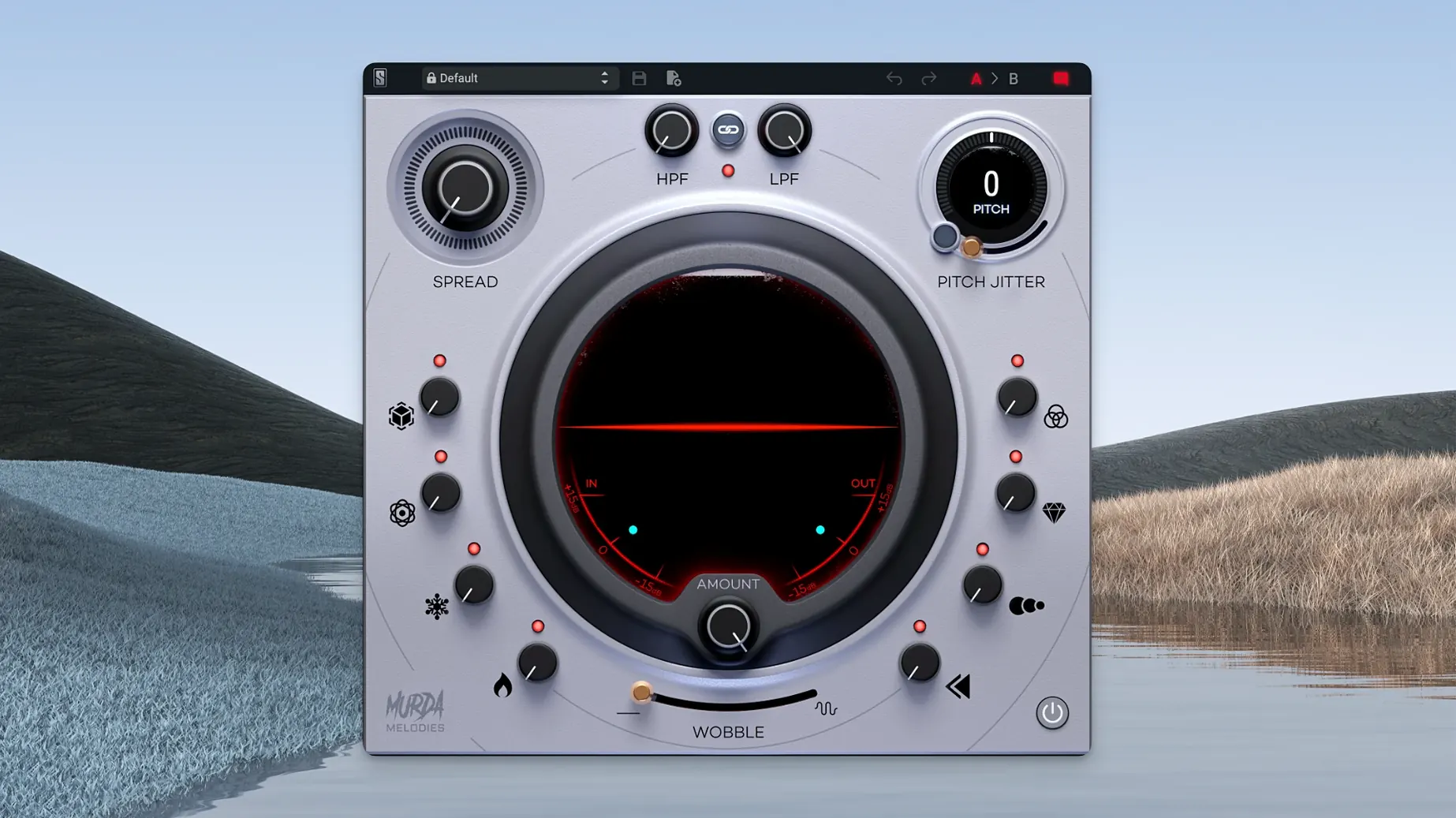
Eight effect controls, each with its own knob, sit inside one plugin built with Murda Beatz.
Multi-effects processor — Combines pitch shifting, filtering, and modulation in a single unit for reshaping melodies and sounds.
Analog-modeled filters — Low-pass and high-pass filters with a character derived from analog hardware.
Pitch shifter — Covers a 4-octave range for dramatic transposition or subtle detuning.
Pitch Jitter — Adds nonlinear artifacts for lo-fi, glitchy, or unstable textures.
Vinyl wobble — Emulates the pitch and volume instability of a record player.
Apple Silicon native — Version 1.0.8 added native support for M-series Macs.
Mono-to-Stereo Widener on Any Track
The Mono-to-stereo compatibility in AAX and AU formats (added in 1.0.8) means you can load the plugin on a mono track and still get a stereo output from the stereo widener. No need to bus the track out or use a workaround.
The default installation path fix from the same update saves you from hunting down orphaned plugin files. If you are reinstalling or moving to a new machine, the plugin now lands where your DAW expects it.
All more than 50 presets are browsable directly from the plugin window. You can audition them without opening a separate preset manager. The presets are split between those made by Murda Beatz and those by Slate Digital, so you can get a feel for different production workflows.
Cycle Presets on a Dry Aux Track
Start with a dry sound — a simple synth pad or a vocal phrase. Load Murda Melodies on an aux track and cycle through the presets to hear how the eight effect controls work together. Note which combinations you like.
Map the pitch shifter to a MIDI controller if your DAW allows it. The 4-octave range is easier to explore with a physical knob or slider than by clicking on-screen.
Try the Pitch Jitter control at low settings first. A little goes a long way for lo-fi texture. Crank it for aggressive glitch effects.
Use the vinyl wobble on a stereo track. It interacts with the stereo widener, so you can get a warbly, wide sound that still collapses to mono cleanly.
Fix Latency and Preset Mismatches
Plugin Does Not Show Up in DAW
Check that the installation placed the plugin files in your DAW's scan folder. If you are using an M-series Mac, confirm you downloaded the Apple Silicon version (1.0.8 or later). The Intel version will not load on Apple Silicon natively.
No Sound After Applying a Preset
Some presets use heavy filtering or reverse processing that can mute the output. Disable the analog-modeled low-pass and high-pass filters temporarily. If sound returns, adjust the filter cutoff frequencies or the mix knob for that effect.
Stereo Widener Sounds Off-Center
If your mix is collapsing to mono (e.g., for a broadcast or a club system), the stereo widener may sound phasey or thin. Disable the widener or use the mono-to-stereo compatibility feature to check the mono sum. The plugin's stereo image is designed for stereo playback, so plan your mix for the target format.
Pitch Jitter Creates Unwanted Artifacts
Lower the Pitch Jitter control or pair it with a high-pass filter to reduce low-end instability. The effect is meant to be nonlinear, but you can tame it with the analog-modeled filters for a more controlled result.
Vinyl Wobble Is Too Subtle or Too Extreme
The wobble interacts with the pitch shifter and modulation controls. If it sounds too subtle, increase the wobble depth. If it sounds too extreme, reduce the pitch shifter's range or turn down the modulation effect. There is no global depth control, so adjust each effect's knob individually.
- macOS 11 or later
- Apple Silicon
- English interface
Questions I get about this line
It is a multi-effects plugin for reshaping melodies and sounds. It combines eight effect controls, including filters, pitch shifting, and vinyl wobble, in one unit.
Yes. Version 1.0.8 added native Apple Silicon support, so it runs natively on M-series Macs.
It requires macOS 11 or later and works on Apple Silicon architecture.
The install order
- Run the installer package.
- Follow the on-screen prompts to complete the standard installation.