- Home
- VST Plugins
- Tone Projects Basslane Pro

- Version
- 1.0.7
- Developer
- Tone Projects
- Languages
- English
- License type
- k'ed by GUISEPPE
| macOS range | macOS 11 or later |
|---|---|
| Chip | Apple Silicon, Intel 64-bit |
| Download | 57 MB |
Screenshots
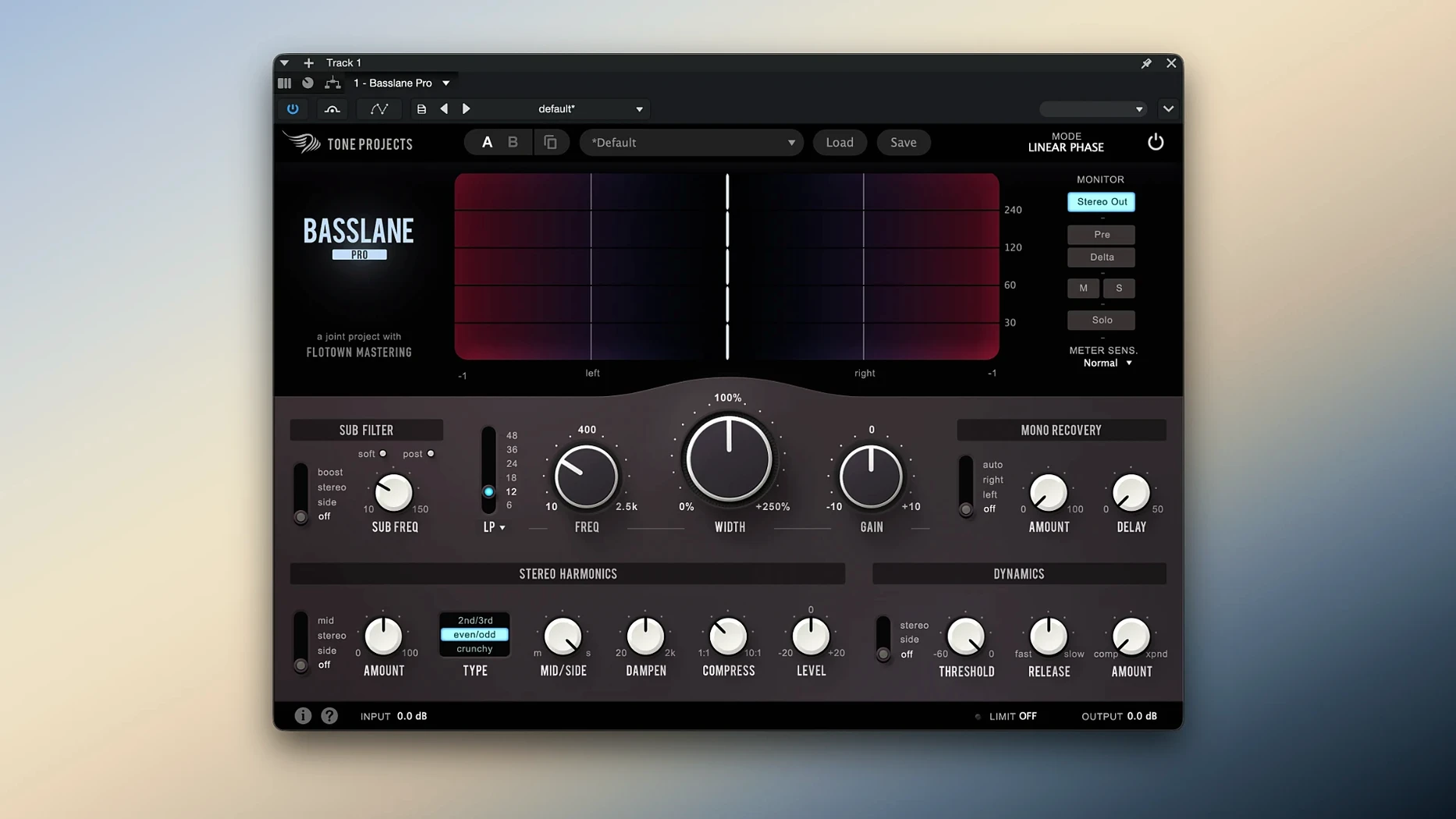
Wide stereo bass sounds great on headphones. On club speakers it turns into phase cancellation, weak low end. Basslane Pro fixes that. It controls the stereo width of low frequencies and shapes bass with high-fidelity linear-phase processing.
Linear-Phase Bass Width Control
Basslane Pro — plugin for controlling low-end stereo width and shaping bass. Uses linear-phase processing to keep phase coherent below the crossover frequency.
Stereo Harmonics — adds upper harmonics to the mono bass, so the low end stays full even on small speakers.
Basslane — freeware predecessor. Basslane Pro adds features like Stereo Harmonics and adjustable crossover slope.
Fixing a Low-End Width Problem in One Mix
Start with a single mix that has noticeable low-end width issues. Insert Basslane Pro on the master bus or a stereo bass bus. Adjust the crossover frequency to where your low end loses focus — usually between 80 and 150 Hz. Mono Recovery is the first control to try. It sums everything below the crossover to mono without changing the level. Listen for the low end becoming tighter and more centered. Next, experiment with the Width control. Narrowing by a few percent is common. Go too far and the mix sounds thin in the lows. Stereo Harmonics adds back energy that mono summing removes. Dial it in by ear until the bass feels present on small speakers.
Save presets for different source material. A rock bus and an electronic track need different crossover points and width amounts. The plugin remembers nothing between sessions. Build a few starting points to speed up recall.
Avoid Collapsing the Midrange with High Crossover
Setting the crossover too high. Narrowing everything above 100 Hz can collapse the midrange. Keep the crossover low, below 200 Hz at most. Another mistake is applying full mono recovery without checking low-end energy loss. Mono Recovery can thin the bass if the original stereo content was wide. Compensate with the Stereo Harmonics control or adjust the Width before summing.
Beginners also ignore the dynamics processing based on Unisum. It tightens the low end further by controlling transient and sustain separately. Skipping it leaves punch on the table. Apply it after setting mono and width. A light setting is enough. Too much makes the bass sound squashed.
Finally, installing without reading the included instructions. The package contains activation and setup notes specific to this build. Read them before opening your DAW. It saves time troubleshooting authorization.
First Days After Installing: What to Check
Open Basslane Pro on a familiar mix you know well. Load a preset that matches your genre and listen for ten seconds. Then bypass the plugin. The difference tells you if your room translation is off. If the bypassed low end sounds wider than the processed version, you are in the right range.
Set the crossover slope to 12 dB per octave first. It is the safest starting point for most material. Steeper slopes sound cleaner but can reveal artifacts in poorly recorded bass. Listen for pre-ringing on kick drums. If you hear it, back off the slope.
Check mono compatibility right away. Play your mix on a single speaker or collapse to mono in your DAW. If the bass disappears or shifts, Basslane Pro is doing its job. Adjust the Width control until the low end holds up in mono.
Save a project template with Basslane Pro inserted and bypassed. That way you can A/B quickly without hunting for the plugin in every new session. It is a small step that saves time across weeks of mixing.
Common Beginner Mistakes
Processing the low end before fixing the source. Basslane Pro cannot fix a badly recorded bass that is already phase-canceled. Fix the mic placement or DI routing first. The plugin polishes, it does not rebuild.
Using full Stereo Harmonics on every track. It adds upper harmonics that can clash with vocal or snare content. Apply it only on tracks that actually need the energy back. A light touch is better than drowning the mix in harmonics.
Ignoring the dynamics section. The Unisum-based dynamics processing is not just a gimmick. Set it to a low ratio and watch the low end tighten without losing weight. Beginners often leave it at default and wonder why the bass still sounds loose. Try it with a 1.5:1 ratio and a fast attack. It makes a difference.
Forgetting to check the output level. Narrowing the width can drop perceived loudness. Compare levels before and after processing. Adjust gain to match. Your ears will thank you when switching between tracks.
Yes, if you are on macOS 11 or later. It runs natively on both Intel 64-bit and Apple Silicon Macs. Interface is English.
- macOS 11 or later
- Intel 64-bit or Apple Silicon
The install order
- Open the downloaded package.
- Copy the plugin file to your usual VST, AU, or AAX folder.
- Follow the included instructions for activation.