- Home
- VST Plugins
- uJAM Virtual Guitarist SPARKLE 2

- Version
- 2.4.1
- Developer
- UJAM
- Languages
- English
- License type
- K'ed by MORiA
| macOS range | macOS 10.13 or later |
|---|---|
| Chip | Apple Silicon, Intel 64-bit |
| Download | 6.7 GB |
Screenshots
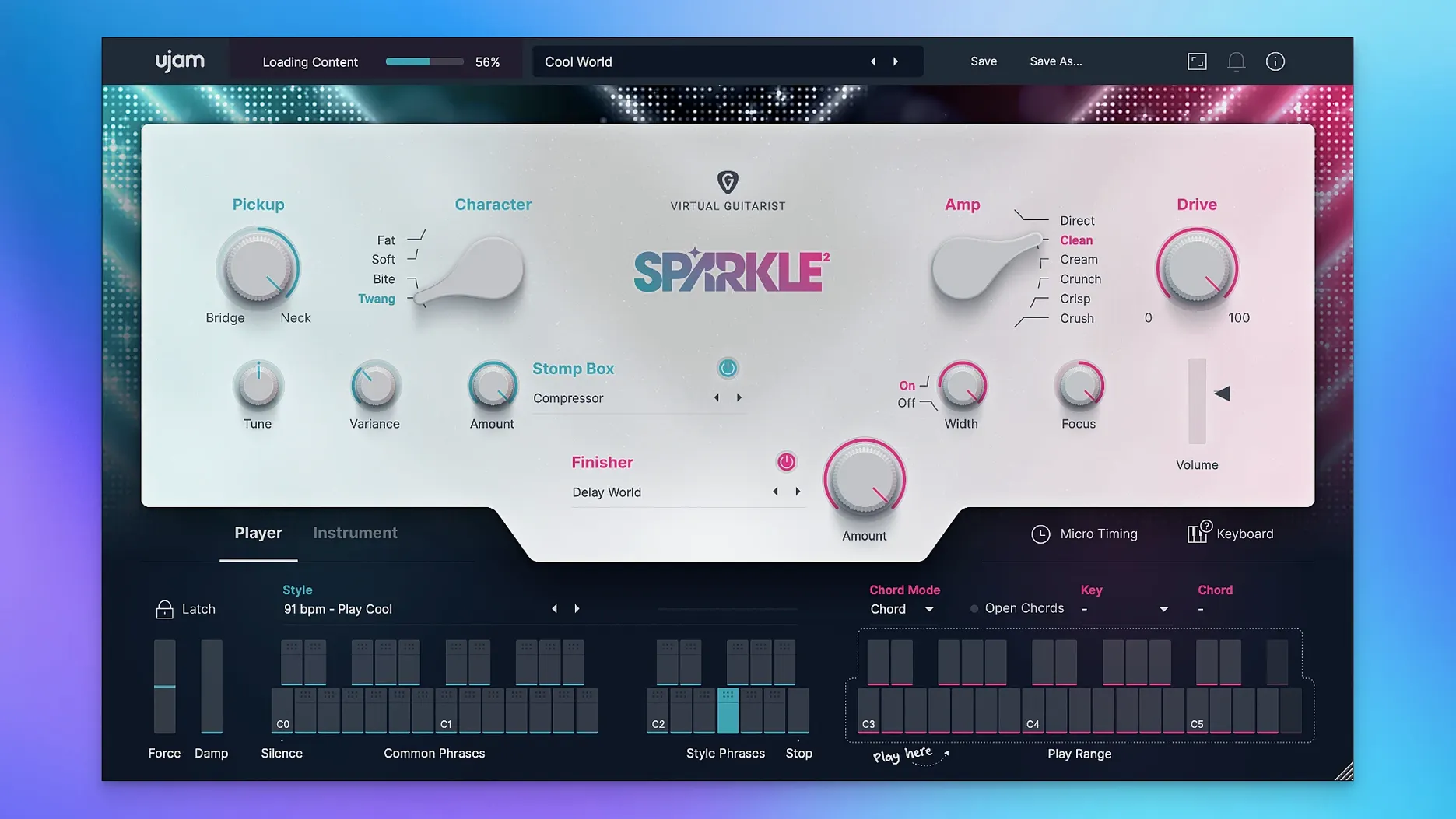
uJAM Virtual Guitarist SPARKLE 2 is a virtual instrument that delivers crisp, electric rhythm guitar performances with minimal effort. It is built for pop guitar parts — clean, bright, and tight — without needing to play a real instrument.
- Redesigned amps and cabinet section. The second-generation engine overhauls the amp models, giving you a range from clean and soft to denser and fuller tones.
- Stomp Box effects. Shape the sound further with drive, modulation, and time-based effects before the signal hits the amp.
- Finisher. A single macro control that layers multiple effects and processing chains to transform the guitar tone in one move.
- MIDI drag and drop. Drag phrases directly from the plug-in into your DAW as MIDI clips for full control over arrangement and editing.
- Newly recorded content. The phrase library was recorded fresh for version 2, covering a wide range of pop rhythm styles.
- Multiple format support. Works as VST3, VST2, AU 2, and AAX, so it fits into any modern DAW on macOS.
The controls are straightforward — pick a player style, adjust the Finisher, and let the built-in effects do the rest. It is a fast way to add live-sounding electric guitar to a mix.
Works with Logic, Ableton, Pro Tools, Cubase, and GarageBand
Yes, SPARKLE 2 works alongside any DAW that supports VST3, VST2, AU 2, or AAX. Logic Pro, Ableton Live, Pro Tools, Cubase, and GarageBand all work without extra setup. The plug-in appears in your instrument list as soon as it is installed and scanned.
It runs on both Intel and Apple Silicon Macs under macOS 10.13 or later. No Rosetta workarounds are needed. The installer detects your architecture automatically.
The MIDI drag-and-drop feature lets you pull phrases out of the plug-in and onto a DAW track as editable MIDI. That is useful when you want to tweak a part note by note or layer it with other instruments. The phrase stays intact, and you keep the original plug-in part for comparison.
Layers beneath vocals or lead synths in pop arrangements
Use SPARKLE 2 as a layer beneath a vocal or lead synth in a pop arrangement. It sits naturally in the mid-range. Pair it with a soft synth bass or a sampled drum kit for a full band feel without recording live players.
On macOS, the plug-in respects Audio Units routing, so you can load it in MainStage for live performance. The Finisher and Stomp Box effects respond to automation in your DAW, letting you change the tone mid-song without touching the interface.
If you use UJAM's other Virtual Guitarist plug-ins, the engine layout stays consistent. Switching between them takes minimal relearning. The MIDI drag-and-drop works the same across the whole series.
Common questions before installing SPARKLE 2
Does it replace a real guitarist? No. It gives you ready-to-use rhythm parts that sound like a real player, but it will not adapt to a live band's dynamics or write a solo for you. Think of it as a session player that follows your chord changes and stays in time.
Can I use my own guitar samples or recordings with it? No. SPARKLE 2 is a self-contained instrument with its own sample library. You cannot load external samples into it. What you can do is drag the MIDI phrases out and trigger your own guitar sampler if you want a different sound.
Will it work with my existing UJAM plug-ins? Yes. It uses the same engine as other second-generation Virtual Guitarist plug-ins. Installing SPARKLE 2 does not change or conflict with your existing UJAM products. Each plug-in keeps its own library and settings.
How much disk space does it need? The installer package contains the full sample library. The exact size depends on the content, but virtual instrument libraries of this type typically take a few gigabytes. Make sure you have enough free space before starting the installation.
How it fits with macOS features and other tools
On macOS, SPARKLE 2 works with Audio Units and Core Audio natively. That means latency compensation, multi-output routing, and audio unit presets all behave as expected. If you use Logic Pro's track stacks or Ableton's groups, the plug-in handles bus processing without glitches.
You can save your own presets using the host DAW's preset system or the plug-in's internal preset browser. The Finisher and Stomp Box settings are stored with each preset, so switching between a clean verse sound and a fuller chorus sound is a single click.
For producers who use multiple virtual instruments, SPARKLE 2 slots into a template easily. Load it on a track, set your input as a MIDI region or a chord track, and route the output to a bus with reverb or compression. The plug-in stays out of the way once it is set up.
- macOS 10.13 or later
- Intel or Apple Silicon processor
- Supported plugin host (VST3, VST2, AU 2, or AAX compatible)
- Interface language: English
Questions I get about this line
Yes. SPARKLE 2 runs natively on both Intel and Apple Silicon Macs (macOS 10.13 or later).
Yes. You can drag and drop MIDI phrases from the plug-in into your DAW and edit them as standard MIDI clips.
The install order
- Remove any previous version of SPARKLE 2 before installing the new version.
- Open the downloaded package and follow the included installation and activation instructions.