- Version
- 2026.10.0
- Developer
- 28 bit S.R.L.
- Languages
- English
- License type
- Included
| macOS range | macOS 14 or later |
|---|---|
| Chip | Apple Silicon, Intel 64-bit |
| Download | 15 MB |
Screenshots
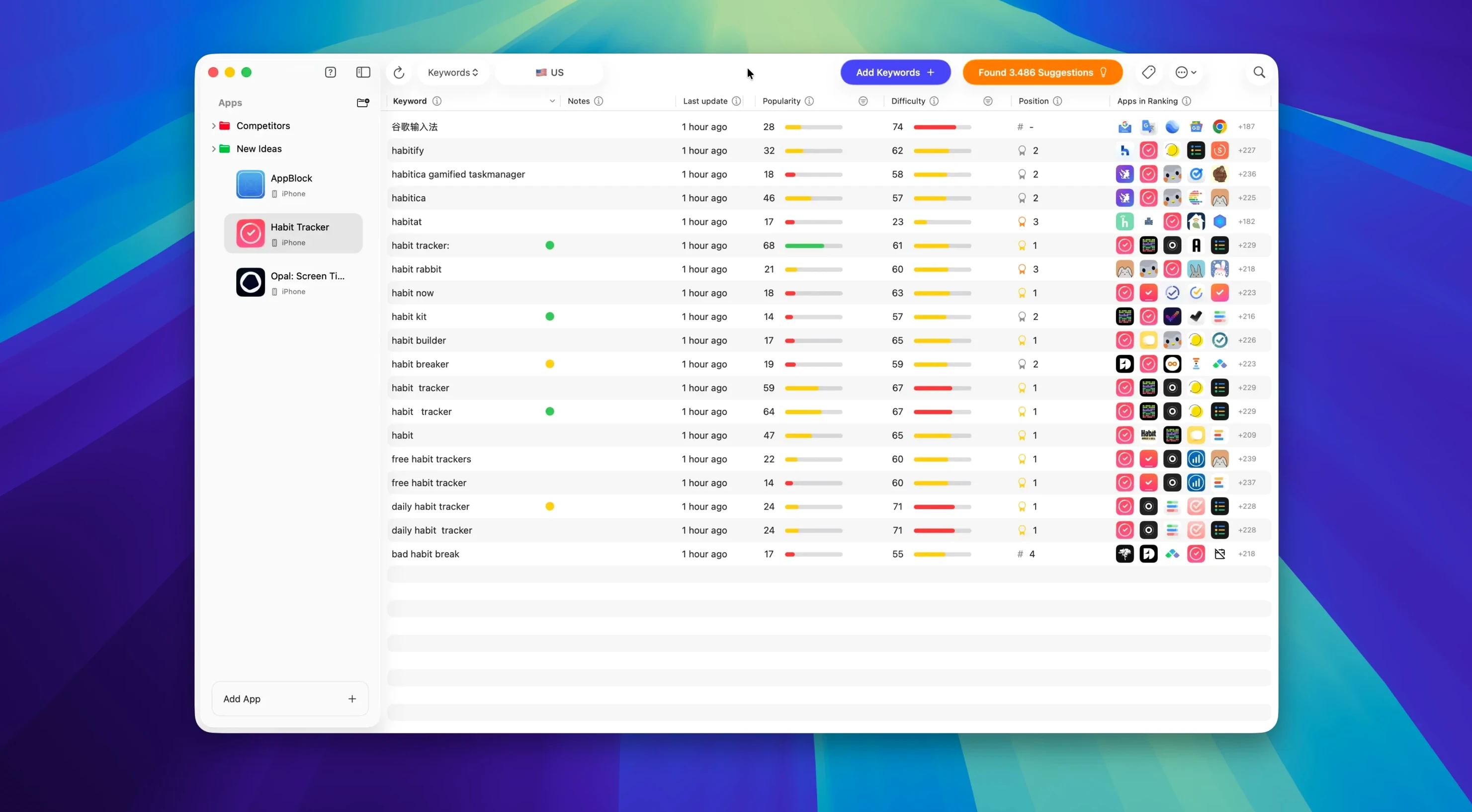
Astro runs on any Mac with macOS 14 or later, on both Intel and Apple Silicon. It pulls data straight from Apple Search Ads, so you are working with the same numbers Apple uses for ad placement.
What it tracks
The app updates keyword positions daily and gives you popularity metrics for each term. That combination tells you which keywords are worth chasing and which ones are already saturated.
Working with the data
Astro organizes keyword lists by store and by app. When you need to reuse research, you can copy keywords across stores or into another app entirely. Version 2026.10.0 adds keyword deletion in the MCP server, which simplifies housekeeping for large lists. The interface is English throughout.
Beginners often make a few predictable mistakes with keyword research work.
Copy keywords with regional checks
- Copying keywords without regional checks. A keyword that scores high in the U.S. store might sit unused in Japan or Germany. Always verify position data for each region you care about before copying a list.
- Ignoring difficulty metrics. Popularity alone is misleading. A keyword with high popularity and high difficulty means you are fighting entrenched competitors. Astro gives you both numbers; ignore difficulty and you waste effort on terms you cannot realistically rank for.
- Not cleaning up old keywords. Stale keyword lists accumulate fast. Use the MCP server delete function (added in 2026.10.0) to purge terms you no longer track. A clean list means daily updates reflect only the keywords that matter.
Using Astro without Search Ads
Do I need Apple Search Ads running to use Astro? No. The Search Ads data simply gives you extra signals if you have campaigns live.
Can I share keyword lists with a team member who uses a PC? The app runs only on macOS 14 or later. You can export your keyword research and share it as a file, but the teammate needs a Mac or an alternative tool to open and edit the lists natively.
Does it work on Intel Macs? Yes. Astro supports both ARM and x86 64-bit architectures. It runs on any Mac that meets the macOS 14 requirement.
Common mistakes beginners make
Even with good data in front of you, it is easy to fall into habits that reduce the tool's value. Here are the ones I see most often.
Tracking too many keywords at once
Astro updates positions daily. If you throw 500 keywords into a single list, you are not paying attention to any of them. Start with 20 to 30 terms per app. Expand only after you know which ones actually drive installs.
Ignoring position changes over time
A single daily snapshot tells you where a keyword sits today. The real signal is the trend. If a term dropped ten spots in a week, something changed. Astro shows position history so you can spot those shifts before you lose visibility entirely. Beginners look at today's rank and move on. That misses the story.
Skipping metadata optimization recommendations
Keyword research is only half the work. Astro gives optimization suggestions for your app metadata. A lot of people pull keyword lists and never apply them to their title, subtitle or description. That is where the ranking improvement actually happens. The tool points you at what to change; use it.
Questions people ask before installing
How long before I see results from keyword changes?
There is no fixed answer. Apple's algorithm re-evaluates metadata over days, not hours. Track the keywords in Astro and watch the daily updates. If nothing moves after two weeks, revisit your metadata choices.
Can I use Astro for apps in multiple regions at once?
Yes. The app covers 91 regions. You can set up separate keyword lists per store and copy keywords across them. That is useful when you localize an app and want to reuse proven terms with regional position checks first. Just remember to verify difficulty and popularity per region before committing.
Do I need an Apple Developer account?
No. You do not need a developer account to search keywords or view position data. If you want to link Search Ads data, you need an active Search Ads account, but the keyword research and tracking work without one.
- Keywords can be copied across stores or to another app
- MCP server now supports deleting keywords
- macOS 14 or later
- Apple Silicon or Intel
- Interface language: English
Questions I get about this line
Astro requires macOS 14 or later. It runs on both Intel and Apple Silicon Macs.
Keyword positions are updated daily, giving you a fresh view of where your app ranks each morning.
Astro analyzes data from Apple Search Ads and covers keyword information across 91 regions.
The install order
- Open the downloaded disk image
- Drag the app onto the Applications folder shortcut
- After the copy finishes, open the app from Launchpad