
- Version
- 2.1.6
- Developer
- Digitalanarchy
- Languages
- English
- License type
- K'ed by Monter Group
| Chip | Apple Silicon, Intel 64-bit |
|---|---|
| Download | 24 MB |
Screenshots
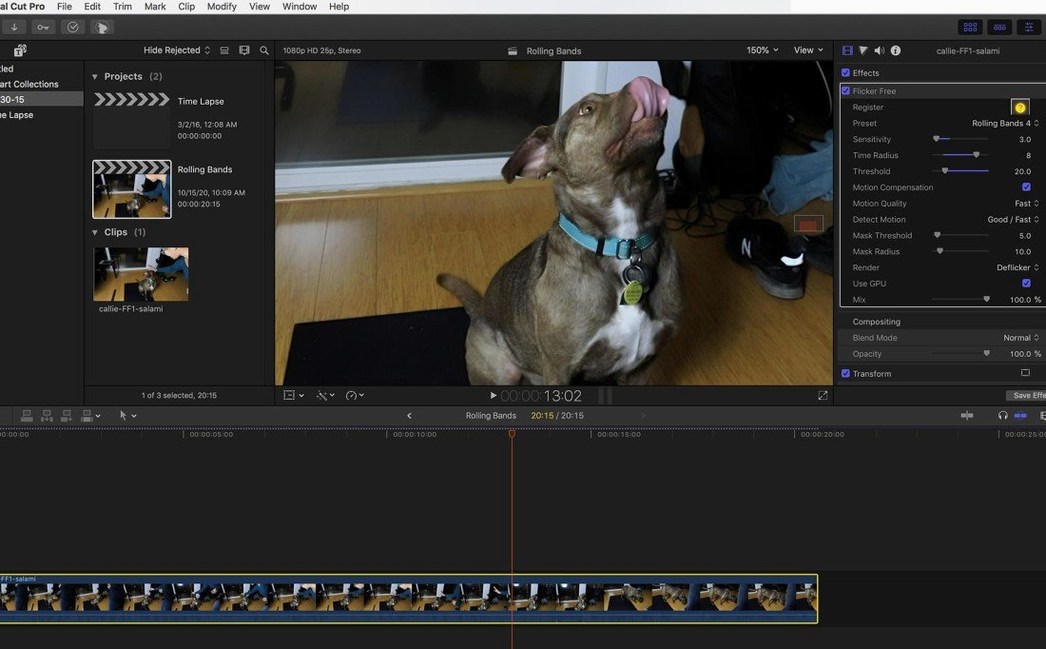
Editors working with high-frame-rate cameras like the Phantom Flex or Sony FS700U know the pain of rolling flicker from LED and fluorescent lights. Flicker Free, a plugin from Digital Anarchy, tackles that problem directly.
Test Before Committing
You apply it to a clip, then render a short test section to check the result before processing the whole timeline. That keeps the job moving without committing to a long render.
A typical session looks like this:
- Drop Flicker Free onto the clip with flicker.
- Render a 10-second test segment.
- Review the preview and tweak settings if needed.
- Run the full render once the test looks clean.
It works on the timeline as an effect, and it also handles time-lapse sequences where flicker shows up as a pulsing brightness. Flicker Free analyzes frames as it processes, so it adapts to the footage rather than applying a fixed filter.
Flicker Free suits a specific range of Mac users. Video editors who shoot time-lapse sunsets or city skylines get the most out of it — that pulsing brightness from changing daylight and artificial light is exactly what the plugin was built to handle. Motion graphics pros who layer computer-generated content over real footage also benefit; monitor flicker from screen captures disappears in a single pass. Post-production teams working with slow-motion clips from the GoPro HERO3 Black or similar cameras will find it useful because flicker becomes more noticeable when you stretch the timeline. If you are cutting a music video or a commercial lit with LED arrays, you are the target user.
Plugin Compatibility Guide
Does Flicker Free work with my NLE? Yes, it integrates as a plugin in Final Cut Pro, After Effects, Premiere Pro, Avid, DaVinci Resolve, and any app that supports OpenFX. The package includes install instructions for each host.
Will it slow down my MacBook Air? The plugin analyzes frames while processing, so a short test render is the best way to gauge performance on your hardware. A 10-second clip tells you everything before you queue up a long export.
Do I need to adjust it for every clip? Not necessarily. The presets cover common flicker sources: fluorescent, LED, monitor, and time-lapse. Start with one preset, render a test, and only tweak if the result looks off.
Can I use it on already-graded footage? Yes. Flicker Free processes the video data regardless of color grading, so you can apply it before or after your color pass.
Fixing 50 Hz Fluorescent Flicker
You have a time-lapse sequence shot over an hour in a warehouse lit by fluorescent tubes. Every third frame pulses brighter than the rest — standard 50 Hz flicker from the ballasts. You bring the clip into your timeline, drop Flicker Free onto it, and pick the fluorescent preset from the plugin menu. Then you render a 10-second chunk near the middle of the sequence where the flicker is worst. The preview comes back clean: no pulsing, no brightness shift. You let the full render run and move on to the next clip in the bin.
Later that day, a client sends slow-motion footage from a Phantom Flex shot under LED stage lights. The rolling flicker looks like waves moving up the frame. You apply Flicker Free, pick the LED preset, test a short section, and see the waves gone. The render finishes in about the same time as the test suggested. No re-do, no wasted export.
That is the workflow Flicker Free is built for: quick test, verify, then commit. It keeps flicker from eating into your edit time.
- macOS (version not specified)
- Intel or Apple Silicon
- Interface language: English
Questions I get about this line
It removes rolling flicker from fluorescent and LED lamps, plus flicker caused by unsynchronized cameras in high-frame-rate or time-lapse footage.
Yes, you can apply the plugin and render a short test segment to preview the result before processing the full video.
It works with footage from cameras like the Phantom Flex, Sony FS700U, and GoPro HERO3 Black, among others.
The install order
- Run the included installer.
- Follow the activation instructions provided.