- Version
- 1.12.1
- Developer
- Binary Fruit
- Languages
- English
- License type
- Included
| macOS range | OS X 10.9 or later |
|---|---|
| Chip | Apple Silicon, Intel 64-bit |
| Download | 30 MB |
Screenshots
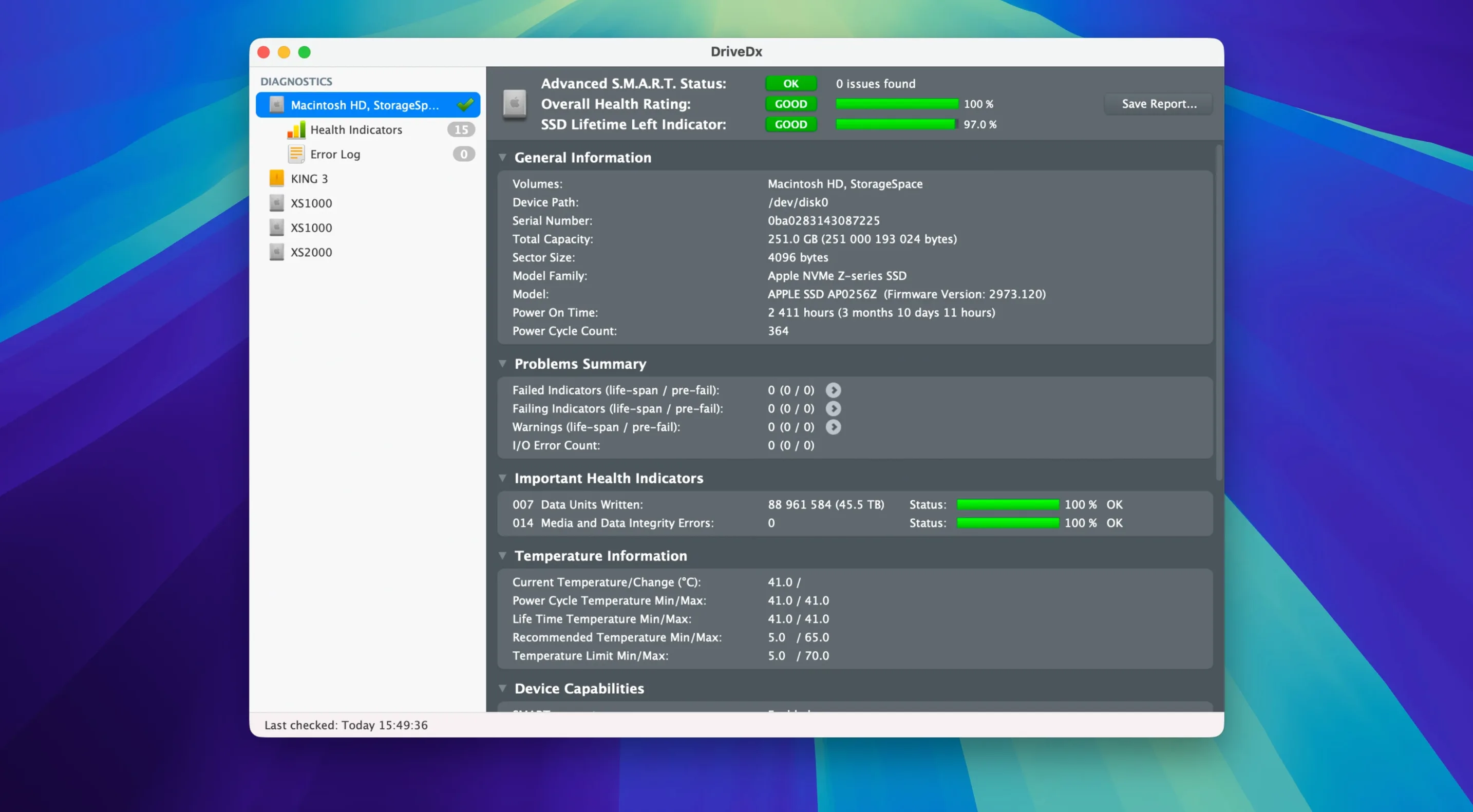
You already know the built-in Disk Utility can check a drive’s S.M.A.R.T. status, but it only gives you a pass/fail verdict. DriveDx goes further, showing you the raw health data behind that status and using heuristic algorithms to predict failures before they happen.
It is a third-party diagnostic and monitoring utility for hard disk drives and solid-state drives. You can run it in the background, and it periodically checks drive status, so you get a warning when something looks off rather than finding out when the drive dies.
DriveDx is built for Mac users who manage their own hardware, whether that is a single MacBook or a fleet of machines. It requires macOS 10.9 or later and runs on both Intel and Apple Silicon Macs.
The current version, 1.12.1, is a maintenance release that adds macOS Sonoma support and drops the Rosetta 2 requirement from the driver installer. It also improves the diagnostic algorithms and heuristics, plus support for Patriot P200 SSDs.
SMART Check Workflow
Here is a typical routine if you have a drive you are not sure about.
- Open DriveDx from Launchpad. The main window lists every internal and external drive connected to your Mac.
- Select the drive you want to inspect. DriveDx immediately reads the S.M.A.R.T. data and shows the overall health state: OK, warning, or failing. The status label uses the heuristic algorithms, not just the raw S.M.A.R.T. pass/fail.
- Read the attribute table. You see rows for SSD wear, reallocated sectors, pending bad sectors, and I/O errors. Each value is color-coded: green for normal, yellow for borderline, red for critical.
- Run a self-test. Click the button for a short test or a full test. The short test finishes in a minute or two and checks the drive's electronics and firmware. The full test takes longer and reads every sector. DriveDx reports the result when the test completes.
- Schedule background monitoring. Leave DriveDx running and it checks the drive at set intervals. If a threshold is crossed, it sends you a notification. You do not have to watch the window.
This workflow helps you catch problems early, especially on drives with pending bad sectors or high SSD wear counts.
Warning and Failing States Buy Backup Time
DriveDx supports warning and failing health states in addition to OK and failed. That is useful because many drives degrade slowly. A warning state gives you time to back up and replace the drive before data loss. The failing state is the next step, where the drive is likely to fail soon.
The notification system works with the background checks. You get an alert when a drive changes state. You do not need to leave the app in the foreground or check it manually.
Another subtle feature is the support for Patriot P200 SSDs. That specific model got improved detection in version 1.12.1, meaning the algorithms now read and interpret its S.M.A.R.T. data correctly. If you own one of those drives, you get accurate wear and health readings rather than empty or confusing values.
The driver installer no longer requires Rosetta 2 on Apple Silicon Macs. That means the installation is faster and uses less system overhead. It is purely a convenience, but it matters if you manage many machines.
Scenario: A System Administrator Checking Rented Macs
Alice manages a small production studio that rents out iMacs to video editors. She has ten machines, each with an internal SSD and two external drives for project storage. Drives fail under heavy write loads, and she cannot afford an editor losing a day of work.
She installs DriveDx on every Mac. She opens the app once per machine, checks the SSD wear and reallocated sectors, then leaves it running in the background. The periodic checks and notifications mean she gets an email alert when a drive hits a warning state. She then swaps that machine out before the drive fails. The full self-test is also useful before renting a machine out: she runs it during prep to confirm the drive is in good shape.
This is not a one-time diagnosis. It is ongoing monitoring. DriveDx running in the background gives her a heads-up rather than a surprise failure call from a client.
- Maintenance release.
- Ready for macOS Sonoma.
- Driver installer no longer requires Rosetta 2.
- Improved drive diagnostic algorithms and heuristics.
- Improved support for Patriot P200 SSDs.
- macOS 10.9 Mavericks or later
- Architecture: both Intel and Apple Silicon
- Interface language: English
Questions I get about this line
Yes, DriveDx runs on macOS 10.9 Mavericks or later, so it covers most Macs from 2013 onward.
It uses heuristic algorithms to analyze drive health data and predict potential failures before they occur.
The install order
- Open the downloaded disk image.
- Drag the app to the Applications folder alias.
- After copying finishes, launch it from Launchpad.