- Version
- 1.8
- Developer
- Aviorrok
- Languages
- Russian, English, German, Hebrew, Spanish, Italian, Chinese (Simplified), Korean, Portuguese, Slovak, Turkish, French, Japanese
- License type
- Not required
| macOS range | macOS 11 or later |
|---|---|
| Chip | Apple Silicon, Intel 64-bit |
| Download | 115 MB |
Screenshots
Scroll the row, it snaps to each screenshot. Click one to see it wider.
DynamicLake Pro runs on any Mac with macOS 11 or later, Intel or Apple Silicon. It layers Dynamic Island-style elements onto your desktop, so you get a modern notification and widget hub without upgrading hardware.
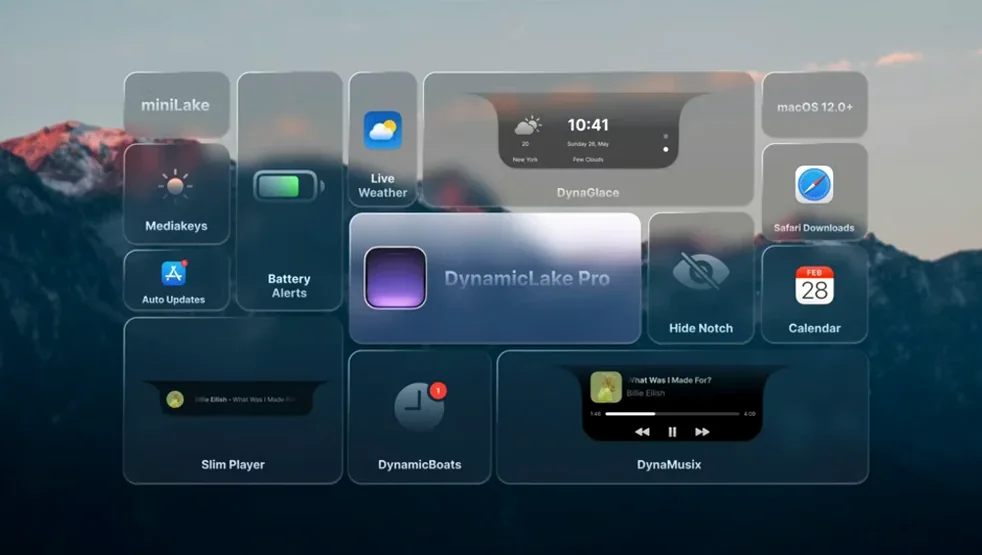
Quick app switching, widgets, and Bluetooth alerts
- Quick app switching with a dedicated switcher.
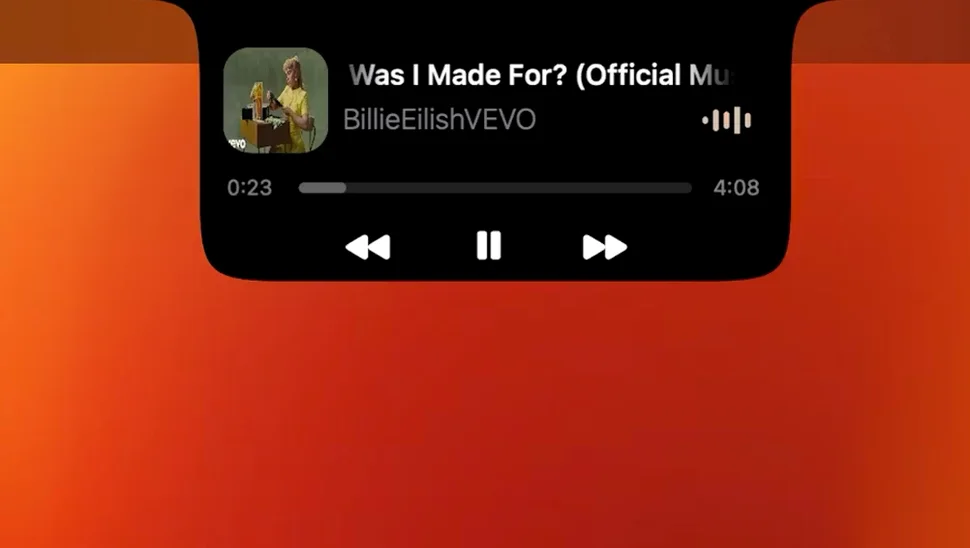
- Music, weather, and calendar widgets at a glance.
- Bluetooth connect/disconnect alerts via DynaConnect.
- Timers from the macOS Clock app showing up automatically.
- A compact miniLake format for the core functions.
Runs on macOS 11+, Intel and Apple Silicon
- Requires macOS 11 or later; works on both Intel and Apple Silicon.
- Interface is localized in 13 languages, including English, Russian, German, and Japanese.
- Version 1.8 is the current release.
Position the bar and test Option+Tab cycling
When you first launch DynamicLake Pro, it will place its widget bar on your screen. Move it where you want — it remembers the position. Start with DynaSwitcher: press Option+Tab to cycle open apps. You will notice it skips windows you closed, which saves a tab or two. Give DynaMusic a try with your default player; the animation triggers when a track starts. For weather, let the app find your location once, and it updates in the background.
Open the macOS Clock app and set a timer. DynamicLake picks it up without any extra setup. That is useful if you cook or need a screen timer that stays visible on the desktop. Set a few calendar events, and DynaGlance will show the next one. No calendar to use? The weather widget alone gives you a reason to keep the bar up.
After a few hours, adjust the app's position if it covers something. The miniLake option strips the bar down to core widgets only, good for a 13-inch screen. Enable DynaConnect if you use Bluetooth headphones or a keyboard — it alerts you on connect and disconnect. That stops you wondering why sound dropped.
Widget bar vs. three macOS rivals
There are a few other apps that add widgets or a notification panel to macOS. Here is how DynamicLake Pro stacks up against three of them.
Bartender
Bartender puts a menu bar calendar and weather icon up top. It is minimal and stays out of your way. DynamicLake Pro does more: it adds a full switcher, music controls with animation, and Bluetooth alerts. Bartender is lighter but does not give you the same glanceable hub. If you only want weather in the menu bar, Bartender is fine. If you want music, timers, and app switching on screen, DynamicLake Pro wins.
Horo
Horo is a timer and stopwatch app that puts a widget on your desktop. It handles timers well. DynamicLake Pro also shows timers from the macOS Clock app automatically, but it does not have its own timer creation. Horo is a dedicated tool; DynamicLake Pro is a broader hub that includes timer visibility as one feature among many. Use Horo if you live in the stopwatch. Use DynamicLake Pro if you want the timer alongside everything else.
Mactracker
Mactracker gives you an app launcher and a few widgets. It focuses on launching apps by category. DynamicLake Pro includes DynaSwitcher, which switches between running apps rather than launching from a list. Mactracker is better for organizing your software library. DynamicLake Pro is better for moving quickly between active windows and seeing notifications.
None of these replace the Dynamic Island-style bar that DynamicLake Pro provides. They solve one or two problems. DynamicLake Pro tries to solve several at once.
DynaConnect Bluetooth pairing alerts
Some features do not get as much attention as the big widgets. They are worth knowing about.
- DynaConnect alerts — Bluetooth pairing and disconnection trigger a small notification. Useful if you share a Mac with others and want to know when a device drops off.
- Automatic calendar alerts — DynaGlance shows your next event without you opening a calendar app. The alert appears at the time set in macOS Calendar.
- They extend the notification system beyond what the default macOS offers, giving you a single place for system-level alerts.
- Audio and video conversion — A feature mentioned in the official list. You can convert media files from within the app rather than opening a separate tool.
- DynaKeys — Adjust volume, brightness, and keyboard backlight without digging into System Settings. The controls appear on the widget bar.
- miniLake format — Switches the bar to a smaller footprint that keeps core widgets. Good for multitasking without losing visibility of time, weather, and music.
- Meeting alerts — If your calendar has a meeting with a zoom link or a location, DynamicLake Pro shows the meeting name and time in a notification.
These are not headline features. They are the kind of details that make the app stick after a week of use.
No activation required, drag to Applications
DynamicLake Pro runs on macOS 11 or later. Your machine can be Intel 64-bit or Apple Silicon — both architectures are supported. The app does not require activation. After copying it to Applications and launching from Launchpad, it will place the widget bar on your desktop. Expect the bar to stay on top of most windows unless minimized. It takes up a slice of screen real estate on the side you choose.
The app uses your existing macOS settings for language. It supports 13 languages, so if your system language is one of them, the interface should match. If not, you can switch manually. The widgets pull data from your system calendar, weather source, and music player without extra sign-ins. No accounts are required.
You can quit the app from its menu. It does not add a startup item automatically, but you can add it yourself if you want the bar every boot. The app's disk image is a few megabytes. Once installed, it runs as a background process with a visible window. The miniLake mode reduces the visible footprint without quitting the app.
- macOS 11 or later
- Intel or Apple Silicon
The install order
- Open the downloaded disk image.
- Drag the app into the Applications folder alias.
- After copying finishes, launch the app from Launchpad.