Free download (9 MB) Previous versions
- Version
- 1.4
- Developer
- vesslo
- Languages
- English, German, Korean
- License type
- Not required
| macOS range | macOS 12 or later |
|---|---|
| Chip | Apple Silicon, Intel 64-bit |
| Download | 9 MB |
| Previous versions | 1 on file |
Screenshots
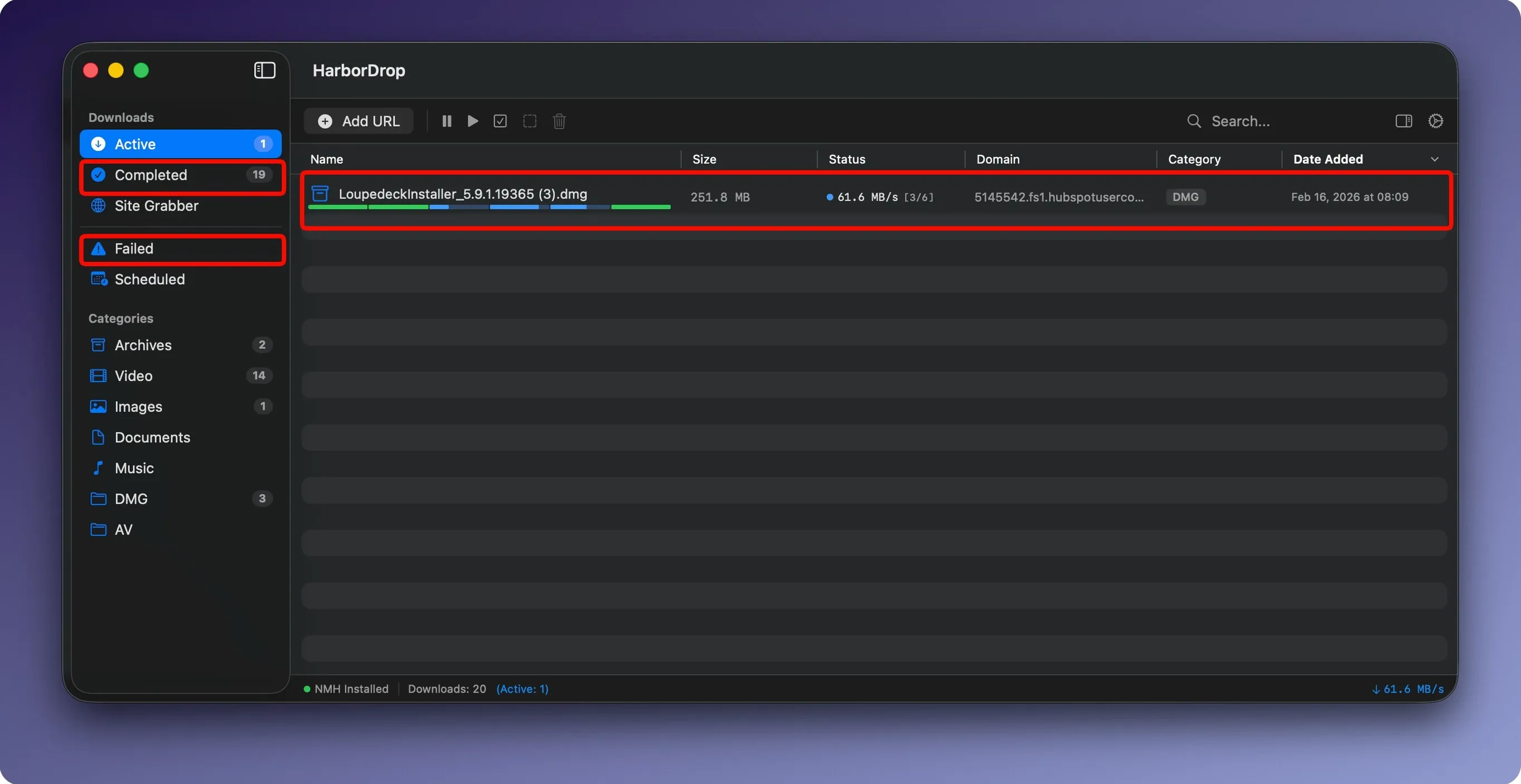
You're on a page with a dozen high-res images you need for a client presentation. Clicking each one separately in Safari takes forever. With HarborDrop, you grab them all at once. The browser extension intercepts the file links and sends them to the app, which splits each download into up to 6 segments and pulls them in parallel. The whole batch lands in your Downloads folder in a fraction of the time.
Once the files are down, HarborDrop can run a Shell script or JavaScript to rename, move, or process them automatically. Set it once, and every download from that site gets sorted by domain or file type without you touching a thing. Media links go straight to HarborDrop too, so video files don't stall the browser.
The extension works in Chrome, Edge, Firefox, and Arc. The app itself runs on macOS 12 or later, on both Intel and Apple Silicon. English, German, and Korean interfaces are built in.
Reduce segments to 3 when downloads stall
New users often skip configuring the segment count. HarborDrop defaults to 6 segments, which works for most connections, but some servers throttle when they see too many parallel requests. If a download stalls or slows down, reduce segments to 3 or 4 in the app’s settings. The reverse is also true: on a fast connection with a cooperative server, increasing segments can speed things up.
Another mistake is not checking the browser extension after installation. The extension icon shows a small badge when HarborDrop is active. If the badge isn’t there, right-click the icon and confirm it’s set to intercept links. Otherwise, you’re still downloading through the browser.
People also forget to configure post-download actions early. Setting up a Shell script to rename files or move them to a project folder is easy, but if you add it after a batch of downloads finishes, you have to process those files manually. Define your automation rules before the first big download session.
Lastly, the Site Grabber crawl depth defaults to 1. Beginners sometimes set it to 3 or 4 without thinking, which pulls in hundreds of unrelated files from a page. Start at depth 1 and increase only if you need nested links.
For designers and video editors with large assets
Designers and video editors who regularly handle large assets — PSDs, TIFFs, 4K clips — benefit the most. These files often come from shared link pages or cloud storage sites, and browser downloads time out or fail. HarborDrop’s segmented downloading handles the size, and the Finder integration opens the file’s folder immediately, so you can start editing right away.
Developers also gain a lot. Running JavaScript or AppleScript after a download lets you automate decompression, validation, or ingestion into a local toolchain. If you’re pulling daily database dumps or build artifacts, you can have HarborDrop unpack and verify them without manual steps.
Anyone who saves HLS streams for offline viewing — training videos, conference recordings, archived webinars — will find the m3u8 support the main reason to install it. The app handles the playlist and saves the file as a single video, not a folder of fragments.
Sample workflow: grab a batch of assets for a mockup
- Open Chrome and navigate to a page with 15 product images in high resolution.
- The HarborDrop extension icon turns active. Right-click any image and choose "Send to HarborDrop." The extension captures all visible file links on the page.
- In the app, the Site Grabber window appears with the URL pre-filled. Set crawl depth to 1 and filter by file type (e.g., .jpg, .png).
- Start the grab. HarborDrop splits each image into segments and downloads them in parallel. A progress bar shows each file.
- When the batch finishes, HarborDrop opens the folder in Finder. The images are sorted by domain name because you set that sorting rule earlier.
- Drag the images into your mockup tool. The whole process, from clicking the first link to having files ready, takes a fraction of the time a browser would need.
It's a straightforward tool for anyone who downloads a lot and wants the process to be faster and less manual.
- macOS 12 or later
- Intel or Apple Silicon
- Activation not required
The install order
- Open the downloaded disk image.
- Drag HarborDrop to the Applications folder.
- Launch it from Launchpad after the copy finishes.