
Free download (39 MB) Previous versions
- Version
- 6.5
- Developer
- Objective Development
- Languages
- English, German
- License type
- Included
| macOS range | macOS 14 or later |
|---|---|
| Chip | Apple Silicon, Intel 64-bit |
| Download | 39 MB |
| Previous versions | 9 on file |
Screenshots
Scroll the row, it snaps to each screenshot. Click one to see it wider.
Little Snitch is a macOS network monitor and application firewall that puts you in control of every connection your Mac makes.
See which apps phone home and block them
- Anyone who wants to see which apps are phoning home and block the ones that shouldn't.
- IT folks managing Macs in a small business who need per-app network policy.
- Privacy-minded users who want to know exactly where their data goes.
- People testing software who need to stop unexpected background traffic.
Intercept connections and spot odd traffic on a world map
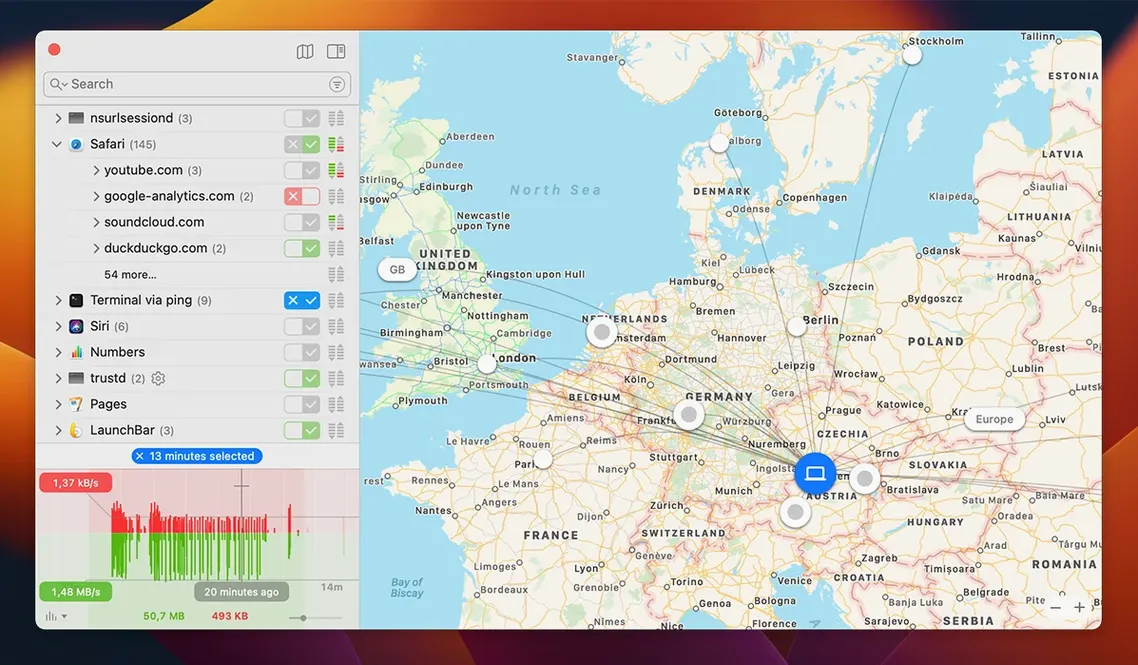
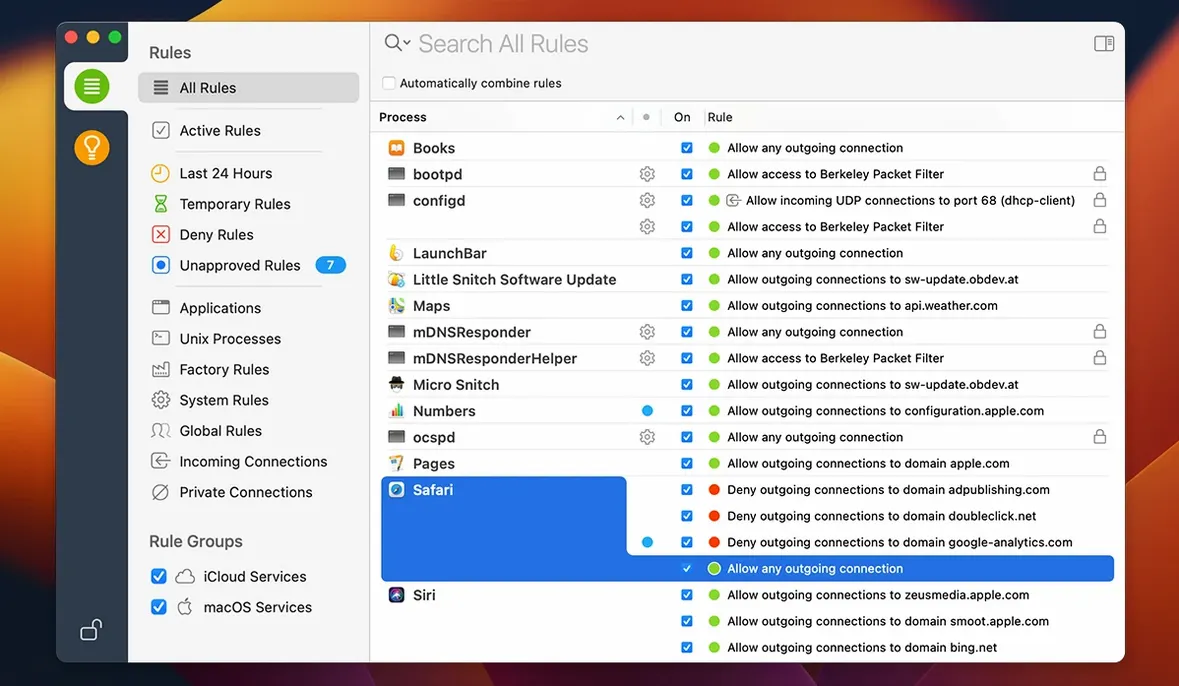
Little Snitch intercepts each connection attempt and lets you allow or deny it. The interactive world map shows where those servers live, so you can spot odd traffic at a glance. Quiet Mode postpones alerts when you don't want interruptions, and the Network Monitor gives you a live view of activity. Version 6.5 improves encrypted DNS handling and adds an experimental NAT64 implementation, plus compatibility with macOS 27 Golden Gate.
Expect a burst of alerts as it learns your normal patterns
Little Snitch starts learning your normal traffic patterns the moment it is running. Expect a burst of alerts in the first few hours as apps you haven't thought about in years try to reach their update servers. That is normal.
What to do early on
- Set aside 30 minutes for the initial alert barrage. Open the apps you actually use — browser, mail client, chat, office suite — and approve the connections you recognize. Deny anything that looks unfamiliar or belongs to an app you removed last year.
- Use the temporary rule option for the first few days. That way you can revisit a decision later without hunting through the rule list.
- Check the Suggestions panel once a day during the first week. Expired temporary rules land there, and so do connection attempts from apps you might have forgotten about.
- Turn on Quiet Mode during work hours if you are in a help-desk or coding flow. Review the backlog at the end of the day.
- Keep the world map open in a corner of the screen for a couple of days. You will start recognizing the normal server locations for your daily apps, which makes the odd ones stand out immediately.
System admins and privacy-focused users benefit most
Little Snitch is useful for almost any Mac owner, but some types of user benefit more than others.
- System administrators managing a handful of Macs in a clinic or small office. They can set baseline rules once and deploy the same configuration across machines. The command-line interface helps script updates without touching every computer.
- Privacy-focused users who dislike the idea of apps sending telemetry without a say-so. Little Snitch gives them a per-connection veto, not just a global on-off switch.
- Software testers and developers who need to verify that an application does not call out during a test run. They can deny or monitor traffic for a specific app without blocking everything else.
- Anyone troubleshooting a slow or suspicious network issue. The Network Monitor shows which apps are using bandwidth, and the hourly traffic history helps spot patterns that might point to a misbehaving process.
- IT generalists who support mixed environments. Because Little Snitch runs on both Intel and Apple Silicon Macs, one tool covers the whole fleet.
macOS 27 Golden Gate support and daily workflow changes
Version 6.5 (build 7303) does not turn the interface upside down, but a few changes affect daily workflow.
- macOS 27 Golden Gate support means you can run Little Snitch on the latest macOS without waiting for a compatibility update. That alone saves a day of re-testing rules after an OS upgrade.
- App bundle integrity monitoring now checks that a running application has not been modified since you approved its rule. If an update changes the binary, Little Snitch re-prompts instead of silently trusting the old rule. This cuts down on rule creep where a patched app starts doing something different but keeps its old permission.
- Encrypted DNS handling is better. Earlier versions could interfere with DNS-over-HTTPS and DNS-over-TLS setups. Version 6.5 handles those flows more cleanly, so users who run encrypted DNS see fewer false-positive alerts about their own resolver.
- NAT64 support (experimental) matters mostly if you run IPv6-only networks at home or in a lab. For the rest, it is a future-proofing step that does not change day-to-day behavior.
- Label change from traffic amount to traffic volume is purely cosmetic and made the interface slightly clearer for non-technical users.
- Two bug fixes that remove small annoyances: the exact-match search in the rules list no longer crashes, and expired temporary rules actually appear under Suggestions > Expired instead of vanishing into a void.
Installation note
Remove any previous version before installing 6.5. The new filtering engine does not share data structures with the old kernel-extension approach, so a clean install avoids conflicts. Follow the included activation instructions to get going.
- Adds compatibility with macOS 27 Golden Gate.
- Monitors app bundle integrity while running.
- Adds an experimental NAT64 implementation.
- Improves encrypted DNS handling.
- macOS 14 or later
- Intel or Apple Silicon
- Languages: English, German
Questions I get about this line
Yes, Little Snitch 6.5 runs on both Intel and Apple Silicon Macs, requiring macOS 14 or later.
The install order
- Remove the previous version before installing the new one.
- Follow the included installation and activation instructions.