- Home
- VST Plugins
- Tone Empire La Crème 3
- Version
- 1.0.3
- Developer
- Tone Empire
- Languages
- English
- License type
- K'ed by MORiA
| macOS range | macOS 10.13 or later |
|---|---|
| Chip | Apple Silicon, Intel 64-bit |
| Download | 197 MB |
Screenshots
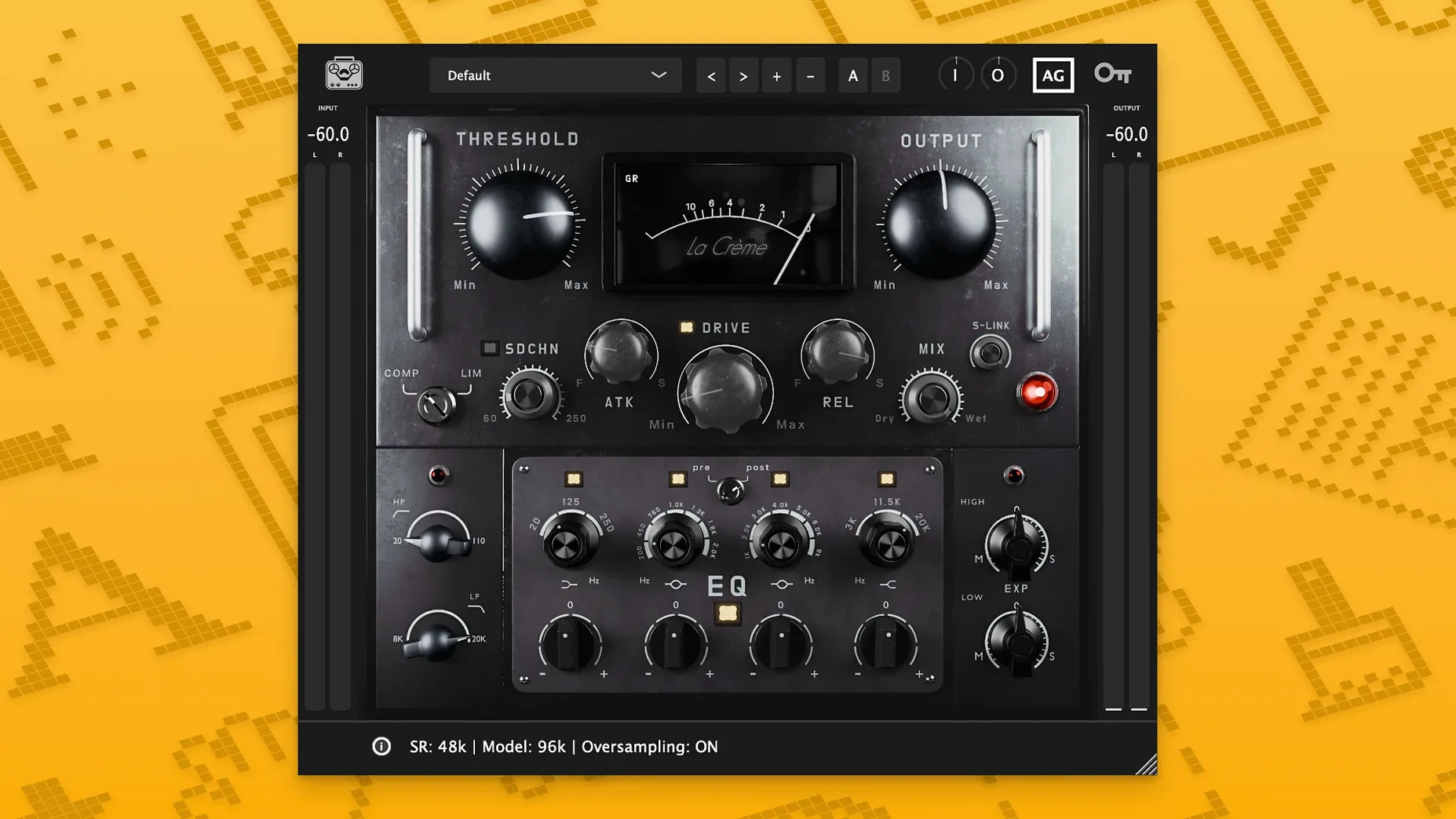
The latest update to Tone Empire La Crème 3 keeps the same straightforward channel-strip layout but refines the core processing. If you're new to this plugin, here's where to start.
Begin with the Vari-Mu compressor. It's the heart of the strip — set a moderate ratio and let the input drive the gain reduction. The auto oversampling keeps the high end smooth even when you push it.
Next, shape with the 4-band parametric EQ. Cut before you boost; the filters are clean and musical. Finally, try the stereo expansion on a mix bus — a little width goes a long way.
The Neural LSTM technology in the background adds a subtle glue that's hard to describe but easy to hear. Run through a preset, tweak the compressor, and you'll get the idea quickly.
Workflow: Vocal Bus from Clean to Finished
Route your lead vocal group to a bus with La Crème 3 inserted as the only processor.
- Start with the compressor section. Use a 2:1 ratio and gradually increase input trim until you see 3-4 dB of gain reduction on the loudest phrases. Engage the high-pass sidechain filter at around 120 Hz to keep the compressor from pumping on low-frequency breath noise.
- Switch to the 4-band EQ. Pull a narrow cut around 300 Hz to remove boxiness from the vocal. Add a gentle shelf at 8 kHz to bring out presence. The LSTM modeling keeps the boosted frequencies musical rather than harsh.
- Activate the stereo expander. Keep the width control low — around 15-20 percent — to widen the vocal without losing mono compatibility.
- Use Auto Gain to level-match the output against the bypassed signal. That way you compare apples to apples when A/B-ing.
The whole chain takes under a minute once you know where the controls are. No extra plugins needed.
Back Off Input Trim for Vari-Mu Compression
- Compression sounds too heavy. The Vari-Mu character can pile up fast. Back off the input trim or raise the threshold until you see only 1-2 dB reduction on peaks. Let the EQ do the shaping.
- Stereo width makes the mix feel lopsided. The expander works on the whole signal. On a full mix bus, keep the width at 10 percent or less. For individual tracks, check the mix in mono to confirm nothing cancels.
- Plugin doesn't appear in the DAW after install. Make sure you ran the standard installer from the disk image. If it still doesn't show, verify that your DAW scan path includes the folder where AU, VST3 or AAX files are placed. Restart the DAW after moving them.
- High CPU or crackling. The automatic oversampling adds load on dense sessions. Try running La Crème 3 on a bus rather than on every track individually. Freeze or bounce tracks once the processing is set.
- macOS 10.13 or later
- Apple Silicon or Intel 64-bit
- English interface
The install order
- Open the downloaded disk image.
- Run the installer and follow the prompts.